
LinkedIn for AI Roles
Optimizing your LinkedIn profile for AI/ML recruiter searches and networking.
Reading time: ~30 min | Interview relevance: High | Roles: All AI/ML roles
The Real Interview Moment
You are a machine learning recruiter at a public tech company. Your hiring manager just opened a req for a Senior ML Engineer - someone who can build and deploy recommendation systems, has production experience with PyTorch, and ideally has worked with real-time feature stores.
You open LinkedIn Recruiter. You type: "machine learning engineer" + "recommendation systems" + "PyTorch" + "feature store." You get 4,200 results.
You start scrolling.
Candidate A: Headline reads "Aspiring Data Scientist | Lifelong Learner | Passionate About AI." The about section is three sentences: "I am passionate about leveraging cutting-edge AI to drive business value. I have experience with Python and machine learning. I am looking for new opportunities." You skip to the next profile.
Candidate B: Headline reads "ML Engineer @ Spotify | Recommendation Systems | Real-time Serving | PyTorch." The about section opens with: "I build recommendation systems that serve 400M+ users. Currently at Spotify, I designed and deployed the podcast recommendation pipeline, reducing cold-start latency by 60% through a hybrid collaborative filtering + content-based approach. Previously, I built real-time feature engineering pipelines processing 2B events/day at [Previous Company]." You click "Save to Project."
Candidate B did not have a better career than Candidate A. Candidate B might actually be more junior. But Candidate B understood something crucial: LinkedIn is a search engine, and your profile is your search result.
Candidate A optimized for how they see themselves. Candidate B optimized for how recruiters search.
The recruiter spends 45 minutes reviewing profiles. She saves 35 candidates. She sends InMails to 15. Of those 15, 8 respond. Of those 8, 5 pass the phone screen. Three get offers.
This chapter ensures your profile is one of the 35 that get saved.
How LinkedIn Search Actually Works
Before optimizing your profile, you need to understand what you are optimizing for. LinkedIn has two primary discovery channels for job seekers:
Channel 1: Recruiter Search
LinkedIn Recruiter (the paid tool recruiters use) searches across these fields, weighted approximately as follows:

This means your headline and current title carry disproportionate weight. A skill mentioned in your headline is worth more than the same skill buried in your third job description.
Channel 2: Feed Algorithm
When you post content or engage with posts, LinkedIn's algorithm decides who sees it. The algorithm favors:
- Dwell time - How long people spend reading your post
- Early engagement - Likes and comments in the first 60 minutes
- Relevance to viewer - Based on shared connections, industry, and interests
- Content type - Text + image posts and document (carousel) posts outperform link posts
- Comment quality - Longer, substantive comments signal value
Channel 3: Profile Views from Content
When you comment on someone's post, people see your name and headline. If the headline is compelling, they click through to your profile. This means your headline is not just for search - it is your micro-advertisement on every comment and post.
LinkedIn optimization has two goals: (1) appear in recruiter searches for the roles you want by including the right keywords in high-weight fields, and (2) build visibility through content that drives profile views from hiring managers and engineers at your target companies.
The Headline: Your Most Important Line
Your headline is the single most impactful element on your profile. It appears:
- In search results
- Next to every comment you leave
- Next to every post you publish
- In connection request previews
- In InMail previews
You have 220 characters. Every character matters.
Headline Formulas That Work
Formula 1: Role + Company + Specialty
ML Engineer @ [Company] | Recommendation Systems | Real-time ML | PyTorch
Best for: People currently employed in AI roles who want to be found by recruiters.
Formula 2: Role + What You Build
Machine Learning Engineer | Building real-time fraud detection systems at scale
Best for: People who want to communicate impact, not just title.
Formula 3: Transitioning Role + Target
Senior Backend Engineer → ML Engineer | NLP, LLMs, Production ML Systems
Best for: Career changers who want to signal their transition clearly.
Formula 4: Role + Key Technologies + Scale
Senior ML Engineer | Transformer Models, Distributed Training, 100B+ Parameter Models
Best for: People targeting research-adjacent engineering roles.
Formula 5: Specific Impact Statement
ML Engineer reducing insurance claim processing from 5 days to 5 minutes with NLP
Best for: People targeting product-focused companies that care about business impact.
Headlines to Avoid
| Bad Headline | Why It Fails | Better Version |
|---|---|---|
| "Aspiring Data Scientist" | "Aspiring" signals you are not one yet | "Data Scientist |
| "Passionate About AI/ML" | Everyone says this, no keywords | "ML Engineer |
| "Looking for new opportunities" | Signals desperation, wastes keyword space | Remove this entirely |
| "AI Enthusiast | Lifelong Learner" | No searchable keywords, no specificity | "ML Engineer | PyTorch, NLP, Production Deployment" |
| Just your job title: "Software Engineer" | No AI/ML keywords for recruiters to find | "Software Engineer → ML Engineer | LLMs, RAG, Python" |
Never include "Open to Work" in your headline text. Use LinkedIn's "Open to Work" feature (visible only to recruiters) instead. Including it in text wastes keyword space and some hiring managers perceive it as a signal of desperation - unfair as that is.
The About Section: Your 2,600-Character Pitch
The About section (formerly Summary) is where most people waste their best real estate. They write vague paragraphs about being passionate. Instead, treat this section as a keyword-rich narrative that tells recruiters exactly what you do, what you have accomplished, and what you are looking for.
About Section Template
[Opening hook - one sentence stating what you do and at what scale]

[2-3 sentences about your current or most recent role, with specific achievements and numbers]

[1-2 sentences about your technical specialties, mentioning specific tools and frameworks]

[1 sentence about what you are looking for - only if actively searching]

Key areas of expertise:
• [Specialty 1] - [brief context]
• [Specialty 2] - [brief context]
• [Specialty 3] - [brief context]
• [Specialty 4] - [brief context]

Technologies: [Comma-separated list of all relevant tools, frameworks, languages]

[Optional: Link to blog, portfolio, or notable project]
About Section Examples
Example 1: ML Engineer at a tech company
I build recommendation systems that serve 50M+ daily active users at [Company].
In my current role, I designed the content ranking pipeline that increased user engagement by 23% through a hybrid approach combining collaborative filtering with transformer-based content embeddings. I also built the real-time feature engineering infrastructure processing 800M events/day, reducing feature freshness from 24 hours to under 5 minutes.
Previously at [Previous Company], I developed a fraud detection system using gradient-boosted trees and graph neural networks that caught $12M in fraudulent transactions in its first quarter.
Key areas of expertise:
- Recommendation systems (collaborative filtering, content-based, hybrid)
- Real-time ML serving and feature engineering
- NLP and transformer models for text understanding
- ML infrastructure (training pipelines, model serving, monitoring)
Technologies: Python, PyTorch, TensorFlow, Spark, Airflow, Kubernetes, FastAPI, Redis, Kafka, PostgreSQL, AWS (SageMaker, ECS, S3)
Blog: [yoursite.com/blog] | GitHub: [github.com/yourusername]
Example 2: Career changer moving into AI
I am a software engineer with 5 years of backend experience transitioning into machine learning engineering. My engineering background means I do not just build models \text{---} I build systems that put models into production reliably.
Current ML projects:
- Built a document Q&A system using RAG (LangChain + Pinecone + GPT-4) that reduced customer support ticket volume by 35% in a pilot deployment
- Developed a computer vision pipeline for manufacturing defect detection (YOLOv8, 94% mAP) deployed on edge devices
- Created an open-source MLOps template with CI/CD, experiment tracking, and model registry
My software engineering foundation: At [Company], I built distributed microservices processing 2M requests/day, designed database schemas handling 500GB+ datasets, and led a team of 4 engineers shipping features used by 100K+ users.
Key areas: NLP/LLMs, RAG systems, ML deployment, computer vision, ML infrastructure
Technologies: Python, PyTorch, Hugging Face, LangChain, Docker, Kubernetes, FastAPI, PostgreSQL, Redis, AWS
Portfolio: [github.com/yourusername] | Blog: [yoursite.com]
About Section Anti-Patterns
Do not write your About section in the third person ("John is a machine learning engineer who..."). It reads like a Wikipedia entry and feels impersonal. Write in first person. This is your voice.
Other patterns to avoid:
- Starting with "I am passionate about..." \text{---} Every profile starts this way. It is noise.
- Writing a wall of text with no formatting \text{---} Use line breaks, bullet points, and sections
- Only listing technologies without context \text{---} "Python, TensorFlow, PyTorch" tells a recruiter nothing about what you did with them
- Including your entire life story \text{---} Focus on the last 3-5 years
- Leaving it blank \text{---} Blank About sections are a strong negative signal
Experience Section: Writing Descriptions That Rank
Your experience descriptions serve two purposes: (1) providing keywords for recruiter search and (2) giving hiring managers concrete evidence of your capabilities.
The STAR-K Method for LinkedIn Experience
STAR-K extends the STAR method (Situation, Task, Action, Result) with Keywords:
| Component | Purpose | Example |
|---|---|---|
| Situation | Context and scale | "At [Company], the content moderation team manually reviewed 50K user reports daily" |
| Task | Your specific responsibility | "I was tasked with building an automated classification system" |
| Action | What you did (with technologies) | "Designed a multi-label text classifier using BERT fine-tuned on 200K labeled examples, deployed via FastAPI on Kubernetes" |
| Result | Measurable outcome | "Automated 78% of reviews, reducing the moderation backlog from 3 days to 4 hours" |
| Keywords | Technologies for search | Naturally embedded: BERT, text classification, NLP, FastAPI, Kubernetes |
How to Write Each Role
For each role in your experience section, include:
- A one-line summary of what you did at the company (this appears in search previews)
- 3-5 bullet points following the STAR-K method
- Media attachments if available (blog posts, presentations, papers)
Example experience entry:
Machine Learning Engineer | [Company Name] Jan 2023 - Present
Building ML systems for the content recommendation team, serving personalized content to 15M+ monthly active users.
- Designed and deployed a transformer-based content ranking model (PyTorch, ONNX Runtime) that increased click-through rate by 18% and user session duration by 12%, generating an estimated $4.2M in additional annual revenue
- Built real-time feature engineering pipeline (Spark Streaming, Kafka, Redis) processing 500M events/day with p99 latency under 50ms, replacing a batch system with 24-hour feature staleness
- Implemented A/B testing framework for ML model experiments, enabling the team to run 3x more experiments per quarter with statistically rigorous evaluation
- Led migration from TensorFlow Serving to Triton Inference Server, reducing model serving costs by 40% while supporting 5x more concurrent model versions
- Mentored 2 junior ML engineers through their first production model deployments
If you work at a well-known tech company, your company name does much of the credibility work. Focus bullets on impact and scale. If you work at a lesser-known company, spend more words explaining the context - what the company does, the scale of the problem, and why it mattered.
The Featured Section: Your Visual Portfolio
The Featured section appears prominently on your profile and allows you to showcase links, media, and documents. Most people ignore it. This is a mistake.
What to Feature (in order of priority)
- Your best blog post - The one most relevant to roles you are targeting
- A project demo - Video walkthrough, live demo link, or GitHub repository
- A conference talk or presentation - Even a lightning talk at a meetup
- A notable publication - If you have papers, feature the most impactful one
- A technical document or slide deck - System design docs, architecture overviews
How to Make Featured Items Stand Out
Each featured item needs:
- A compelling title - Not "My Blog Post" but "How We Reduced Inference Latency by 85%"
- A custom thumbnail - Upload a clean image instead of relying on LinkedIn's auto-generated preview
- A brief description - One sentence explaining what it is and why it matters
Aim for 3-5 featured items. More than that clutters the section. Fewer than 3 looks sparse.

Skills and Endorsements
The Skills Section Strategy
LinkedIn allows you to list up to 50 skills. You should list all 50 that are relevant. Here is why: the skills section is heavily weighted in recruiter search. A recruiter searching for "PyTorch" will find profiles that have "PyTorch" listed as a skill, even if the word does not appear elsewhere on the profile.
Priority Skill Categories for AI/ML Roles
Tier 1 - Must-have (list all that apply):
- Machine Learning
- Deep Learning
- Natural Language Processing (NLP)
- Computer Vision
- PyTorch
- TensorFlow
- Python
- Data Science
Tier 2 - Role-specific (list based on your target):
- Reinforcement Learning
- Large Language Models (LLMs)
- Recommendation Systems
- MLOps
- Feature Engineering
- A/B Testing
- Distributed Systems
- Model Deployment
Tier 3 - Supporting skills:
- SQL
- Docker
- Kubernetes
- Apache Spark
- AWS / GCP / Azure
- Git
- Linux
- Statistics
Endorsements Strategy
Endorsements are a weak signal, but they break ties in search ranking. Two strategies:
- Endorse your connections strategically - When you endorse someone, they often endorse you back. Focus on endorsing people in your field for skills you also have listed.
- Pin your top 3 skills - LinkedIn lets you reorder your skills. Pin the 3 most relevant to your target role at the top. These are the ones LinkedIn displays prominently.
Content Creation Strategy
Posting content on LinkedIn is the most powerful free tool for getting noticed by hiring managers and recruiters. Here is a systematic approach.
What to Post

Post Type Performance
| Post Type | Average Reach | Engagement | Best For |
|---|---|---|---|
| Text only (short, under 300 words) | High | Medium | Quick insights, hot takes |
| Text + image | Very High | High | Tutorials, diagrams, results |
| Document/carousel | Very High | Very High | Step-by-step guides, comparisons |
| Video | Medium | High | Demos, walkthroughs |
| Link to external site | Low | Low | Sharing blog posts (add context) |
| Poll | Very High | Medium | Engagement farming (use sparingly) |
LinkedIn's algorithm suppresses posts that contain external links. If you are sharing a blog post, write a substantial text post that provides value on its own, then put the link in the first comment or at the very end of the post. Never make the link the main content.
Post Templates
Template 1: The Learning Post
I just spent [time] learning about [topic]. Here is what surprised me:

1. [Insight 1 - counterintuitive or unexpected]
2. [Insight 2 - practical implication]
3. [Insight 3 - what you will do differently]

The biggest takeaway: [one sentence summary]

[Optional: link to resource or your blog post in comments]

What has been your experience with [topic]?
Template 2: The Project Update
Just finished building [project name]: [one-sentence description]

The problem: [2-3 sentences about the problem]

My approach:
- [Technical decision 1 and why]
- [Technical decision 2 and why]
- [Key result or metric]

The hardest part was [specific challenge]. I solved it by [approach].

[Image: architecture diagram, results chart, or demo screenshot]

Code: [GitHub link]
Template 3: The Industry Commentary
[Recent news/paper/announcement] is getting a lot of attention. Here is my take:

[Your perspective in 3-5 sentences, grounded in experience]

What most people are missing: [contrarian or nuanced point]

This matters because [practical implication for practitioners]

What do you think? [Genuine question, not performative]
Template 4: The Before/After
Before: [how I used to do X]
After: [how I do X now]

What changed: [the learning or tool that shifted your approach]

Results: [concrete improvement]

If you are still doing [old approach], here is why you should consider switching:
[2-3 bullet points]
Posting Frequency and Timing
| Factor | Recommendation |
|---|---|
| Frequency | 2-3 posts per week (more is fine, less than 1/week loses momentum) |
| Best days | Tuesday, Wednesday, Thursday |
| Best times | 8-9 AM or 12-1 PM in your target timezone |
| Consistency | Same days/times each week if possible |
| Comment replies | Respond to every comment within 2 hours of posting |
Engagement Strategy (Not Just Posting)
Posting is only half the equation. Engaging with other people's content is equally important for visibility.
Daily engagement routine (15 minutes):
- Open LinkedIn
- Find 3-5 posts from people in your target field (ML engineers, AI researchers, hiring managers at target companies)
- Leave substantive comments (3+ sentences, adding your own perspective or asking a thoughtful question)
- Like or react to 5-10 additional posts
Why this works: When you comment on a post by an ML engineering manager at Google, everyone who reads that comment thread sees your name and headline. If your comment is insightful, they click through to your profile. Some of those people are hiring. This is how "networking" actually works on LinkedIn - not by sending cold connection requests, but by being visible and valuable in the conversations that matter.
The most effective LinkedIn strategy for job seekers is not posting - it is commenting. Thoughtful comments on posts by hiring managers and engineers at your target companies put your name and headline in front of the exact right people, without requiring you to build your own audience first.
Recruiter Search Optimization
Understanding What Recruiters Search For
Recruiters use LinkedIn Recruiter, which has advanced search filters. Here is what they typically search by:
| Filter | What They Enter | What This Means for You |
|---|---|---|
| Job title | "Machine Learning Engineer" or "ML Engineer" | Use both variants in your profile |
| Skills | "PyTorch" AND "NLP" AND "Production" | List all relevant skills |
| Location | City or "Remote" | Set your location accurately, enable "open to remote" |
| Years of experience | 3-5 years, 5-10 years, etc. | Ensure your dates are correct |
| Current company | Sometimes filtered by tier | Nothing you can do here, but do not hide your company |
| Industry | "Technology," "Artificial Intelligence" | Set your industry to match |
| Keywords | Free-text search across all fields | Mention key terms in multiple profile sections |
The Keyword Repetition Strategy
A keyword that appears in multiple sections of your profile ranks higher in search than a keyword that appears only once. Here is where to place your most important keywords:
- Headline - "ML Engineer | NLP, PyTorch, Recommendation Systems"
- About section - "I build NLP systems using PyTorch..."
- Current role title - "Machine Learning Engineer"
- Current role description - "Developed NLP models using PyTorch..."
- Skills section - "PyTorch," "NLP," "Machine Learning"
- Education - Relevant coursework if applicable
The same keyword (e.g., "PyTorch") appearing in headline + about + experience + skills signals strong relevance to the recruiter search algorithm.
Open to Work Settings
LinkedIn's "Open to Work" feature lets recruiters know you are available. Configure it correctly:
- Turn it ON (visible to recruiters only, not publicly)
- List 3-5 target job titles - "Machine Learning Engineer," "ML Engineer," "Applied Scientist," "NLP Engineer," "AI Engineer"
- Set location preferences - Include both specific cities and "Remote" if applicable
- Set start date - "Immediately" or specific date
- Set job types - Full-time, contract, etc.
Profile Optimization by Role
Different AI roles require different profile optimization strategies:
ML Engineer Profile Focus
- Headline emphasis: Production ML, specific frameworks, scale
- Experience bullets: System metrics (latency, throughput, uptime), deployment details, infrastructure
- Featured: System architecture diagrams, blog posts about engineering challenges
- Key skills: PyTorch/TensorFlow, Docker, Kubernetes, distributed systems, MLOps
Data Scientist Profile Focus
- Headline emphasis: Business impact, analysis, experimentation
- Experience bullets: Revenue impact, statistical significance, stakeholder presentation
- Featured: Analysis write-ups, dashboard screenshots, presentation decks
- Key skills: SQL, Python, statistics, A/B testing, visualization, Spark
Research Scientist Profile Focus
- Headline emphasis: Research areas, publications, lab affiliations
- Experience bullets: Novel methods, paper contributions, benchmark results
- Featured: Key publications, conference talks, blog-style paper summaries
- Key skills: PyTorch, specific model architectures, mathematical methods
AI Engineer / LLM Engineer Profile Focus
- Headline emphasis: LLMs, application building, production AI
- Experience bullets: Application metrics, user-facing products, LLM integration
- Featured: Demo videos, application links, architecture blog posts
- Key skills: LLMs, RAG, prompt engineering, LangChain, vector databases, API design
LinkedIn Networking: Building Connections Strategically
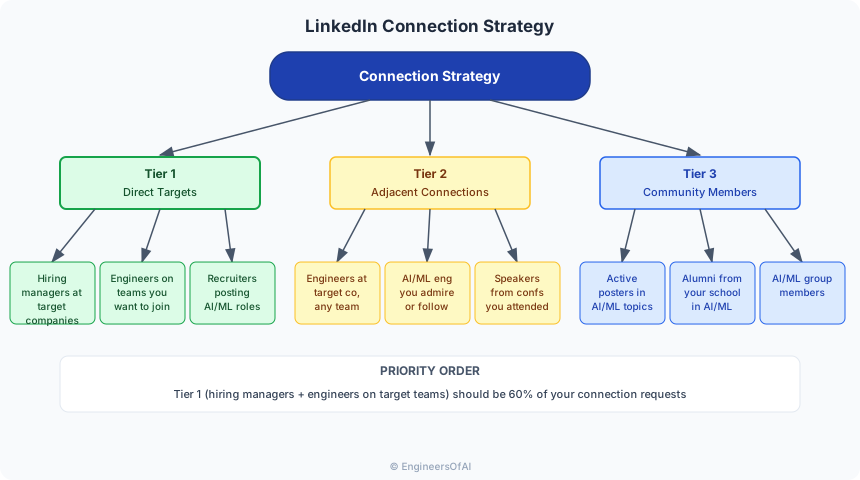
Who to Connect With
Do not mass-connect with random people. Build a targeted network:
Connection Request Messages
Always include a note with your connection request. LinkedIn gives you 300 characters.
Template 1: Shared interest
Hi [Name], I read your post about [topic] and found your point about
[specific detail] really insightful. I am working on similar problems
in [your area]. Would love to connect and learn more.
Template 2: Same company target
Hi [Name], I am exploring ML engineering roles and [Company] is at
the top of my list. I would love to learn more about your experience
on the [Team] team. Would you be open to connecting?
Template 3: After engaging with their content
Hi [Name], I have been following your posts about [topic] - your
recent one about [specific post] was really helpful for my work on
[your project]. Would love to stay connected.
Do not send connection requests to 100 people per day with no message. LinkedIn may restrict your account, and people ignore blank connection requests from strangers. Send 5-10 thoughtful requests per day with personalized notes.
Common LinkedIn Mistakes for AI Job Seekers
| Mistake | Why It Hurts | Fix |
|---|---|---|
| Headline says "Seeking Opportunities" | Wastes keyword space, signals desperation | Replace with role + skills |
| About section is empty | Major red flag for recruiters | Write 200+ words following the template |
| No profile photo | Profiles without photos get 14x fewer views | Use a professional headshot (does not need to be studio quality - good lighting, neutral background, professional attire) |
| Skills section has 5 items | Missing keyword matches in search | Add up to 50 relevant skills |
| Education missing | Recruiters often filter by education | Add all degrees, bootcamps, relevant certifications |
| No activity (posts, comments, likes) | Signals inactive or unengaged professional | Start with commenting, then posting |
| Job titles do not match industry norms | Recruiters search for "ML Engineer," not "Innovation Catalyst" | Use standard job titles |
| All bullets start with "Responsible for..." | Does not show impact | Rewrite using STAR-K method |
| Profile set to private | Recruiters cannot find you | Set profile to fully public |
| Featured section is empty | Missing opportunity to showcase best work | Add 3-5 items |
Profile Audit Checklist
Run through this checklist before you start your job search:
Completeness Checklist
- Professional profile photo (clear face, good lighting)
- Custom background banner (use Canva - something related to AI/ML or your brand)
- Headline with target role + key skills (all 220 characters used)
- About section (200+ words with keywords, achievements, and links)
- All relevant work experience with STAR-K bullet points
- Education section complete (including relevant coursework)
- 30+ skills listed, top 3 pinned
- Featured section with 3-5 items
- Custom URL (linkedin.com/in/yourname, not linkedin.com/in/john-doe-a1b2c3d4)
- Location set correctly
- "Open to Work" enabled for recruiters
Keyword Checklist
- Target job title appears in headline AND current role
- Top 5 technical skills appear in headline + about + experience + skills section
- Industry-standard terminology used (not internal jargon)
- Both full names and abbreviations included ("Natural Language Processing (NLP)")
Activity Checklist
- Posted at least 1 piece of content in the last 30 days
- Commented on 10+ posts in the last 30 days
- Sent 5+ personalized connection requests to people in your target field
- Engaged with content from people at target companies
Practice Exercises
Exercise 1: Headline Rewrite (15 minutes)
Write 5 different headlines for your profile. Ask 2-3 people in your field which one they would click on. Pick the winner.
Exercise 2: About Section Draft (30 minutes)
Using the template above, write your About section. Include at least 3 specific achievements with numbers, 4 specialty areas, and a technology list.
Exercise 3: Experience Rewrite (45 minutes)
Rewrite the bullets for your most recent 2 roles using the STAR-K method. Every bullet should include a measurable result and at least one technology keyword.
Exercise 4: Content Week (1 week)
Post 3 times this week:
- Day 1: Share something you learned with your own analysis
- Day 3: Comment substantively on 5 posts from people at target companies
- Day 5: Share a project update or blog post with a text-first format
Exercise 5: Connection Campaign (2 weeks)
Identify 20 people at your top 5 target companies. Send personalized connection requests to all 20. Engage with their content for 2 weeks before asking any questions about hiring.
Interview Cheat Sheet
| Question | What They Want to Hear |
|---|---|
| "How did you find us / this role?" | "I have been following [Person]'s posts about your team's work on [specific project]. When I saw the role posted, it aligned perfectly with my experience in [area]." |
| "What do you know about our team?" | Reference specific posts, papers, or projects by team members you follow on LinkedIn. |
| "How do you stay current?" | "I am active on LinkedIn - I follow researchers like [names], engage with discussions about [topics], and share my own learnings regularly." |
| "Do you have any questions for me?" | "I saw [team member] posted about [specific technical challenge]. Can you tell me more about how the team approached that?" |
Next Steps
With your LinkedIn profile optimized for search and visibility, the next chapter covers Cold Outreach That Works - how to write cold emails and DMs that actually get responses from hiring managers and engineers at your target companies.