
Common Mistakes - The Twelve Ways to Fail a Take-Home
Reading time: ~45 min | Interview relevance: Critical | Roles: MLE, AI Eng, Data Scientist, Research Engineer, MLOps
The Real Interview Moment
You are a staff ML engineer at Airbnb, reviewing take-home submissions for a senior data scientist role. Your team has a rubric with twelve "instant fail" criteria - mistakes so fundamental that any one of them moves a submission from "evaluate further" to "reject." You are not looking for perfect submissions. You are looking for submissions that demonstrate competence and rigor. You have seen hundreds of take-homes. You can spot data leakage in 30 seconds. You can tell when someone evaluated on training data by looking at a single metric. You know when someone faked spending 6 hours on what was clearly a 2-hour effort.
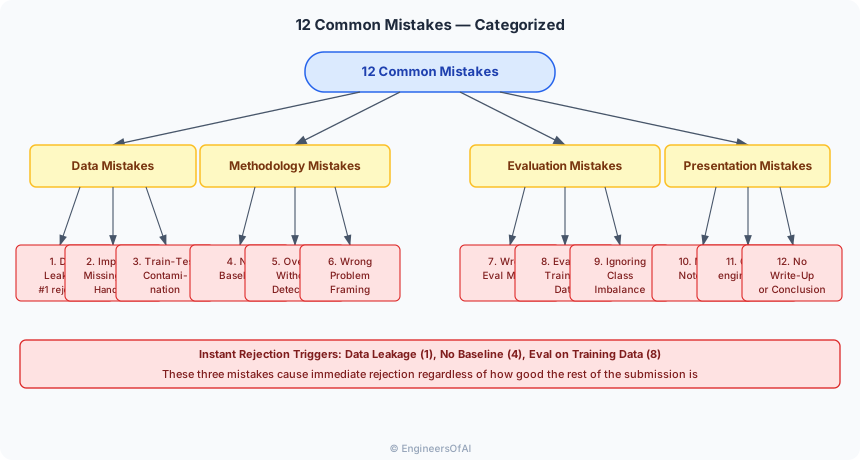
The twelve mistakes in this guide are not obscure edge cases. They are the mistakes you will see in 60-70% of all take-home submissions. They are the mistakes that turn "good enough" models into automatic rejections. They are also the mistakes that are easiest to fix - once you know what they are.
This page teaches you to recognize each mistake, understand why it fails, and implement the fix. If you avoid all twelve, you will be in the top 10% of submissions purely through error avoidance.
What You Will Master
- Recognize and fix data leakage in feature engineering and validation
- Detect and prevent overfitting through proper evaluation methodology
- Choose and justify appropriate evaluation metrics for any problem
- Implement meaningful baselines that contextualize your results
- Avoid notebook organization anti-patterns that frustrate evaluators
- Resist overengineering temptations that consume time without adding value
- Apply a pre-submission checklist that catches these mistakes before you submit
Self-Assessment: Where Are You Now?
| Skill | 1 -- Cannot | 2 -- Vaguely | 3 -- Can Spot | 4 -- Can Fix | 5 -- Can Teach | Your Score |
|---|---|---|---|---|---|---|
| Identify data leakage in feature engineering | ___ | |||||
| Detect overfitting from learning curves | ___ | |||||
| Choose appropriate metrics for imbalanced data | ___ | |||||
| Build a meaningful baseline for comparison | ___ | |||||
| Structure a notebook for readability | ___ | |||||
| Know when to stop adding complexity | ___ | |||||
| Validate train-test consistency | ___ | |||||
| Handle missing data without introducing bias | ___ |
Target: All 4s and 5s before you submit any take-home.
The Twelve Mistakes
Mistake 1 - Data Leakage
What It Is
Data leakage occurs when information from the test set (or from the future) influences the training process. It makes your model appear far better than it actually is. This is the single most common reason take-homes are rejected.
The Three Types of Leakage

Type 1: Target Leakage
The most insidious form. A feature is causally downstream of the target, not upstream.
# LEAKED - "days_to_cancel" is derived from the cancellation event,
# which is the target itself. This feature perfectly predicts churn
# because it only has a value for customers who churned.
df["days_to_cancel"] = (df["cancel_date"] - df["signup_date"]).dt.days
df["has_cancel_reason"] = df["cancel_reason"].notna().astype(int)

# CLEAN - use only features available at prediction time
df["days_since_signup"] = (prediction_date - df["signup_date"]).dt.days
df["days_since_last_login"] = (prediction_date - df["last_login"]).dt.days
How to detect it: If a feature has a suspiciously high correlation with the target (> 0.8) or if removing it dramatically changes performance, investigate whether it is causally downstream of the target.
def check_for_target_leakage(
    df: pd.DataFrame,
    target_col: str,
    threshold: float = 0.8,
) -> List[str]:
    """Identify features suspiciously correlated with the target.

    Args:
        df: DataFrame with features and target.
        target_col: Name of the target column.
        threshold: Correlation threshold for flagging.

    Returns:
        List of suspicious feature names.
    """
    numeric_cols = df.select_dtypes(include=[np.number]).columns
    correlations = df[numeric_cols].corrwith(df[target_col]).abs()

    suspicious = correlations[
        (correlations > threshold) & (correlations.index != target_col)
    ]

    if len(suspicious) > 0:
        logger.warning(
            f"Potential target leakage detected! "
            f"Features with |correlation| > {threshold}:\n"
            f"{suspicious.sort_values(ascending=False)}"
        )

    return suspicious.index.tolist()
Type 2: Train-Test Leakage (Preprocessing Leakage)
Fitting preprocessing steps on the full dataset before splitting.
# LEAKED - scaler sees test data statistics
scaler = StandardScaler()
X_scaled = scaler.fit_transform(X)  # Fits on ALL data including test
X_train, X_test = train_test_split(X_scaled, ...)

# CLEAN - fit only on training data
X_train, X_test, y_train, y_test = train_test_split(X, y, ...)
scaler = StandardScaler()
X_train_scaled = scaler.fit_transform(X_train)  # Fit on train only
X_test_scaled = scaler.transform(X_test)  # Transform test with train stats
Other common sources of preprocessing leakage:
# LEAKED - target encoding uses full dataset
target_means = df.groupby("city")[target_col].mean()
df["city_encoded"] = df["city"].map(target_means)
# Test data's target values influenced the encoding!

# LEAKED - imputation uses full dataset statistics
df["age"].fillna(df["age"].mean(), inplace=True)
# Test data's age values influenced the mean!

# LEAKED - feature selection uses full dataset
from sklearn.feature_selection import SelectKBest
selector = SelectKBest(k=10)
X_selected = selector.fit_transform(X, y)  # Sees all data
X_train, X_test = train_test_split(X_selected, ...)
Type 3: Temporal Leakage
Using future information to make past predictions. Common in time-series and event-based datasets.
# LEAKED - random split on temporal data
X_train, X_test = train_test_split(transactions, test_size=0.2)
# Training set contains January transactions, test set contains
# December transactions AND some January transactions.
# Model sees the future!

# CLEAN - temporal split
cutoff_date = pd.Timestamp("2025-11-01")
train = transactions[transactions["date"] < cutoff_date]
test = transactions[transactions["date"] >= cutoff_date]
Data leakage is the fastest way to fail a take-home. If your model achieves AUC > 0.99 on a real-world problem, the evaluator's first assumption is leakage, not that you built a perfect model. Always sanity-check results that seem too good. Evaluators who find leakage in your submission will immediately reject it, regardless of everything else.
"Data leakage means information from the test set or the future influenced the training process. It inflates metrics and makes the model useless in production. I prevent it three ways: first, I split data before any preprocessing and fit transformers only on training data. Second, for temporal data, I use time-based splits, not random splits. Third, I verify that every feature is available at prediction time by asking 'would I have this information before the event I am predicting?' If a feature has suspiciously high correlation with the target, I investigate before using it."
Mistake 2 -- Improper Missing Data Handling
What It Is
Missing data requires careful treatment. The two most common mistakes are: dropping rows silently (introducing survivorship bias) and imputing without thought (introducing artificial patterns).
The Wrong Ways
# WRONG - silent data loss, no logging, no justification
df = df.dropna()
# How many rows did you lose? Why? Did the dropped rows have
# different characteristics than the kept rows?

# WRONG - mean imputation on the entire dataset (leakage)
df["income"].fillna(df["income"].mean(), inplace=True)
# Test data income values influenced the mean

# WRONG - forward fill on non-temporal data
df["score"].fillna(method="ffill", inplace=True)
# Row order is arbitrary - this creates random correlations
The Right Ways
def handle_missing_values(
    df: pd.DataFrame,
    strategy: Dict[str, str],
    fit_stats: Optional[Dict[str, float]] = None,
) -> Tuple[pd.DataFrame, Dict[str, float]]:
    """Handle missing values with logging and train-test consistency.

    Args:
        df: Input DataFrame.
        strategy: Dict mapping column names to strategies
            ('drop', 'mean', 'median', 'mode', 'constant:value', 'flag').
        fit_stats: Pre-computed statistics from training set.
            If None, computes from df (use only for training set).

    Returns:
        Tuple of (processed DataFrame, fit statistics for reuse on test set).
    """
    df = df.copy()
    stats = fit_stats or {}

    for col, strat in strategy.items():
        n_missing = df[col].isnull().sum()
        if n_missing == 0:
            continue

        pct_missing = n_missing / len(df) * 100
        logger.info(f"{col}: {n_missing} missing ({pct_missing:.1f}%)")

        if strat == "drop":
            df = df.dropna(subset=[col])
            logger.info(f"  -> Dropped {n_missing} rows")
        elif strat == "mean":
            if col not in stats:
                stats[col] = df[col].mean()
            df[col] = df[col].fillna(stats[col])
            logger.info(f"  -> Imputed with mean: {stats[col]:.2f}")
        elif strat == "median":
            if col not in stats:
                stats[col] = df[col].median()
            df[col] = df[col].fillna(stats[col])
            logger.info(f"  -> Imputed with median: {stats[col]:.2f}")
        elif strat == "flag":
            df[f"{col}_missing"] = df[col].isnull().astype(int)
            if col not in stats:
                stats[col] = df[col].median()
            df[col] = df[col].fillna(stats[col])
            logger.info(f"  -> Created missing indicator + median impute")
        elif strat.startswith("constant:"):
            value = float(strat.split(":")[1])
            df[col] = df[col].fillna(value)
            logger.info(f"  -> Imputed with constant: {value}")

    return df, stats


# Usage - fit on train, apply to test
train_df, impute_stats = handle_missing_values(
    train_df,
    strategy={"income": "median", "age": "flag", "city": "mode"},
    fit_stats=None,  # Compute from training data
)

test_df, _ = handle_missing_values(
    test_df,
    strategy={"income": "median", "age": "flag", "city": "mode"},
    fit_stats=impute_stats,  # Use training statistics
)
Missing data is often informative. A missing "income" field might mean the user chose not to report income, which could correlate with income level, privacy sensitivity, or form completion behavior. Before imputing, check whether missingness itself is predictive by creating a binary "is_missing" feature. This is called the "missing indicator" approach and is often more valuable than the imputed value itself.
Mistake 3 -- Train-Test Contamination
What It Is
Train-test contamination goes beyond preprocessing leakage. It includes any situation where the training and test sets are not truly independent.
Common Contamination Sources
| Source | Example | Fix |
|---|---|---|
| Duplicate rows | Same transaction in train and test | Deduplicate before splitting |
| Group leakage | Same customer in train and test | Split by customer_id, not by row |
| Temporal overlap | Random split on time-series data | Use temporal split with gap |
| Data augmentation | Augmented and original in different sets | Augment only training data, after split |
| Target encoding | Encoding uses global target statistics | Use fold-aware encoding or fit on train only |
Group-Aware Splitting
from sklearn.model_selection import GroupKFold, GroupShuffleSplit


def group_aware_split(
    df: pd.DataFrame,
    target_col: str,
    group_col: str,
    test_size: float = 0.2,
    random_state: int = 42,
) -> Tuple[pd.DataFrame, pd.DataFrame]:
    """Split data ensuring no group appears in both train and test.

    Critical for datasets where rows from the same group (e.g., same
    customer, same patient) are not independent.

    Args:
        df: Input DataFrame.
        target_col: Name of target column.
        group_col: Name of group column (e.g., customer_id).
        test_size: Fraction of groups for test set.
        random_state: Random seed.

    Returns:
        Tuple of (train DataFrame, test DataFrame).
    """
    splitter = GroupShuffleSplit(
        n_splits=1, test_size=test_size, random_state=random_state
    )

    groups = df[group_col]
    train_idx, test_idx = next(splitter.split(df, df[target_col], groups))

    train_df = df.iloc[train_idx].copy()
    test_df = df.iloc[test_idx].copy()

    # Verify no group overlap
    train_groups = set(train_df[group_col])
    test_groups = set(test_df[group_col])
    overlap = train_groups & test_groups

    assert len(overlap) == 0, f"Group overlap detected: {len(overlap)} groups"

    logger.info(
        f"Split: {len(train_df)} train rows ({len(train_groups)} groups), "
        f"{len(test_df)} test rows ({len(test_groups)} groups). "
        f"Zero group overlap verified."
    )

    return train_df, test_df
If a customer has 50 transactions and 40 are in training and 10 are in test, your model can "recognize" the customer's patterns from training data and predict their test transactions with inflated accuracy. This is not generalization - it is memorization. Group-aware splits prevent this by ensuring all of a customer's data is in either train or test, never both.
Mistake 4 -- No Baseline
What It Is
Reporting model metrics without a baseline comparison is like saying "I ran the 100m in 12 seconds" without context. Is that good? For an Olympic sprinter, terrible. For a hobbyist, excellent.
What Counts as a Baseline

Implementing Baselines
def compute_baselines(
    y_train: pd.Series,
    y_test: pd.Series,
    task: str = "classification",
) -> Dict[str, Dict[str, float]]:
    """Compute baseline metrics for comparison.

    Args:
        y_train: Training labels.
        y_test: Test labels.
        task: 'classification' or 'regression'.

    Returns:
        Dict of baseline names to metric dictionaries.
    """
    baselines = {}

    if task == "classification":
        # Random baseline
        random_preds = np.random.choice(
            y_train.unique(), size=len(y_test), p=None
        )
        baselines["random"] = {
            "accuracy": (random_preds == y_test).mean(),
            "pr_auc": y_test.mean(),  # Random PR-AUC = positive rate
        }

        # Majority class baseline
        majority_class = y_train.mode()[0]
        majority_preds = np.full(len(y_test), majority_class)
        baselines["majority_class"] = {
            "accuracy": (majority_preds == y_test).mean(),
            "pr_auc": y_test.mean() if majority_class == 1 else 0.0,
        }

        # Logistic regression baseline
        from sklearn.linear_model import LogisticRegression
        from sklearn.preprocessing import StandardScaler

        # Simple LR on raw features
        lr = LogisticRegression(random_state=42, max_iter=1000)
        # Assumes X_train and X_test are available in scope
        # In practice, pass these as arguments

    elif task == "regression":
        # Mean baseline
        mean_pred = np.full(len(y_test), y_train.mean())
        baselines["mean_prediction"] = {
            "rmse": np.sqrt(np.mean((y_test - mean_pred) ** 2)),
            "mae": np.mean(np.abs(y_test - mean_pred)),
            "r2": 0.0,  # By definition, mean prediction has R^2 = 0
        }

        # Median baseline
        median_pred = np.full(len(y_test), y_train.median())
        baselines["median_prediction"] = {
            "rmse": np.sqrt(np.mean((y_test - median_pred) ** 2)),
            "mae": np.mean(np.abs(y_test - median_pred)),
        }

    return baselines
Reporting Results with Baselines
## Results

| Model | PR-AUC | ROC-AUC | Precision@10\% | Lift vs. Random |
|-------|--------|---------|---------------|-----------------|
| Random baseline | 0.080 | 0.500 | 0.080 | 1.0x |
| Majority class | 0.000 | 0.500 | 0.000 | 0.0x |
| Logistic Regression | 0.276 | 0.834 | 0.241 | 3.0x |
| **LightGBM** | **0.431** | **0.912** | **0.620** | **7.8x** |

The LightGBM model achieves a 5.4x improvement in PR-AUC over the
random baseline and a 56\% improvement over logistic regression,
confirming that non-linear feature interactions and the engineered
velocity features provide meaningful predictive signal.
Reporting "AUC of 0.91" without a baseline is meaningless. For a balanced dataset, random achieves 0.50, so 0.91 is impressive. For a dataset where one class is 95% of the data, a trivial classifier achieves 0.95 accuracy, making 0.91 actually worse than random. Evaluators who see metrics without baselines assume the candidate does not understand evaluation.
Mistake 5 -- Overfitting Without Detection
What It Is
Overfitting is not the mistake \text{---} failing to detect it is. Every model overfits to some degree. The mistake is not knowing whether yours does and by how much.
The Detection Framework
def detect_overfitting(
    model,
    X_train: pd.DataFrame,
    y_train: pd.Series,
    X_val: pd.DataFrame,
    y_val: pd.Series,
    metric_func: callable,
    metric_name: str = "metric",
    threshold: float = 0.1,
) -> Dict[str, any]:
    """Detect and quantify overfitting.

    Args:
        model: Trained model with predict or predict_proba method.
        X_train: Training features.
        y_train: Training labels.
        X_val: Validation features.
        y_val: Validation labels.
        metric_func: Function(y_true, y_pred) -> float.
        metric_name: Name of the metric for logging.
        threshold: Gap threshold for overfitting warning.

    Returns:
        Dict with train metric, val metric, gap, and diagnosis.
    """
    if hasattr(model, "predict_proba"):
        train_pred = model.predict_proba(X_train)[:, 1]
        val_pred = model.predict_proba(X_val)[:, 1]
    else:
        train_pred = model.predict(X_train)
        val_pred = model.predict(X_val)

    train_metric = metric_func(y_train, train_pred)
    val_metric = metric_func(y_val, val_pred)
    gap = train_metric - val_metric

    diagnosis = {
        f"train_{metric_name}": train_metric,
        f"val_{metric_name}": val_metric,
        "gap": gap,
        "gap_pct": gap / train_metric * 100 if train_metric > 0 else 0,
    }

    if gap > threshold:
        diagnosis["status"] = "OVERFITTING"
        logger.warning(
            f"Overfitting detected: train {metric_name}={train_metric:.4f}, "
            f"val {metric_name}={val_metric:.4f}, gap={gap:.4f} ({diagnosis['gap_pct']:.1f}\%)"
        )
    elif gap < -0.01:
        diagnosis["status"] = "SUSPICIOUS"
        logger.warning(
            f"Validation > train \text{---} possible data issue or leakage: "
            f"train={train_metric:.4f}, val={val_metric:.4f}"
        )
    else:
        diagnosis["status"] = "OK"
        logger.info(
            f"No significant overfitting: train={train_metric:.4f}, "
            f"val={val_metric:.4f}, gap={gap:.4f}"
        )

    return diagnosis
Overfitting Red Flags
| Signal | What It Suggests | Action |
|---|---|---|
| Train AUC = 1.00, Val AUC = 0.75 | Severe overfitting or leakage | Check for leakage first, then regularize |
| Val AUC > Train AUC | Data leakage or bug | Investigate immediately \text{---} this should not happen |
| Train AUC = 0.99, Val AUC = 0.98 | Perfect training, slight overfit | Acceptable for most problems |
| Train loss still decreasing, val loss increasing | Classic overfitting pattern | Implement early stopping |
| Performance drops 15%+ on held-out test | Distribution shift or overfitting to validation | Use temporal split, add regularization |
Do not use cross-validation scores as your final reported metric if you then retrain on the full dataset and have no held-out test set. Cross-validation estimates generalization, but the final model trained on all data may differ. Best practice: report cross-validation metrics AND hold out a true test set that the model never sees during development.
Mistake 6 -- Wrong Problem Framing
What It Is
Solving the wrong problem \text{---} or solving the right problem with the wrong formulation \text{---} is a mistake that no amount of good modeling can fix.
Common Framing Errors
| Error | Example | Correct Framing |
|---|---|---|
| Regression when it should be classification | Predicting exact churn date instead of churn probability | Binary classification: will they churn in the next 30 days? |
| Classification when it should be ranking | Predicting "fraud / not fraud" when the business needs a priority queue | Ranking: order transactions by fraud likelihood |
| Point prediction when interval is needed | "Revenue will be $1.2M" | "Revenue will be $1.0-1.4M (90% CI)" |
| Wrong time horizon | Predicting next-day churn for a subscription business | Predict 30-day or 90-day churn (matches business decision cycle) |
| Ignoring the deployment context | Building a complex model when latency matters | Consider inference time constraints in model selection |
How to Verify Your Framing
Before writing any code, answer these five questions in a markdown cell:
## Problem Framing

1. **What decision will this model inform?**
   → Customer success team decides which customers to contact proactively.

2. **What is the prediction target, precisely?**
   → Binary: will this customer cancel their subscription within 30 days?

3. **When does the prediction need to be made?**
   → At the start of each month, for all active customers.

4. **What features are available at prediction time?**
   → Historical usage, billing, support tickets. NOT future events.

5. **What metric aligns with the business objective?**
   → PR-AUC (precision-recall) because we want to identify high-risk
   customers without overwhelming the CS team with false positives.
When a candidate starts with a problem framing section, I know they think before they code. When a candidate jumps straight into model.fit(), I know they are executing without understanding. The framing section takes 10 minutes to write and is worth more than any hyperparameter tuning.
Mistake 7 -- Wrong Evaluation Metric
What It Is
Using an inappropriate metric for the problem at hand. This is especially dangerous because the model may actually be good, but the metric does not reveal it \text{---} or the model may be bad, but the metric hides it.
The Metric Selection Guide

The Most Common Metric Mistakes
Mistake: Using accuracy for imbalanced classification
# BAD \text{---} accuracy is meaningless here
y_test = [0]*950 + [1]*50  # 5\% positive rate
y_pred = [0]*1000           # Predict all negative

accuracy = sum(t == p for t, p in zip(y_test, y_pred)) / len(y_test)
# accuracy = 0.95 \text{---} looks great! But we caught 0\% of positives.

# GOOD \text{---} use metrics that capture minority class performance
from sklearn.metrics import average_precision_score, classification_report

print(f"PR-AUC: {average_precision_score(y_test, y_scores):.3f}")
print(f"Baseline PR-AUC (random): {sum(y_test)/len(y_test):.3f}")
print(classification_report(y_test, y_pred))
Mistake: Using RMSE when the target has huge outliers
# BAD \text{---} one outlier dominates RMSE
y_true = [10, 12, 11, 13, 10, 500]  # One outlier
y_pred = [11, 11, 12, 12, 11, 15]   # Reasonable predictions

rmse = np.sqrt(np.mean((np.array(y_true) - np.array(y_pred)) ** 2))
# RMSE = 197.9 \text{---} dominated by the single outlier

# GOOD \text{---} use MAE or median absolute error for robustness
mae = np.mean(np.abs(np.array(y_true) - np.array(y_pred)))
# MAE = 81.2 \text{---} still affected but less dramatic

median_ae = np.median(np.abs(np.array(y_true) - np.array(y_pred)))
# MedAE = 1.0 \text{---} captures typical error well
Mistake: Using R-squared without checking if the model beats the mean
# BAD \text{---} R^2 can be negative, and that is important information
from sklearn.metrics import r2_score

y_true = [1, 2, 3, 4, 5]
y_pred = [10, 10, 10, 10, 10]  # Terrible predictions

r2 = r2_score(y_true, y_pred)
# R^2 = -23.5 \text{---} model is WORSE than predicting the mean
# Reporting only RMSE would hide this

# GOOD \text{---} always report R^2 alongside RMSE/MAE
print(f"R^2: {r2:.3f} (< 0 means worse than mean prediction)")
print(f"RMSE: {np.sqrt(np.mean((np.array(y_true) - np.array(y_pred))**2)):.3f}")
print(f"Baseline RMSE (mean): {np.std(y_true):.3f}")
The Metric Reporting Template
Always report multiple metrics. Different stakeholders care about different aspects.
def comprehensive_evaluation(
    y_true: pd.Series,
    y_scores: np.ndarray,
    y_pred: np.ndarray,
    task: str = "binary_classification",
) -> pd.DataFrame:
    """Compute a comprehensive set of evaluation metrics.

    Args:
        y_true: True labels.
        y_scores: Predicted probabilities (for classification).
        y_pred: Predicted labels (after thresholding).
        task: Type of prediction task.

    Returns:
        DataFrame with metric names and values.
    """
    metrics = {}

    if task == "binary_classification":
        metrics["ROC-AUC"] = roc_auc_score(y_true, y_scores)
        metrics["PR-AUC"] = average_precision_score(y_true, y_scores)
        metrics["Accuracy"] = (y_true == y_pred).mean()
        metrics["Precision"] = (
            (y_true[y_pred == 1] == 1).sum() / max((y_pred == 1).sum(), 1)
        )
        metrics["Recall"] = (
            (y_pred[y_true == 1] == 1).sum() / max((y_true == 1).sum(), 1)
        )
        metrics["F1"] = (
            2 * metrics["Precision"] * metrics["Recall"] /
            max(metrics["Precision"] + metrics["Recall"], 1e-8)
        )

        # Baseline comparison
        metrics["Baseline PR-AUC (random)"] = y_true.mean()
        metrics["Lift vs. Random"] = (
            metrics["PR-AUC"] / max(y_true.mean(), 1e-8)
        )

    return pd.DataFrame(
        {"Metric": metrics.keys(), "Value": metrics.values()}
    )
Mistake 8 -- Evaluating on Training Data
What It Is
Using training data to evaluate model performance. This is surprisingly common, and it always makes the model look better than it is.
# BAD \text{---} evaluating on training data
model.fit(X_train, y_train)
train_accuracy = model.score(X_train, y_train)  # This is NOT generalization
print(f"Model accuracy: {train_accuracy:.3f}")
# A decision tree with no depth limit will score 1.0 here

# GOOD \text{---} proper evaluation
model.fit(X_train, y_train)
val_accuracy = model.score(X_val, y_val)
print(f"Train accuracy: {model.score(X_train, y_train):.3f}")
print(f"Val accuracy:   {val_accuracy:.3f}")
print(f"Gap:            {model.score(X_train, y_train) - val_accuracy:.3f}")
Subtle Forms of Training Data Evaluation
| Scenario | Why It Is Wrong | Fix |
|---|---|---|
| Selecting features based on test set performance | Test set influenced model design | Use only training/validation for feature selection |
| Tuning hyperparameters on test set | Test set is no longer independent | Use train for fitting, validation for tuning, test for final report |
| Choosing the best model based on test set | Test set influenced the selection | Use CV on training data for selection, test for final evaluation |
| Reporting best epoch based on test set | Implicitly optimized for test set | Use validation set for early stopping, report test performance once |
If your notebook only shows model.score(X_train, y_train) and never evaluates on held-out data, the submission is automatically rejected. There is no way to assess your model's generalization ability. This is the most basic evaluation requirement and failing to meet it signals a fundamental lack of ML knowledge.
Mistake 9 -- Ignoring Class Imbalance
What It Is
Treating a dataset with 5% positives the same as a dataset with 50% positives. Class imbalance affects every aspect of the pipeline: evaluation metrics, model training, and decision thresholds.
The Imbalance Impact Chain

Handling Imbalance Correctly
# Step 1: Detect and report imbalance
class_distribution = y_train.value_counts(normalize=True)
imbalance_ratio = class_distribution.max() / class_distribution.min()
logger.info(
    f"Class distribution:\n{class_distribution}\n"
    f"Imbalance ratio: {imbalance_ratio:.1f}:1"
)

# Step 2: Use stratified splits (always, even for balanced data)
from sklearn.model_selection import StratifiedKFold

cv = StratifiedKFold(n_splits=5, shuffle=True, random_state=SEED)

# Step 3: Consider class weights
model = lgb.LGBMClassifier(
    is_unbalance=True,  # LightGBM handles this internally
    random_state=SEED,
)

# OR manually set scale_pos_weight
n_positive = y_train.sum()
n_negative = len(y_train) - n_positive
scale_pos_weight = n_negative / n_positive

model = lgb.LGBMClassifier(
    scale_pos_weight=scale_pos_weight,
    random_state=SEED,
)

# Step 4: Choose appropriate metrics
from sklearn.metrics import average_precision_score

# PR-AUC is the right metric for imbalanced classification
pr_auc = average_precision_score(y_val, y_scores)
random_baseline = y_val.mean()  # This is the PR-AUC of a random model
lift = pr_auc / random_baseline

logger.info(f"PR-AUC: {pr_auc:.3f} (random baseline: {random_baseline:.3f}, lift: {lift:.1f}x)")

# Step 5: Tune the decision threshold
def find_optimal_threshold(
    y_true: pd.Series,
    y_scores: np.ndarray,
    target_precision: float = 0.3,
) -> float:
    """Find the threshold that achieves a target precision.

    Args:
        y_true: True labels.
        y_scores: Predicted probabilities.
        target_precision: Desired precision level.

    Returns:
        The optimal threshold.
    """
    precision, recall, thresholds = precision_recall_curve(y_true, y_scores)

    # Find threshold closest to target precision
    valid_mask = precision[:-1] >= target_precision
    if not valid_mask.any():
        logger.warning(
            f"Cannot achieve precision >= {target_precision}. "
            f"Max precision: {precision.max():.3f}"
        )
        return 0.5

    # Among thresholds meeting precision target, pick highest recall
    best_idx = np.where(valid_mask)[0][-1]
    optimal_threshold = thresholds[best_idx]

    logger.info(
        f"Optimal threshold: {optimal_threshold:.3f} "
        f"(precision={precision[best_idx]:.3f}, recall={recall[best_idx]:.3f})"
    )

    return optimal_threshold
SMOTE (Synthetic Minority Over-sampling Technique) is NOT a magic fix for imbalance. Applied incorrectly, it can make things worse. Common SMOTE mistakes: (1) applying SMOTE before the train-test split (leakage!), (2) applying SMOTE and then evaluating with accuracy (still misleading), (3) applying SMOTE when the classes are naturally imbalanced and the model should learn that (e.g., fraud detection). Use SMOTE only within cross-validation folds, only on training data, and only after confirming it actually improves your target metric.
Mistake 10 -- Messy Notebook
What It Is
A notebook that cannot be read sequentially, contains dead code, uses meaningless variable names, and has no narrative structure. This is not a code quality issue \text{---} it is a communication failure.
The Messy Notebook Checklist (If You Have Any of These, Fix Before Submitting)
| Issue | Severity | Time to Fix |
|---|---|---|
| Cells out of order (execution order matters) | Critical | 5 min \text{---} restart and run all |
| Commented-out code blocks | Major | 5 min \text{---} delete them |
Variables named df2, temp, test_final_v3 | Major | 10 min \text{---} rename to descriptive names |
| No markdown cells between code sections | Major | 15 min \text{---} add section headers and rationale |
| Unused imports | Minor | 2 min \text{---} remove them |
| Print statements for debugging | Minor | 5 min \text{---} replace with logging |
| Hardcoded absolute file paths | Critical | 2 min \text{---} use relative paths |
| Stale cell outputs (from previous run with different data) | Critical | 5 min \text{---} restart and run all |
| No summary or conclusion at the end | Major | 10 min \text{---} add summary and next steps |
| Cells that error out but you kept going | Critical | 5 min \text{---} fix or remove |
The "Restart and Run All" Test
This is non-negotiable. Before submitting, you must restart your kernel and run every cell from top to bottom. If any cell errors out, fix it. If any cell produces different output than expected, investigate.
# Add this as the LAST cell of your notebook
print("=" * 60)
print("SUBMISSION VERIFICATION")
print("=" * 60)
print(f"Notebook executed successfully at: {datetime.now()}")
print(f"Python version: {sys.version}")
print(f"Total cells executed: all")
print(f"Random seed: {SEED}")
print(f"Key result: PR-AUC = {final_pr_auc:.4f}")
print("=" * 60)
I spend 30 seconds deciding whether to deep-read a submission. In those 30 seconds, I scroll through the notebook looking for: (1) markdown section headers, (2) a summary or conclusion cell, (3) clean variable names, and (4) no red error outputs. If I see a clean, structured notebook, I invest 15-30 minutes reading it carefully. If I see a mess, I invest 2 minutes looking for the results and move on. First impressions are disproportionately important.
Mistake 11 -- Overengineering
What It Is
Building a more complex solution than the problem requires, consuming time that should be spent on evaluation, analysis, and communication.
The Overengineering Spectrum

Signs of Overengineering
| Sign | What is Happening | What to Do Instead |
|---|---|---|
| Building a custom neural network for tabular data with 10K rows | Applying deep learning where it is not needed | Use LightGBM \text{---} it will outperform on small tabular data |
| Creating a 5-model stacking ensemble | Diminishing returns on complexity | One strong model + one baseline is sufficient |
| Building a full CI/CD pipeline | Solving a deployment problem, not a modeling problem | Focus on the analysis, mention CI/CD in Next Steps |
| Writing a Python package with setup.py | Over-investing in packaging | A notebook + src/ directory is plenty |
| Implementing a custom loss function | Optimizing a metric that sklearn already supports | Use built-in loss functions unless the prompt specifically requires custom loss |
| Building a Streamlit dashboard | Scope creep into product development | Save screenshots of key results instead |
The Complexity Budget
For a take-home, your complexity budget is limited. Spend it where it matters most.
| Complexity Investment | Impact on Evaluation | Recommendation |
|---|---|---|
| Feature engineering (domain-driven) | Very High | Invest heavily |
| Proper cross-validation and metrics | Very High | Non-negotiable |
| Clean, readable code | High | Invest moderately |
| Error analysis and interpretation | Very High | Invest heavily |
| Hyperparameter tuning | Medium | 10-20 Optuna trials |
| Multiple model comparison | Medium | 2-3 models max |
| Write-up and communication | Very High | Invest heavily |
| Neural networks (for tabular data) | Low | Skip unless data warrants it |
| Ensemble methods | Low | Skip unless baseline is very strong |
| Deployment artifacts | Low | Skip unless prompt requests it |
Mistake 12 -- No Write-Up or Conclusion
What It Is
Submitting a notebook that ends with model.fit() or print(classification_report(...)) and has no summary, no interpretation, and no next steps. This is the most common mistake that turns a "maybe hire" into a "no hire."
What a Conclusion Must Contain
CONCLUSION_TEMPLATE = """
## Summary and Conclusions

### Key Results
- **Best model:** {model_name} with {metric_name} = {metric_value}
- **Baseline comparison:** {baseline_improvement}x improvement over {baseline_name}
- **Most important features:** {top_3_features}

### Key Decisions
1. {decision_1_and_rationale}
2. {decision_2_and_rationale}
3. {decision_3_and_rationale}

### Limitations
- {limitation_1}
- {limitation_2}
- {limitation_3}

### Next Steps (with estimated time)
1. {next_step_1} (~{hours_1} hours)
2. {next_step_2} (~{hours_2} hours)
3. {next_step_3} (~{hours_3} hours)

### What I Would Do Differently
- {reflection_1}
- {reflection_2}
"""
Good vs. Bad Conclusions
Bad conclusion (or no conclusion):
# Last cell of notebook
print(classification_report(y_test, y_pred))
# ... notebook ends here
Good conclusion:
## Summary

I built a customer churn prediction model achieving **PR-AUC = 0.431**
(5.4x improvement over the random baseline of 0.080). The model identifies
**62\% of churners in the top risk decile**, enabling targeted intervention
by the customer success team.

**Key insight:** Engagement velocity features (login frequency change
over the past 14 days) are 3x more predictive than demographic or
account-level features. This suggests that behavioral signals \text{---} not
customer profiles \text{---} are the primary drivers of churn.

**Limitations:**
- The model underperforms on customers with < 30 days of history
  (insufficient behavioral data)
- Feature engineering assumes stable product usage patterns; a major
  product change would require retraining
- No calibration analysis performed \text{---} probability outputs may not
  be well-calibrated for cost-sensitive decision making

**Next Steps (prioritized):**
1. Error analysis by customer segment to identify underserved populations (~2h)
2. Calibration analysis and Platt scaling for reliable probability outputs (~1h)
3. A/B test design: model-driven outreach vs. current heuristic approach (~1h)
4. Temporal features: sliding-window engagement trajectories (~3h)
5. Deployment: daily batch scoring pipeline with monitoring (~4h)
The Master Anti-Pattern Reference
All Twelve Mistakes at a Glance
| # | Mistake | Detection | Severity | Fix Time |
|---|---|---|---|---|
| 1 | Data leakage | Suspiciously high metrics (AUC > 0.99) | Critical | 30 min |
| 2 | Bad missing data handling | Silent dropna(), full-dataset imputation | Major | 20 min |
| 3 | Train-test contamination | Same customer in train and test | Critical | 15 min |
| 4 | No baseline | Metrics reported without context | Major | 10 min |
| 5 | Undetected overfitting | No train-val gap analysis | Major | 15 min |
| 6 | Wrong problem framing | Model solves a different problem than asked | Critical | 10 min |
| 7 | Wrong evaluation metric | Accuracy on 5% positive rate data | Major | 10 min |
| 8 | Evaluating on training data | Only model.score(X_train, y_train) | Critical | 5 min |
| 9 | Ignoring class imbalance | No stratification, no class weights, accuracy only | Major | 20 min |
| 10 | Messy notebook | Dead code, out-of-order cells, no markdown | Major | 30 min |
| 11 | Overengineering | Custom neural net for 10K rows of tabular data | Minor | 0 min (just do not) |
| 12 | No conclusion | Notebook ends with model.fit() | Major | 15 min |
Practice Problems
Problem 1: Find the Leakage
The following feature engineering code has data leakage. Identify all sources of leakage and fix them.
# Load all data
df = pd.read_csv("data.csv")

# Preprocessing on full dataset
scaler = StandardScaler()
df[numeric_cols] = scaler.fit_transform(df[numeric_cols])

# Target encoding on full dataset
for col in categorical_cols:
    means = df.groupby(col)["target"].mean()
    df[col + "_encoded"] = df[col].map(means)

# Feature selection on full dataset
from sklearn.feature_selection import SelectKBest, f_classif
selector = SelectKBest(f_classif, k=20)
X_selected = selector.fit_transform(df[feature_cols], df["target"])

# Now split
X_train, X_test, y_train, y_test = train_test_split(X_selected, df["target"])

# Train and evaluate
model = LGBMClassifier()
model.fit(X_train, y_train)
print(f"Test AUC: {roc_auc_score(y_test, model.predict_proba(X_test)[:, 1])}")
Hint 1 -- Direction
There are three distinct sources of leakage in this code. Look at what operations are performed before the train-test split.
Hint 2 -- The Three Leaks
- StandardScaler is fit on the full dataset (test data statistics leak into training)
- Target encoding uses the full dataset's target values (test targets leak into training features)
- Feature selection uses the full dataset (test data influences which features are selected)
Hint 3 -- Full Fix
# Load all data
df = pd.read_csv("data.csv")

# SPLIT FIRST \text{---} before any preprocessing
X_train, X_test, y_train, y_test = train_test_split(
    df[feature_cols], df["target"],
    test_size=0.2, random_state=42, stratify=df["target"]
)

# Preprocessing \text{---} fit on TRAIN ONLY
scaler = StandardScaler()
X_train[numeric_cols] = scaler.fit_transform(X_train[numeric_cols])
X_test[numeric_cols] = scaler.transform(X_test[numeric_cols])  # transform, not fit_transform

# Target encoding \text{---} fit on TRAIN ONLY
encoding_maps = {}
for col in categorical_cols:
    means = X_train.join(y_train).groupby(col)["target"].mean()
    encoding_maps[col] = means
    X_train[col + "_encoded"] = X_train[col].map(means)
    X_test[col + "_encoded"] = X_test[col].map(means)
    # Handle unseen categories in test
    global_mean = y_train.mean()
    X_test[col + "_encoded"] = X_test[col + "_encoded"].fillna(global_mean)

# Feature selection \text{---} fit on TRAIN ONLY
selector = SelectKBest(f_classif, k=20)
X_train_selected = selector.fit_transform(X_train[feature_cols], y_train)
X_test_selected = selector.transform(X_test[feature_cols])  # transform, not fit_transform

# Train and evaluate
model = LGBMClassifier(random_state=42)
model.fit(X_train_selected, y_train)
print(f"Test AUC: {roc_auc_score(y_test, model.predict_proba(X_test_selected)[:, 1])}")
Key principle: SPLIT FIRST, then fit preprocessing on train, apply to test.
Scoring Rubric:
- Strong Hire: Identifies all three leakage sources, explains why each is problematic, and provides correct fixes with proper fit/transform separation. Handles unseen categories in test set.
- Lean Hire: Identifies the scaler leakage and one other, provides correct fixes for those.
- No Hire: Identifies only one leakage source or cannot articulate why preprocessing before splitting is a problem.
Problem 2: Diagnose This Submission
A candidate submitted the following results for a fraud detection take-home (0.3% fraud rate):
Model Performance:
- Accuracy: 99.7\%
- AUC: 0.65
- No baseline reported
- No class imbalance handling mentioned
- Evaluation: train_test_split with default parameters
List every mistake and explain the impact of each.
Hint 1 -- Direction
There are at least 5 issues. Consider: the metric choice, the suspicious accuracy, the lack of baseline, the evaluation methodology, and the missing imbalance handling.
Hint 2 -- Key Issues
- Accuracy of 99.7% = predicting all transactions as non-fraud (99.7% of data is non-fraud)
- AUC of 0.65 is actually terrible \text{---} barely better than random (0.50)
- No PR-AUC reported, which is the right metric for 0.3% fraud rate
- No baseline comparison \text{---} 0.65 AUC has no context
- No stratified split \text{---} random split with 0.3% positive rate could result in folds with zero frauds
- No class weights or resampling \text{---} model ignores minority class
Hint 3 -- Full Diagnosis
| Issue | Impact | Severity |
|---|---|---|
| Accuracy = 99.7% | This equals the non-fraud rate. The model likely predicts everything as non-fraud. Accuracy is a useless metric here \text{---} a model that catches zero fraud has 99.7% accuracy. | Critical |
| AUC = 0.65 | Only 30% better than random coin flip (0.50). For fraud detection, this is unacceptably poor. A reasonable model should achieve > 0.90 AUC. | Major |
| No PR-AUC | PR-AUC is the right metric for 0.3% positive rate. ROC-AUC can be inflated by the large number of true negatives. PR-AUC would likely be near the random baseline (0.003), revealing how poor the model actually is. | Major |
| No baseline | Without a baseline, we cannot tell if 0.65 AUC is good or bad. A simple rule-based baseline ("flag transactions over $5K") might achieve 0.60 AUC, making the ML model barely better than a heuristic. | Major |
| Non-stratified split | With 0.3% fraud rate and default train_test_split, the test set may have very few (or zero) fraud cases, making metrics unreliable. Must use stratify=y. | Major |
| No class imbalance handling | Without class weights, the model optimizes for accuracy, which means predicting the majority class. Setting scale_pos_weight or using is_unbalance=True would force the model to attend to the minority class. | Major |
| No threshold tuning | The default 0.5 threshold is completely wrong for a 0.3% positive rate. The optimal threshold is likely 0.01-0.05, and should be tuned based on the cost of false positives vs. false negatives. | Major |
What the candidate should have done:
- Report PR-AUC as the primary metric (with the 0.003 random baseline)
- Use stratified 5-fold CV
- Set class weights or use is_unbalance=True
- Report precision-recall tradeoff at multiple thresholds
- Include a rule-based baseline for comparison
- Frame results in terms of fraud caught vs. false alerts
Scoring Rubric:
- Strong Hire: Identifies all 6+ issues, explains why accuracy is meaningless here, proposes PR-AUC with the correct random baseline (positive rate), and suggests both methodological fixes and proper evaluation.
- Lean Hire: Identifies the accuracy/imbalance issue and the missing baseline, but misses the stratification or threshold tuning issues.
- No Hire: Says "0.65 AUC is not great" without identifying the root causes or knowing what the right metric should be.
Problem 3: Spot the Mistakes
Review this take-home notebook outline and identify every mistake:
Cell 1: import everything
Cell 2: df = pd.read_csv("/Users/jane/Desktop/data.csv")
Cell 3: df.head()
Cell 4: df.describe()
Cell 5: sns.heatmap(df.corr()) - 35 features, unreadable
Cell 6: df = df.dropna()  (dropped 12% of rows, no comment)
Cell 7-15: [9 cells of EDA plots, no markdown between them]
Cell 16: X = df.drop("target", axis=1); y = df["target"]
Cell 17: X_train, X_test, y_train, y_test = train_test_split(X, y)
Cell 18: # model = RandomForestClassifier()  (commented out)
Cell 19: # model = SVM()  (commented out)
Cell 20: model = XGBClassifier(n_estimators=2000, max_depth=15)
Cell 21: model.fit(X_train, y_train)
Cell 22: print(model.score(X_train, y_train))  # Output: 1.0
Cell 23: print(model.score(X_test, y_test))    # Output: 0.74
[notebook ends here]
Hint 1 -- Direction
Count the mistakes. There are at least 12 distinct issues, spanning data handling, evaluation, code quality, and communication.
Hint 2 -- Categories
Data issues (2), evaluation issues (3), code quality issues (4), communication issues (3). Map each cell to its mistakes.
Hint 3 -- Full Review
| Cell | Mistake | Severity | Category |
|---|---|---|---|
| 2 | Hardcoded absolute path | Critical | Code quality |
| 5 | Unreadable 35-feature correlation heatmap | Minor | Communication |
| 6 | Silent dropna() - 12% data loss without justification | Major | Data handling |
| 6 | No investigation of whether dropped rows differ from kept rows | Major | Data handling |
| 7-15 | 9 EDA cells with no markdown between them | Major | Communication |
| 17 | No random_state in train_test_split | Major | Reproducibility |
| 17 | No stratification (stratify=y) | Major | Evaluation |
| 18-19 | Commented-out code left in notebook | Major | Code quality |
| 20 | XGBoost with extreme parameters (2000 trees, depth 15) - overfit guaranteed | Major | Methodology |
| 21-22 | Train score of 1.0 - model memorized training data, this is severe overfitting | Critical | Overfitting |
| 22-23 | Gap of 0.26 between train (1.0) and test (0.74) - overfitting not addressed | Critical | Overfitting |
| 23 | Using accuracy - is the dataset balanced? Unknown. | Major | Evaluation |
| -- | No baseline model for comparison | Major | Evaluation |
| -- | No executive summary or conclusion | Major | Communication |
| -- | No next steps | Minor | Communication |
| -- | No feature engineering - used raw features only | Major | Methodology |
| -- | Notebook ends abruptly with no narrative | Major | Communication |
Total: 17 issues, 3 Critical, 10 Major, 4 Minor.
This submission would be rejected. The critical issues alone (hardcoded path, undetected severe overfitting, accuracy-only evaluation) are each sufficient for rejection. Combined with the complete absence of narrative, baselines, and conclusions, this candidate demonstrates insufficient ML engineering practice for any role above intern.
Problem 4: Fix This Evaluation
The following evaluation code has multiple issues. Identify them and write the corrected version.
# Problematic evaluation
from sklearn.metrics import accuracy_score, roc_auc_score

model.fit(X, y)  # Trained on ALL data

y_pred = model.predict(X)
y_proba = model.predict_proba(X)[:, 1]

print(f"Accuracy: {accuracy_score(y, y_pred):.4f}")
print(f"AUC: {roc_auc_score(y, y_proba):.4f}")
Hint 1 -- Direction
There are at least 4 issues: no train-test split, evaluating on training data, no cross-validation, and potentially wrong metrics.
Hint 2 -- The Issues
- Model trained on ALL data - no held-out test set
- Evaluated on training data - inflated metrics
- No cross-validation - no estimate of variance
- Accuracy may be inappropriate (if imbalanced)
- No baseline comparison
- No random seed
Hint 3 -- Corrected Version
from sklearn.model_selection import StratifiedKFold
from sklearn.metrics import (
    accuracy_score, roc_auc_score, average_precision_score,
    classification_report
)
import numpy as np

SEED = 42

# Stratified K-Fold Cross-Validation
cv = StratifiedKFold(n_splits=5, shuffle=True, random_state=SEED)

cv_results = {
    "accuracy": [], "roc_auc": [], "pr_auc": [],
    "train_accuracy": [], "train_roc_auc": [],
}

for fold, (train_idx, val_idx) in enumerate(cv.split(X, y)):
    X_train, X_val = X.iloc[train_idx], X.iloc[val_idx]
    y_train, y_val = y.iloc[train_idx], y.iloc[val_idx]

    model = LGBMClassifier(random_state=SEED, verbose=-1)
    model.fit(X_train, y_train)

    # Validation metrics
    y_val_proba = model.predict_proba(X_val)[:, 1]
    y_val_pred = model.predict(X_val)

    cv_results["accuracy"].append(accuracy_score(y_val, y_val_pred))
    cv_results["roc_auc"].append(roc_auc_score(y_val, y_val_proba))
    cv_results["pr_auc"].append(average_precision_score(y_val, y_val_proba))

    # Training metrics (for overfitting detection)
    y_train_proba = model.predict_proba(X_train)[:, 1]
    cv_results["train_roc_auc"].append(roc_auc_score(y_train, y_train_proba))

# Report results
print("5-Fold Stratified Cross-Validation Results:")
print(f"  Accuracy:  {np.mean(cv_results['accuracy']):.4f} +/- {np.std(cv_results['accuracy']):.4f}")
print(f"  ROC-AUC:   {np.mean(cv_results['roc_auc']):.4f} +/- {np.std(cv_results['roc_auc']):.4f}")
print(f"  PR-AUC:    {np.mean(cv_results['pr_auc']):.4f} +/- {np.std(cv_results['pr_auc']):.4f}")
print(f"\nOverfitting check:")
print(f"  Train ROC-AUC: {np.mean(cv_results['train_roc_auc']):.4f}")
print(f"  Val ROC-AUC:   {np.mean(cv_results['roc_auc']):.4f}")
print(f"  Gap:           {np.mean(cv_results['train_roc_auc']) - np.mean(cv_results['roc_auc']):.4f}")
print(f"\nBaseline (random):")
print(f"  PR-AUC:  {y.mean():.4f}")
print(f"  Lift:    {np.mean(cv_results['pr_auc']) / y.mean():.1f}x")
Key fixes:
- Train-test separation via cross-validation
- Stratified folds for class balance
- Multiple metrics including PR-AUC
- Overfitting detection via train-val gap
- Baseline comparison (random PR-AUC = positive rate)
- Random seeds for reproducibility
- Variance estimates via standard deviation across folds
Interview Cheat Sheet
| Mistake | Detection Signal | Fix | Time to Fix |
|---|---|---|---|
| Data leakage | AUC > 0.99, feature corr > 0.8 with target | Split first, fit on train only | 30 min |
| Bad missing data | Silent dropna(), full-data imputation | Log drops, fit imputer on train only | 20 min |
| Train-test contamination | Same group in both sets | Group-aware splitting | 15 min |
| No baseline | Metrics without context | Add random + majority + simple model baselines | 10 min |
| Undetected overfitting | No train-val gap reported | Report both train and val metrics with gap | 15 min |
| Wrong problem framing | Model does not answer the business question | Write 5-question framing before coding | 10 min |
| Wrong metric | Accuracy on imbalanced data | Use PR-AUC for imbalanced, RMSE/MAE for regression | 10 min |
| Training data evaluation | Only model.score(X_train, y_train) | Use cross-validation, report held-out metrics | 5 min |
| Ignoring imbalance | No stratification, no class weights | Stratified CV, class weights, PR-AUC | 20 min |
| Messy notebook | Dead code, no markdown, bad names | Clean and restructure | 30 min |
| Overengineering | Custom NN for 10K tabular rows | Simplify; LightGBM + good features | 0 min |
| No conclusion | Notebook ends at model.fit() | Add summary, limitations, next steps | 15 min |
Spaced Repetition Checkpoints
Day 0 -- Initial Learning
- Read this entire page
- Identify which mistakes you have made in past projects
- Audit one past project for data leakage using the three-type framework
- Complete the self-assessment
Day 3 -- First Recall
- Without looking, list all twelve mistakes from memory
- For each, state the detection signal and the fix
- Write a leakage-free preprocessing pipeline from scratch
Day 7 -- Practice
- Do Practice Problem 1 (find the leakage) without hints
- Do Practice Problem 3 (spot the mistakes) under timed conditions (10 minutes)
- Review a peer's notebook for these twelve mistakes
Day 14 -- Application
- Complete a mock take-home, specifically checking for all twelve mistakes
- Use the master anti-pattern reference as a pre-submission checklist
- Do Practice Problem 4 (fix the evaluation) from scratch
Day 21 -- Mock Review
- Have someone else review your mock take-home for these twelve mistakes
- Discuss any mistakes they found that you missed
- Review their work in return, building your error-detection instinct
Key Takeaways
-
Data leakage is the number one take-home killer. It inflates your metrics, and experienced evaluators can spot it in seconds. The rule is simple: split your data before any preprocessing, fit transformers on training data only, and never use future information to predict the past.
-
Baselines give your results meaning. A PR-AUC of 0.43 is either impressive or mediocre depending on the baseline. Always include at least a random baseline (for PR-AUC, this equals the positive rate) and a simple model baseline (logistic regression). The lift over baseline is what evaluators actually care about.
-
The right metric depends on the problem, not the method. Accuracy is wrong for imbalanced classification. RMSE is wrong for outlier-heavy regression. PR-AUC is right when you care about finding rare positives. Choose the metric that aligns with the business decision, not the one that makes your model look best.
-
A clean, complete submission beats a complex, messy one. Messy notebooks signal messy thinking. Dead code, out-of-order cells, and missing conclusions tell the evaluator you do not care about the person reading your work. Spend 30% of your time on structure, write-up, and review.
-
Avoiding mistakes is higher-leverage than adding sophistication. If you avoid all twelve mistakes in this guide, you will outperform 60-70% of all take-home submissions without building anything fancy. Error avoidance is the fastest path to the top 10%.