
Project Templates - Your Starting Framework for Any Take-Home
Reading time: ~35 min | Interview relevance: Critical | Roles: MLE, Data Scientist, Applied Scientist, AI Engineer, Research Engineer
The Real Interview Moment
You receive a take-home challenge at 6 PM on a Wednesday. The deadline is Sunday at midnight. You open the prompt: a classification task on tabular data with 100,000 rows. You have done this before, but last time you spent the first two hours creating a directory structure, writing boilerplate data loading code, and setting up your notebook sections - time that would have been better spent on actual analysis.
Now imagine a different scenario: you have a battle-tested template. Within 10 minutes, you have a project directory ready, a notebook with section headers and helper functions pre-written, and a README template waiting to be filled in. You spend those first two hours on EDA instead of setup. By hour four, you have a working baseline. By hour eight, you have a polished submission.
Templates are not cheating. They are the mark of an experienced engineer who has internalized best practices into reusable structure. Every senior data scientist has their own templates. This chapter gives you yours.
What You Will Master
- Complete project templates for six common take-home types
- Directory structures that signal professionalism
- Notebook outlines with the right section flow
- README templates for different project types
- Boilerplate code for common operations
- How to customize templates for specific prompts
Self-Assessment: Where Are You Now?
| Level | Description | Target |
|---|---|---|
| Beginner | "I start every project from scratch" | Read all templates and practice with Template 1 |
| Intermediate | "I have some structure but it varies each time" | Review all templates, adopt the standard directory structure |
| Advanced | "I have my own templates but want to improve them" | Compare yours against these, pick up specific patterns |
Part 1 - The Universal Directory Structure
Regardless of the task type, every take-home project should follow this structure:

"The directory structure is the first thing evaluators see when they unzip your submission. A clean structure with separated concerns (data, notebooks, source code, results) immediately signals that you think about code organization. Even if you do all your work in a single notebook, having this structure shows awareness of production practices. The most important files are: README.md (setup and results), requirements.txt (reproducibility), and your main analysis notebook."
The Minimal Structure (For Tight Deadlines)
When you have 4 hours or less, use this minimal structure:

Even with the minimal structure, never submit a project with just a notebook and nothing else. The 5 minutes it takes to write a README.md and requirements.txt can be the difference between advance and reject.
The requirements.txt Template
# Core data science
pandas==2.2.0
numpy==1.26.4
scikit-learn==1.4.0
scipy==1.12.0

# Visualization
matplotlib==3.8.3
seaborn==0.13.2

# Gradient boosting (include only if used)
xgboost==2.0.3
lightgbm==4.3.0

# Notebook
jupyter==1.0.0
ipykernel==6.29.2

# Utilities
tqdm==4.66.2
The .gitignore Template
# Python
__pycache__/
*.py[cod]
*.egg-info/
.eggs/
dist/
build/

# Jupyter
.ipynb_checkpoints/
*.ipynb_checkpoints

# Environment
.env
venv/
.venv/

# OS
.DS_Store
Thumbs.db

# IDE
.vscode/
.idea/

# Data (if too large for git)
# data/raw/*.csv
Part 2 - Template 1: Classification Task
The most common take-home type. Predict a binary or multi-class outcome from tabular data.
Notebook Outline: analysis.ipynb
# =============================================================================
# CELL 1: Setup and Configuration
# =============================================================================
"""
# Customer Churn Prediction - Take-Home Challenge

**Author:** [Your Name]
**Date:** [Date]
**Time spent:** [X hours]

## Objective
[Restate the problem in your own words]

## Approach Summary
1. Exploratory data analysis to understand the data
2. Feature engineering based on EDA insights
3. Baseline model followed by iterative improvement
4. Rigorous evaluation with appropriate metrics
5. Error analysis and documentation of findings
"""

import warnings
warnings.filterwarnings("ignore")

import pandas as pd
import numpy as np
import matplotlib.pyplot as plt
import seaborn as sns
from pathlib import Path

# Reproducibility
RANDOM_STATE = 42
np.random.seed(RANDOM_STATE)

# Paths
DATA_DIR = Path("data/raw")
RESULTS_DIR = Path("results/figures")
RESULTS_DIR.mkdir(parents=True, exist_ok=True)

# Display settings
pd.set_option("display.max_columns", 50)
plt.style.use("seaborn-v0_8-whitegrid")
sns.set_palette("husl")

print("Setup complete.")
# =============================================================================
# CELL 2: Data Loading and Initial Profiling
# =============================================================================
"""
## 1. Data Loading and Profiling

First, I load the data and examine its structure, types, and quality.
"""

df = pd.read_csv(DATA_DIR / "dataset.csv")

print(f"Dataset shape: {df.shape}")
print(f"\nColumn types:\n{df.dtypes.value_counts()}")
print(f"\nFirst 5 rows:")
df.head()
# =============================================================================
# CELL 3: Data Quality Assessment
# =============================================================================
"""
### Data Quality Assessment

Checking for missing values, duplicates, and data type issues.
"""

def data_quality_report(df: pd.DataFrame) -> pd.DataFrame:
    """Generate a comprehensive data quality report."""
    report = pd.DataFrame({
        "dtype": df.dtypes,
        "non_null": df.notnull().sum(),
        "null_count": df.isnull().sum(),
        "null_pct": (df.isnull().sum() / len(df) * 100).round(2),
        "unique": df.nunique(),
        "sample_value": df.iloc[0],
    })
    return report.sort_values("null_pct", ascending=False)

quality = data_quality_report(df)
print(quality)

print(f"\nDuplicate rows: {df.duplicated().sum()}")
print(f"Total records: {len(df)}")
# =============================================================================
# CELL 4: Target Variable Analysis
# =============================================================================
"""
### Target Distribution

Understanding the target variable is critical for choosing the right
evaluation metric and handling potential class imbalance.
"""

TARGET = "churn"  # Update with actual target column name

fig, axes = plt.subplots(1, 2, figsize=(12, 4))

# Value counts
df[TARGET].value_counts().plot(kind="bar", ax=axes[0], color=["#2563eb", "#dc2626"])
axes[0].set_title("Target Distribution (Counts)")
axes[0].set_ylabel("Count")

# Percentage
df[TARGET].value_counts(normalize=True).plot(
    kind="bar", ax=axes[1], color=["#2563eb", "#dc2626"]
)
axes[1].set_title("Target Distribution (Percentage)")
axes[1].set_ylabel("Proportion")

plt.tight_layout()
plt.savefig(RESULTS_DIR / "target_distribution.png", dpi=150, bbox_inches="tight")
plt.show()

imbalance_ratio = df[TARGET].value_counts().min() / df[TARGET].value_counts().max()
print(f"\nImbalance ratio: {imbalance_ratio:.3f}")
print("Note: If ratio < 0.3, consider precision-recall metrics over accuracy.")
# =============================================================================
# CELL 5-8: Exploratory Data Analysis
# =============================================================================
"""
## 2. Exploratory Data Analysis

### Numeric Feature Distributions
"""

numeric_cols = df.select_dtypes(include=[np.number]).columns.drop(TARGET, errors="ignore")

fig, axes = plt.subplots(
    len(numeric_cols) // 3 + 1, 3, figsize=(15, 4 * (len(numeric_cols) // 3 + 1))
)
axes = axes.flatten()

for i, col in enumerate(numeric_cols):
    df[col].hist(bins=30, ax=axes[i], edgecolor="black", alpha=0.7)
    axes[i].set_title(col)
    axes[i].set_ylabel("Frequency")

for j in range(i + 1, len(axes)):
    axes[j].set_visible(False)

plt.suptitle("Numeric Feature Distributions", fontsize=14, y=1.02)
plt.tight_layout()
plt.savefig(RESULTS_DIR / "numeric_distributions.png", dpi=150, bbox_inches="tight")
plt.show()
"""
### Correlation Analysis

Examining correlations between features and with the target variable.
"""

# Correlation with target
target_corr = df[numeric_cols].corrwith(df[TARGET]).sort_values(ascending=False)
print("Correlation with target:")
print(target_corr)

# Correlation heatmap
fig, ax = plt.subplots(figsize=(12, 10))
corr_matrix = df[numeric_cols].corr()
mask = np.triu(np.ones_like(corr_matrix, dtype=bool))
sns.heatmap(corr_matrix, mask=mask, annot=True, fmt=".2f", cmap="RdBu_r",
            center=0, ax=ax, vmin=-1, vmax=1)
ax.set_title("Feature Correlation Matrix")
plt.tight_layout()
plt.savefig(RESULTS_DIR / "correlation_matrix.png", dpi=150, bbox_inches="tight")
plt.show()
"""
### Categorical Feature Analysis
"""

cat_cols = df.select_dtypes(include=["object", "category"]).columns

for col in cat_cols:
    fig, axes = plt.subplots(1, 2, figsize=(12, 4))

    # Distribution
    df[col].value_counts().plot(kind="bar", ax=axes[0])
    axes[0].set_title(f"{col} - Distribution")
    axes[0].set_ylabel("Count")

    # Relationship with target
    df.groupby(col)[TARGET].mean().plot(kind="bar", ax=axes[1], color="#dc2626")
    axes[1].set_title(f"{col} - Target Rate")
    axes[1].set_ylabel(f"Mean {TARGET}")

    plt.tight_layout()
    plt.show()
"""
### EDA Key Findings

Based on the exploratory analysis:

1. **[Finding 1]:** [Description and implication]
2. **[Finding 2]:** [Description and implication]
3. **[Finding 3]:** [Description and implication]
4. **Missing data:** [Summary of missing data patterns]
5. **Potential issues:** [Any data quality concerns]

These findings inform the following feature engineering decisions.
"""
# =============================================================================
# CELL 9-11: Feature Engineering
# =============================================================================
"""
## 3. Feature Engineering

Based on EDA findings, I create the following features:
"""

from sklearn.model_selection import train_test_split
from sklearn.preprocessing import StandardScaler, LabelEncoder

def engineer_features(df: pd.DataFrame) -> pd.DataFrame:
    """Create derived features from raw data.

    Features created:
    - [Feature 1]: [Rationale]
    - [Feature 2]: [Rationale]
    - [Feature 3]: [Rationale]
    """
    df = df.copy()

    # Example feature engineering - customize for your task
    # Ratio features
    # df["feature_ratio"] = df["col_a"] / (df["col_b"] + 1)

    # Binning continuous variables
    # df["col_binned"] = pd.cut(df["col"], bins=5, labels=False)

    # Interaction features
    # df["interaction"] = df["col_a"] * df["col_b"]

    return df

df_featured = engineer_features(df)
print(f"Features before engineering: {len(df.columns)}")
print(f"Features after engineering: {len(df_featured.columns)}")
"""
### Train/Test Split

Splitting before any preprocessing to prevent data leakage.
"""

FEATURE_COLS = [c for c in df_featured.columns if c not in [TARGET, "id"]]

X = df_featured[FEATURE_COLS]
y = df_featured[TARGET]

X_train, X_test, y_train, y_test = train_test_split(
    X, y, test_size=0.2, random_state=RANDOM_STATE, stratify=y
)

print(f"Training set: {X_train.shape}")
print(f"Test set: {X_test.shape}")
print(f"Training target distribution:\n{y_train.value_counts(normalize=True)}")
print(f"Test target distribution:\n{y_test.value_counts(normalize=True)}")
# =============================================================================
# CELL 12-15: Modeling
# =============================================================================
"""
## 4. Modeling

### Baseline Model

Starting with a dummy classifier to establish the performance floor.
"""

from sklearn.dummy import DummyClassifier
from sklearn.linear_model import LogisticRegression
from sklearn.ensemble import RandomForestClassifier, GradientBoostingClassifier
from sklearn.model_selection import cross_val_score
from sklearn.metrics import (
    classification_report, confusion_matrix,
    roc_auc_score, average_precision_score,
    roc_curve, precision_recall_curve,
)
from sklearn.pipeline import Pipeline
from sklearn.impute import SimpleImputer

def evaluate_model(model, X_train, y_train, cv=5, scoring="roc_auc"):
    """Evaluate model using cross-validation and return scores."""
    scores = cross_val_score(model, X_train, y_train, cv=cv, scoring=scoring)
    return {
        "mean": scores.mean(),
        "std": scores.std(),
        "scores": scores,
    }

# Preprocessing pipeline (applied within CV to prevent leakage)
preprocessor = Pipeline([
    ("imputer", SimpleImputer(strategy="median")),
    ("scaler", StandardScaler()),
])

# Models to evaluate
models = {
    "Baseline (majority)": Pipeline([
        ("prep", preprocessor),
        ("model", DummyClassifier(strategy="most_frequent")),
    ]),
    "Logistic Regression": Pipeline([
        ("prep", preprocessor),
        ("model", LogisticRegression(max_iter=1000, random_state=RANDOM_STATE)),
    ]),
    "Random Forest": Pipeline([
        ("prep", preprocessor),
        ("model", RandomForestClassifier(n_estimators=100, random_state=RANDOM_STATE)),
    ]),
    "Gradient Boosting": Pipeline([
        ("prep", preprocessor),
        ("model", GradientBoostingClassifier(n_estimators=100, random_state=RANDOM_STATE)),
    ]),
}

results = {}
for name, model in models.items():
    result = evaluate_model(model, X_train, y_train)
    results[name] = result
    print(f"{name}: AUC = {result['mean']:.4f} (+/- {result['std']:.4f})")
"""
### Model Comparison

Visualizing cross-validation results across models.
"""

fig, ax = plt.subplots(figsize=(10, 5))
model_names = list(results.keys())
means = [results[m]["mean"] for m in model_names]
stds = [results[m]["std"] for m in model_names]

bars = ax.barh(model_names, means, xerr=stds, color=["#94a3b8", "#2563eb", "#16a34a", "#dc2626"])
ax.set_xlabel("ROC-AUC (5-fold CV)")
ax.set_title("Model Comparison - Cross-Validation Performance")
ax.axvline(x=0.5, color="gray", linestyle="--", label="Random baseline")

for bar, mean in zip(bars, means):
    ax.text(mean + 0.01, bar.get_y() + bar.get_height()/2,
            f"{mean:.4f}", va="center", fontweight="bold")

plt.tight_layout()
plt.savefig(RESULTS_DIR / "model_comparison.png", dpi=150, bbox_inches="tight")
plt.show()
"""
### Final Model Evaluation on Test Set

Selecting [Best Model] based on cross-validation results.
Evaluating ONE TIME on the held-out test set.
"""

best_model = models["Gradient Boosting"]  # Update with actual best
best_model.fit(X_train, y_train)

y_pred = best_model.predict(X_test)
y_prob = best_model.predict_proba(X_test)[:, 1]

print("=== Final Test Set Results ===")
print(f"\nROC-AUC: {roc_auc_score(y_test, y_prob):.4f}")
print(f"Average Precision: {average_precision_score(y_test, y_prob):.4f}")
print(f"\nClassification Report:\n{classification_report(y_test, y_pred)}")
print(f"\nConfusion Matrix:\n{confusion_matrix(y_test, y_pred)}")
"""
### ROC and Precision-Recall Curves
"""

fig, axes = plt.subplots(1, 2, figsize=(14, 5))

# ROC Curve
fpr, tpr, _ = roc_curve(y_test, y_prob)
axes[0].plot(fpr, tpr, color="#2563eb", lw=2,
             label=f"AUC = {roc_auc_score(y_test, y_prob):.4f}")
axes[0].plot([0, 1], [0, 1], "k--", lw=1)
axes[0].set_xlabel("False Positive Rate")
axes[0].set_ylabel("True Positive Rate")
axes[0].set_title("ROC Curve")
axes[0].legend()

# Precision-Recall Curve
prec, rec, _ = precision_recall_curve(y_test, y_prob)
axes[1].plot(rec, prec, color="#dc2626", lw=2,
             label=f"AP = {average_precision_score(y_test, y_prob):.4f}")
axes[1].set_xlabel("Recall")
axes[1].set_ylabel("Precision")
axes[1].set_title("Precision-Recall Curve")
axes[1].legend()

plt.tight_layout()
plt.savefig(RESULTS_DIR / "roc_pr_curves.png", dpi=150, bbox_inches="tight")
plt.show()
# =============================================================================
# CELL 16-17: Conclusion
# =============================================================================
"""
## 5. Conclusions and Next Steps

### Key Findings
1. [Finding 1]
2. [Finding 2]
3. [Finding 3]

### Model Performance
- Best model: [Model Name] with [Metric] = [Value]
- Improvement over baseline: [X]% absolute / [Y]% relative

### Limitations
1. [Limitation 1 - what impact it has]
2. [Limitation 2 - what impact it has]

### Next Steps (with more time)
1. [Specific improvement 1 - tied to an observed weakness]
2. [Specific improvement 2 - tied to an observed weakness]
3. [Specific improvement 3 - tied to an observed weakness]

### Time Spent
- EDA: ~X hours
- Feature Engineering: ~X hours
- Modeling: ~X hours
- Write-up and polish: ~X hours
- **Total: ~X hours**
"""
README Template for Classification Tasks
# [Task Name] - Take-Home Challenge

## Overview
This project addresses [problem description]. Using [dataset description],
I built a [model type] that achieves [key metric] = [value], representing
a [X]% improvement over the majority-class baseline.

## Quick Results
| Model | ROC-AUC | Precision | Recall | F1 |
|-------|---------|-----------|--------|-----|
| Baseline (majority) | 0.500 | - | - | - |
| Logistic Regression | 0.XXX | 0.XX | 0.XX | 0.XX |
| **Gradient Boosting** | **0.XXX** | **0.XX** | **0.XX** | **0.XX** |

## Setup
```bash
python -m venv venv
source venv/bin/activate  # On Windows: venv\Scripts\activate
pip install -r requirements.txt
How to Run
jupyter notebook notebooks/analysis.ipynb
# Run all cells top-to-bottom
Approach
- EDA: [1-2 sentences]
- Features: [1-2 sentences]
- Modeling: [1-2 sentences]
- Evaluation: [1-2 sentences]
Key Decisions
- Metric choice: [Why this metric]
- Model choice: [Why this model]
- Feature engineering: [Key features and rationale]
Limitations & Next Steps
- [Limitation and what you would do]
- [Limitation and what you would do]
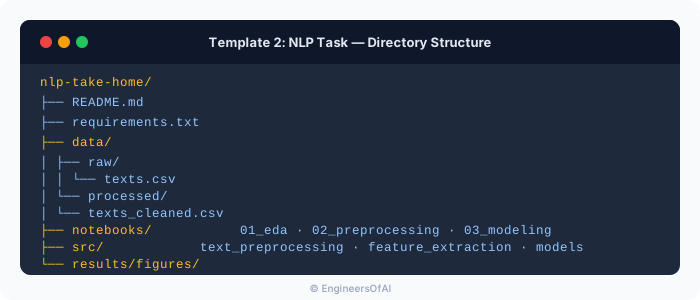
## Part 3 - Template 2: NLP Task
Common prompts: sentiment analysis, text classification, named entity recognition, text summarization, information extraction.
### Directory Structure
### NLP-Specific Boilerplate
```python
"""
# Text Classification - Take-Home Challenge
## NLP-Specific Setup
"""
import re
import string
from collections import Counter
import pandas as pd
import numpy as np
import matplotlib.pyplot as plt
import seaborn as sns
# NLP libraries
from sklearn.feature_extraction.text import TfidfVectorizer, CountVectorizer
from sklearn.model_selection import train_test_split, cross_val_score
from sklearn.pipeline import Pipeline
from sklearn.linear_model import LogisticRegression
from sklearn.naive_bayes import MultinomialNB
from sklearn.ensemble import RandomForestClassifier
from sklearn.metrics import classification_report, confusion_matrix
RANDOM_STATE = 42
np.random.seed(RANDOM_STATE)
"""
## Text-Specific EDA

For NLP take-homes, EDA should cover:
- Document length distribution
- Class distribution
- Most frequent words/n-grams per class
- Language quality (encoding issues, special characters)
"""

def text_eda(df: pd.DataFrame, text_col: str, target_col: str) -> None:
    """Perform comprehensive text EDA."""

    # Document length
    df["text_length"] = df[text_col].str.len()
    df["word_count"] = df[text_col].str.split().str.len()

    fig, axes = plt.subplots(1, 3, figsize=(18, 5))

    # Length distribution by class
    for label in df[target_col].unique():
        subset = df[df[target_col] == label]
        axes[0].hist(subset["word_count"], bins=30, alpha=0.5, label=str(label))
    axes[0].set_title("Word Count Distribution by Class")
    axes[0].set_xlabel("Word Count")
    axes[0].legend()

    # Class distribution
    df[target_col].value_counts().plot(kind="bar", ax=axes[1])
    axes[1].set_title("Class Distribution")

    # Average length by class
    df.groupby(target_col)["word_count"].mean().plot(kind="bar", ax=axes[2])
    axes[2].set_title("Average Word Count by Class")

    plt.tight_layout()
    plt.show()

    # Most common words per class
    for label in df[target_col].unique():
        texts = " ".join(df[df[target_col] == label][text_col].tolist())
        words = texts.lower().split()
        word_freq = Counter(words).most_common(20)
        print(f"\nTop 20 words for class '{label}':")
        for word, count in word_freq:
            print(f"  {word}: {count}")

text_eda(df, "text", "label")
"""
## Text Preprocessing Pipeline
"""

def clean_text(text: str) -> str:
    """Clean and normalize text for NLP modeling.

    Steps:
    1. Lowercase
    2. Remove URLs
    3. Remove HTML tags
    4. Remove special characters (keep alphanumeric and spaces)
    5. Remove extra whitespace
    """
    if not isinstance(text, str):
        return ""

    text = text.lower()
    text = re.sub(r"http\S+|www\.\S+", "", text)         # URLs
    text = re.sub(r"<[^>]+>", "", text)                    # HTML
    text = re.sub(r"[^a-zA-Z0-9\s]", " ", text)           # Special chars
    text = re.sub(r"\s+", " ", text).strip()               # Whitespace

    return text


# NLP Modeling Pipeline
pipelines = {
    "TF-IDF + Logistic Regression": Pipeline([
        ("tfidf", TfidfVectorizer(max_features=10000, ngram_range=(1, 2))),
        ("model", LogisticRegression(max_iter=1000, random_state=RANDOM_STATE)),
    ]),
    "TF-IDF + Naive Bayes": Pipeline([
        ("tfidf", TfidfVectorizer(max_features=10000, ngram_range=(1, 2))),
        ("model", MultinomialNB()),
    ]),
    "BoW + Random Forest": Pipeline([
        ("bow", CountVectorizer(max_features=5000)),
        ("model", RandomForestClassifier(n_estimators=100, random_state=RANDOM_STATE)),
    ]),
}

# If using transformers (when allowed and data is manageable)
# from transformers import pipeline as hf_pipeline
# classifier = hf_pipeline("text-classification", model="distilbert-base-uncased")
Some NLP take-homes explicitly allow or encourage using pre-trained transformer models (BERT, DistilBERT). Others want to see you build from simpler approaches first. If the prompt is ambiguous, start with TF-IDF + Logistic Regression as a baseline, then add a transformer-based approach if time permits. Always document why you chose the approach you chose.
Part 4 - Template 3: Time Series Task
Common prompts: demand forecasting, anomaly detection, stock prediction, sensor data analysis.
Time Series-Specific Considerations

Using train_test_split with shuffle=True on time series data is an instant rejection. Time series must be split chronologically. The training set is the past, the test set is the future. Any other approach creates look-ahead bias.
Time Series Boilerplate
"""
# Time Series Forecasting - Take-Home Challenge
"""

import pandas as pd
import numpy as np
import matplotlib.pyplot as plt
from sklearn.metrics import mean_absolute_error, mean_squared_error
from statsmodels.tsa.stattools import adfuller
from statsmodels.tsa.seasonal import seasonal_decompose

RANDOM_STATE = 42

def prepare_time_series(df: pd.DataFrame, date_col: str, target_col: str) -> pd.DataFrame:
    """Prepare DataFrame for time series analysis."""
    df = df.copy()
    df[date_col] = pd.to_datetime(df[date_col])
    df = df.sort_values(date_col).reset_index(drop=True)
    df = df.set_index(date_col)
    return df


def check_stationarity(series: pd.Series, significance: float = 0.05) -> dict:
    """Perform Augmented Dickey-Fuller test for stationarity."""
    result = adfuller(series.dropna(), autolag="AIC")
    return {
        "test_statistic": result[0],
        "p_value": result[1],
        "is_stationary": result[1] < significance,
        "critical_values": result[4],
    }


def create_lag_features(df: pd.DataFrame, target_col: str, lags: list[int]) -> pd.DataFrame:
    """Create lagged features for time series modeling.

    Important: Only uses past data - no look-ahead bias.
    """
    df = df.copy()
    for lag in lags:
        df[f"{target_col}_lag_{lag}"] = df[target_col].shift(lag)

    # Rolling statistics (using past data only)
    for window in [7, 14, 30]:
        df[f"{target_col}_rolling_mean_{window}"] = (
            df[target_col].shift(1).rolling(window=window).mean()
        )
        df[f"{target_col}_rolling_std_{window}"] = (
            df[target_col].shift(1).rolling(window=window).std()
        )

    return df


def temporal_train_test_split(
    df: pd.DataFrame,
    test_size: float = 0.2,
) -> tuple:
    """Split time series data chronologically (NO shuffling)."""
    split_idx = int(len(df) * (1 - test_size))

    train = df.iloc[:split_idx]
    test = df.iloc[split_idx:]

    print(f"Training period: {train.index.min()} to {train.index.max()}")
    print(f"Test period: {test.index.min()} to {test.index.max()}")
    print(f"Training samples: {len(train)}, Test samples: {len(test)}")

    return train, test


def walk_forward_validation(
    model_class,
    df: pd.DataFrame,
    target_col: str,
    feature_cols: list[str],
    initial_train_size: int,
    step_size: int = 1,
    **model_kwargs,
) -> list[dict]:
    """Perform walk-forward validation for time series.

    This is the gold standard for time series evaluation:
    - Train on all data up to time t
    - Predict time t+1
    - Add true value at t+1 to training set
    - Repeat
    """
    results = []

    for i in range(initial_train_size, len(df) - step_size + 1, step_size):
        train = df.iloc[:i]
        test = df.iloc[i:i + step_size]

        X_train = train[feature_cols]
        y_train = train[target_col]
        X_test = test[feature_cols]
        y_test = test[target_col]

        model = model_class(**model_kwargs)
        model.fit(X_train, y_train)
        y_pred = model.predict(X_test)

        results.append({
            "date": test.index[0],
            "actual": y_test.values[0],
            "predicted": y_pred[0],
        })

    return pd.DataFrame(results)
Part 5 - Template 4: Recommendation System Task
Common prompts: product recommendation, content recommendation, user similarity.
Recommendation System Boilerplate
"""
# Recommendation System - Take-Home Challenge

## Key Considerations
- Collaborative filtering vs content-based vs hybrid
- Cold start problem handling
- Evaluation: precision@k, recall@k, NDCG, MAP
- Implicit vs explicit feedback
"""

import pandas as pd
import numpy as np
from sklearn.metrics.pairwise import cosine_similarity
from scipy.sparse import csr_matrix

RANDOM_STATE = 42


def create_user_item_matrix(
    df: pd.DataFrame,
    user_col: str,
    item_col: str,
    rating_col: str = None,
) -> pd.DataFrame:
    """Create user-item interaction matrix.

    Args:
        df: DataFrame with user-item interactions
        user_col: Column name for user IDs
        item_col: Column name for item IDs
        rating_col: Column name for ratings (None for implicit feedback)

    Returns:
        User-item matrix (users as rows, items as columns)
    """
    if rating_col:
        matrix = df.pivot_table(
            index=user_col, columns=item_col, values=rating_col, fill_value=0
        )
    else:
        # Implicit feedback: binary interaction
        matrix = df.pivot_table(
            index=user_col, columns=item_col, aggfunc="size", fill_value=0
        )
        matrix = (matrix > 0).astype(int)

    print(f"User-item matrix shape: {matrix.shape}")
    print(f"Sparsity: {1 - matrix.values.nonzero()[0].size / matrix.size:.4f}")

    return matrix


def evaluate_recommendations(
    recommended: list,
    relevant: list,
    k: int = 10,
) -> dict:
    """Evaluate recommendation quality with standard metrics."""
    recommended_at_k = recommended[:k]
    relevant_set = set(relevant)
    rec_set = set(recommended_at_k)

    hits = rec_set & relevant_set
    precision = len(hits) / k if k > 0 else 0
    recall = len(hits) / len(relevant_set) if relevant_set else 0

    # NDCG@k
    dcg = sum(
        1 / np.log2(i + 2) for i, item in enumerate(recommended_at_k)
        if item in relevant_set
    )
    ideal = sum(1 / np.log2(i + 2) for i in range(min(len(relevant_set), k)))
    ndcg = dcg / ideal if ideal > 0 else 0

    return {
        f"precision@{k}": precision,
        f"recall@{k}": recall,
        f"ndcg@{k}": ndcg,
    }


def temporal_split_interactions(
    df: pd.DataFrame,
    timestamp_col: str,
    test_ratio: float = 0.2,
) -> tuple:
    """Split interactions chronologically per user.

    For recommendation evaluation, the standard approach is to use
    each user's most recent interactions as the test set.
    """
    df = df.sort_values(timestamp_col)

    train_dfs = []
    test_dfs = []

    for user_id, user_df in df.groupby("user_id"):
        split_idx = int(len(user_df) * (1 - test_ratio))
        if split_idx < 1:
            train_dfs.append(user_df)
            continue
        train_dfs.append(user_df.iloc[:split_idx])
        test_dfs.append(user_df.iloc[split_idx:])

    return pd.concat(train_dfs), pd.concat(test_dfs)
Part 6 - Template 5: Computer Vision Task
Common prompts: image classification, object detection, image similarity, data augmentation strategy.
Computer Vision Boilerplate
"""
# Image Classification - Take-Home Challenge

## Key Considerations
- Dataset size determines approach (small = transfer learning, large = train from scratch)
- Data augmentation is critical for small datasets
- Always start with a pre-trained model as baseline
- Document inference speed alongside accuracy
"""

import torch
import torch.nn as nn
import torchvision.transforms as transforms
from torch.utils.data import DataLoader, Dataset
from torchvision import models
from pathlib import Path
from PIL import Image
import matplotlib.pyplot as plt
import numpy as np

RANDOM_STATE = 42
torch.manual_seed(RANDOM_STATE)
np.random.seed(RANDOM_STATE)

DEVICE = torch.device("cuda" if torch.cuda.is_available() else "cpu")
print(f"Using device: {DEVICE}")


class ImageDataset(Dataset):
    """Custom dataset for image classification take-homes."""

    def __init__(self, image_dir: str, labels: dict, transform=None):
        self.image_dir = Path(image_dir)
        self.image_paths = list(self.image_dir.glob("*.jpg")) + list(self.image_dir.glob("*.png"))
        self.labels = labels
        self.transform = transform

    def __len__(self):
        return len(self.image_paths)

    def __getitem__(self, idx):
        img_path = self.image_paths[idx]
        image = Image.open(img_path).convert("RGB")
        label = self.labels.get(img_path.stem, 0)

        if self.transform:
            image = self.transform(image)

        return image, label


# Standard transforms
train_transform = transforms.Compose([
    transforms.Resize((224, 224)),
    transforms.RandomHorizontalFlip(),
    transforms.RandomRotation(10),
    transforms.ColorJitter(brightness=0.2, contrast=0.2),
    transforms.ToTensor(),
    transforms.Normalize([0.485, 0.456, 0.406], [0.229, 0.224, 0.225]),
])

val_transform = transforms.Compose([
    transforms.Resize((224, 224)),
    transforms.ToTensor(),
    transforms.Normalize([0.485, 0.456, 0.406], [0.229, 0.224, 0.225]),
])


def create_transfer_learning_model(num_classes: int, freeze_backbone: bool = True):
    """Create a transfer learning model using ResNet18.

    Rationale: For small datasets (< 10K images), transfer learning
    from ImageNet is almost always superior to training from scratch.
    ResNet18 provides a good balance of accuracy and inference speed.
    """
    model = models.resnet18(weights=models.ResNet18_Weights.DEFAULT)

    if freeze_backbone:
        for param in model.parameters():
            param.requires_grad = False

    # Replace final layer
    num_features = model.fc.in_features
    model.fc = nn.Sequential(
        nn.Dropout(0.3),
        nn.Linear(num_features, num_classes),
    )

    return model.to(DEVICE)


def visualize_predictions(
    model, dataloader, class_names: list, n_images: int = 16
) -> None:
    """Visualize model predictions on sample images."""
    model.eval()
    images, labels, preds = [], [], []

    with torch.no_grad():
        for batch_images, batch_labels in dataloader:
            outputs = model(batch_images.to(DEVICE))
            _, predicted = torch.max(outputs, 1)
            images.extend(batch_images)
            labels.extend(batch_labels.numpy())
            preds.extend(predicted.cpu().numpy())
            if len(images) >= n_images:
                break

    fig, axes = plt.subplots(4, 4, figsize=(14, 14))
    for i, ax in enumerate(axes.flatten()):
        if i >= len(images):
            break
        img = images[i].permute(1, 2, 0).numpy()
        img = img * np.array([0.229, 0.224, 0.225]) + np.array([0.485, 0.456, 0.406])
        img = np.clip(img, 0, 1)
        ax.imshow(img)
        color = "green" if labels[i] == preds[i] else "red"
        ax.set_title(
            f"True: {class_names[labels[i]]}\nPred: {class_names[preds[i]]}",
            color=color, fontsize=9,
        )
        ax.axis("off")
    plt.suptitle("Model Predictions (Green=Correct, Red=Incorrect)")
    plt.tight_layout()
    plt.show()
Part 7 - Template 6: LLM/RAG Task
The newest and increasingly common take-home format since 2024.
Common prompts: build a RAG pipeline, evaluate LLM outputs, prompt engineering for a specific task, fine-tune a model for classification.
LLM/RAG Boilerplate
"""
# RAG Pipeline - Take-Home Challenge

## Key Considerations
- Retrieval quality is often more important than generation quality
- Evaluation is tricky - define clear metrics upfront
- Cost awareness: document API costs if using external services
- Latency matters for production systems
"""

import os
import json
import time
from pathlib import Path
from typing import Optional

import numpy as np
import pandas as pd

# Embedding and retrieval
# from sentence_transformers import SentenceTransformer
# from openai import OpenAI
# import chromadb  # or faiss, or pinecone

RANDOM_STATE = 42


class SimpleRAGPipeline:
    """A minimal RAG pipeline for take-home challenges.

    Architecture:
    1. Document chunking with overlap
    2. Embedding with sentence-transformers (local, free)
    3. Vector similarity retrieval
    4. LLM generation with retrieved context

    Design decisions documented inline.
    """

    def __init__(
        self,
        chunk_size: int = 500,
        chunk_overlap: int = 50,
        top_k: int = 5,
        embedding_model: str = "all-MiniLM-L6-v2",
    ):
        self.chunk_size = chunk_size
        self.chunk_overlap = chunk_overlap
        self.top_k = top_k
        self.embedding_model_name = embedding_model

        # Using sentence-transformers for free, local embeddings
        # self.embedding_model = SentenceTransformer(embedding_model)
        self.documents = []
        self.embeddings = None

    def chunk_documents(self, documents: list[str]) -> list[dict]:
        """Split documents into overlapping chunks.

        Rationale: Chunk size of 500 chars with 50 char overlap balances
        context preservation with retrieval granularity. Overlap prevents
        information loss at chunk boundaries.
        """
        chunks = []
        for doc_id, doc in enumerate(documents):
            for i in range(0, len(doc), self.chunk_size - self.chunk_overlap):
                chunk_text = doc[i:i + self.chunk_size]
                if len(chunk_text.strip()) > 20:  # Skip tiny fragments
                    chunks.append({
                        "doc_id": doc_id,
                        "chunk_id": len(chunks),
                        "text": chunk_text,
                        "start_char": i,
                    })
        return chunks

    def retrieve(self, query: str, top_k: Optional[int] = None) -> list[dict]:
        """Retrieve most relevant chunks for a query.

        Uses cosine similarity between query embedding and chunk embeddings.
        """
        k = top_k or self.top_k
        # query_embedding = self.embedding_model.encode([query])
        # similarities = cosine_similarity(query_embedding, self.embeddings)[0]
        # top_indices = np.argsort(similarities)[-k:][::-1]
        # return [{"chunk": self.documents[i], "score": similarities[i]} for i in top_indices]
        pass  # Implement with actual embedding model

    def generate(self, query: str, context: list[str]) -> str:
        """Generate answer using retrieved context.

        Prompt template designed to:
        1. Ground the response in retrieved context
        2. Acknowledge when context is insufficient
        3. Avoid hallucination
        """
        context_str = "\n\n".join(context)
        prompt = f"""Answer the following question based ONLY on the provided context.
If the context does not contain enough information to answer, say so explicitly.

Context:
{context_str}

Question: {query}

Answer:"""
        # response = client.chat.completions.create(
        #     model="gpt-4o-mini",
        #     messages=[{"role": "user", "content": prompt}],
        #     temperature=0.1,
        # )
        # return response.choices[0].message.content
        pass  # Implement with actual LLM


def evaluate_rag(
    pipeline,
    test_questions: list[dict],
) -> pd.DataFrame:
    """Evaluate RAG pipeline on test questions.

    Metrics:
    - Retrieval: precision@k, recall@k (if ground truth passages known)
    - Generation: exact match, F1, BLEU (if reference answers available)
    - Faithfulness: Does the answer stick to retrieved context?
    - Latency: End-to-end response time
    """
    results = []
    for item in test_questions:
        query = item["question"]
        expected = item.get("answer", "")
        relevant_docs = item.get("relevant_doc_ids", [])

        start_time = time.time()
        retrieved = pipeline.retrieve(query)
        answer = pipeline.generate(query, [r["chunk"]["text"] for r in retrieved])
        latency = time.time() - start_time

        # Retrieval quality
        retrieved_doc_ids = [r["chunk"]["doc_id"] for r in retrieved]
        retrieval_hits = len(set(retrieved_doc_ids) & set(relevant_docs))

        results.append({
            "question": query,
            "answer": answer,
            "expected": expected,
            "latency_seconds": latency,
            "retrieval_precision": retrieval_hits / len(retrieved) if retrieved else 0,
            "retrieval_recall": retrieval_hits / len(relevant_docs) if relevant_docs else 0,
        })

    return pd.DataFrame(results)
"For LLM/RAG take-homes, the evaluation framework matters more than the implementation complexity. Evaluators want to see: (1) clear chunking strategy with documented rationale, (2) retrieval quality measured separately from generation quality, (3) awareness of failure modes (hallucination, context window limits, embedding quality), and (4) cost and latency considerations. A simple pipeline with rigorous evaluation beats a complex pipeline with no evaluation."
Part 8 - Customizing Templates
Step 1: Read the Prompt Three Times
On the first read, identify the task type. On the second read, highlight every explicit requirement. On the third read, note ambiguities and implicit expectations.
Step 2: Select the Matching Template
| If the Prompt Says... | Use Template |
|---|---|
| "Predict", "classify", "detect" + tabular data | Classification |
| "Sentiment", "classify text", "extract information" | NLP |
| "Forecast", "predict over time", "temporal" | Time Series |
| "Recommend", "personalize", "suggest" | Recommendation |
| "Image", "visual", "detect objects" | Computer Vision |
| "RAG", "LLM", "chatbot", "prompt" | LLM/RAG |
Step 3: Adapt the Template
- Update the title and problem description
- Adjust feature engineering for the specific domain
- Modify evaluation metrics based on the business context
- Add domain-specific visualizations
- Remove sections that do not apply
Step 4: Fill In the README
Use the README template from the matching template section. Fill in as you work - do not leave it for the end.
Interview Cheat Sheet
| Question | Key Points |
|---|---|
| "How do you structure a take-home project?" | Standard directory structure, separated concerns, README and requirements first |
| "What is your first step on a new dataset?" | Data profiling: shape, types, missing values, target distribution |
| "How do you handle NLP vs tabular differently?" | Text-specific EDA (length, vocabulary), different preprocessing pipeline, TF-IDF baseline |
| "How do you evaluate time series models?" | Walk-forward validation, no random splits, check for look-ahead bias |
| "What makes a good RAG pipeline?" | Retrieval quality over generation complexity, separate evaluation, documented chunking strategy |
| "How do you handle a cold-start problem?" | Content-based features for new items/users, popularity baseline, hybrid approach |
| "What is your go-to baseline?" | Depends on task: majority class (classification), mean (regression), TF-IDF+LR (NLP), popularity (recsys) |
Next Steps
Now that you have templates for every common take-home type, the next chapter dives into the most undervalued phase of any project: EDA Best Practices - how to explore data systematically, create meaningful visualizations, and extract insights that inform every downstream decision.