
Binary, Bits, and Bytes - How Computers Store Everything
Reading time: ~20 minutes | Level: Foundation → Engineering
Open a Python shell and type this:
>>> 0.1 + 0.2
0.30000000000000004
Not 0.3. Not even close to 0.3. The computer is apparently wrong about arithmetic that every second-grader knows.
Except it is not wrong. And it is not a Python bug. It is what you get when you try to represent 0.1 in a number system built on powers of 2 - and 0.1 cannot be represented exactly in binary, any more than 1/3 can be represented exactly in decimal. If you do not understand binary, this will always feel like magic or malfunction. Once you do understand it, you can predict exactly when it happens, why it happens in every mainstream programming language, and how to work around it.
This module gives you the complete picture: what a bit is at the physical level, how integers and floats are stored in silicon, why Python integers do not overflow, how text encoding works, and how all of this directly affects your machine learning code.
What You Will Learn
- What a bit and a byte are at the hardware level - transistors and voltage
- How positional notation works in base-2 and how to convert between binary and decimal by hand
- How negative integers are stored using two's complement
- How Python's bitwise operators work and where they are used in real systems
- Why Python integers never overflow - and what CPython does internally instead
- How ASCII, Unicode, and UTF-8 relate to each other and to raw bytes
- Why
0.1 + 0.2 != 0.3happens in every language that uses IEEE 754 floating point - How IEEE 754 floating-point format works at the bit level
- How float32, float16, and bfloat16 differ in AI/ML model training and inference
Prerequisites
- Python installed and runnable
- Familiarity with Python variables and basic arithmetic
- No hardware or computer science background required
The Mental Model: Everything Is Bits
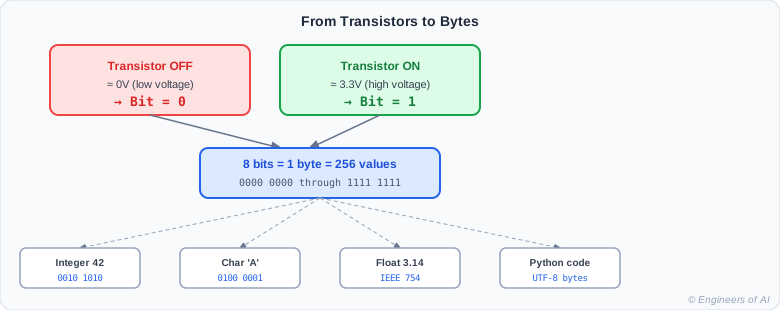
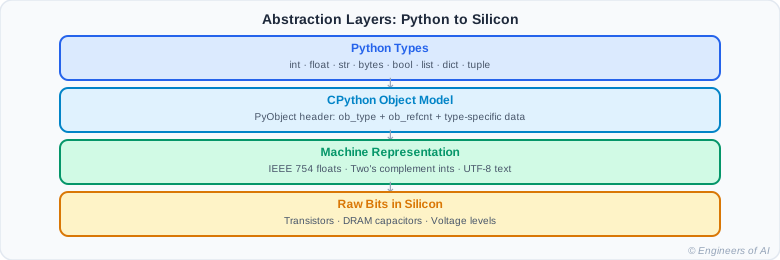
Every Python value eventually becomes bits. Python's type system determines how those bits are interpreted. Understanding the layers lets you reason about precision, performance, and bugs.
Part 1 - What Is a Bit?
A bit is the smallest unit of information. It can hold exactly one of two values: 0 or 1.
At the hardware level, a bit corresponds to a transistor state. A transistor is a semiconductor switch - it either allows current to flow (logic 1, represented by a high voltage, typically ~3.3V or 5V) or blocks it (logic 0, near 0V). Modern CPUs contain billions of transistors. A 4 GB RAM module holds approximately 34 billion bits (4 × 10⁹ × 8).
Physical bit states:
  HIGH voltage (~3.3V or 5V)  →  1
  LOW voltage  (~0V)           →  0

Two states. That is all.
But combine enough of them and you get everything.
Why binary and not, say, base-10? Because two voltage levels are easy to distinguish reliably in hardware despite temperature variations, manufacturing tolerances, and electrical noise. Three or more distinct voltage levels are much harder to keep cleanly separated. Binary is the engineering pragmatism at the root of all computing.
:::note What About Quantum Bits? A quantum computer uses qubits that can exist in a superposition of 0 and 1 simultaneously - fundamentally different from classical binary bits. Every computer you write Python on today uses classical binary bits: on or off, nothing more. :::
Part 2 - What Is a Byte?
A byte is 8 bits. The 8-bit byte became the universal standard because it was the smallest unit that could represent a character in early computing (ASCII needs 7 bits; the 8th was used for error detection and later became part of extended encodings). Today, 8 bits is the addressable unit of memory - even if you need just 1 bit, you typically read and write a whole byte.
1 byte = 8 bits
  Binary range:  00000000  to  11111111
  Decimal range: 0         to  255
  Count:         2^8 = 256 possible values

Real-world uses of a single byte (0–255 range):
  RGB color channel:  0–255  (red, green, or blue intensity)
  ASCII character:    0–127  (128 standard characters)
  Network protocol:   1 byte can encode a message type code
  UTF-8 prefix byte:  encodes how many bytes follow in a sequence
Common byte multiples you encounter in AI/ML work:
| Unit | Bytes | Approx |
|---|---|---|
| Kilobyte (KB) | 1,024 | ~10³ |
| Megabyte (MB) | 1,048,576 | ~10⁶ |
| Gigabyte (GB) | 1,073,741,824 | ~10⁹ |
| Terabyte (TB) | 1,099,511,627,776 | ~10¹² |
A float32 neural network weight is exactly 4 bytes. A model with 7 billion parameters stored in float32 requires 7 × 10⁹ × 4 = 28 GB. That is why dtype choice matters in AI - you are multiplying bytes-per-parameter by total parameter count.
Part 3 - Binary Arithmetic: Base-2 Positional Notation
Decimal (base-10) uses positional notation with powers of 10. Binary (base-2) is the same idea with powers of 2.
Decimal 42 (base-10):
  Position:  1  0
  Digit:     4  2
  Value:   4×10 + 2×1 = 40 + 2 = 42

Binary 00101010 (base-2):
  Position: 7  6  5  4  3  2  1  0
  Bit:      0  0  1  0  1  0  1  0
  Value:    0  0  32 0  8  0  2  0
            = 32 + 8 + 2 = 42  ✓
Manual conversion: decimal 42 → binary
Repeatedly divide by 2 and collect remainders (read bottom to top):
42 ÷ 2 = 21  remainder 0   ← least significant bit (rightmost)
21 ÷ 2 = 10  remainder 1
10 ÷ 2 =  5  remainder 0
 5 ÷ 2 =  2  remainder 1
 2 ÷ 2 =  1  remainder 0
 1 ÷ 2 =  0  remainder 1   ← most significant bit (leftmost)

Read remainders bottom to top: 101010  →  binary for 42
Verify with Python:
# Decimal to binary string
print(bin(42))        # '0b101010'  - '0b' prefix means binary literal
print(bin(255))       # '0b11111111'
print(bin(0))         # '0b0'

# Binary literals in Python source code
x = 0b101010         # This is the integer 42
print(x)             # 42
print(type(x))       # <class 'int'>

# Binary string to integer
print(int("101010", 2))    # 42  - second arg is the base
print(int("11111111", 2))  # 255
print(int("0b101010", 2))  # 42  - '0b' prefix is handled too

# Hex and octal are also common in low-level work
print(hex(42))       # '0x2a'
print(oct(42))       # '0o52'
print(0xFF)          # 255  - hex literal
print(0o52)          # 42   - octal literal
Output:
0b101010
0b11111111
0b0
42
<class 'int'>
42
255
42
0x2a
0o52
255
42
:::tip Why Binary Matters for Python Programmers
You encounter binary in: parsing network packets, reading binary file formats, implementing hash functions, writing bitwise flag operations, and debugging floating-point precision issues. The bin(), hex(), and oct() built-ins are your inspection tools. The struct module lets you read raw bytes as typed values.
:::
Watch: Binary Numbers - Crash Course Computer Science #4
Part 4 - Negative Numbers: Two's Complement
How do you represent -5 in binary? You cannot just add a minus sign - the hardware only has 0s and 1s. Modern systems solve this with two's complement.
Computing -5 in 8-bit two's complement:
Step 1: Write the positive value
  +5  =  00000101

Step 2: Flip all bits (one's complement)
  NOT  00000101  =  11111010

Step 3: Add 1
  11111010
+ 00000001
----------
  11111011  =  -5 in two's complement  ✓
Why two's complement? Because standard addition hardware works correctly for both positive and negative numbers without special cases:
  00000101   (+5)
+ 11111011   (-5 in two's complement)
-----------
  00000000   (0, with carry-out discarded)  ✓
The range of an 8-bit signed two's complement integer: -128 to +127. The most significant bit (bit 7) acts as the sign bit.
 01111111  =  +127   (max positive)
 00000001  =  +1
 00000000  =   0
 11111111  =  -1
 10000001  =  -127
 10000000  =  -128   (min negative)
Python integers do not overflow. They use arbitrary precision. Compare Python to C:
# Python: no overflow, ever
x = 2**63
print(x)        # 9223372036854775808
print(x + 1)    # 9223372036854775809  - works perfectly

# Very large integers work without any special handling
big = 2**332
print(big)      # 883...  (a 101-digit number)

# sys.getsizeof shows that Python int objects grow in memory as needed
import sys
print(sys.getsizeof(1))           # 28 bytes - minimal int
print(sys.getsizeof(2**30))       # 28 bytes - still fits in one 30-bit digit
print(sys.getsizeof(2**60))       # 32 bytes - needs a second digit
print(sys.getsizeof(2**90))       # 36 bytes - three digits
print(sys.getsizeof(10**100))     # 72 bytes - a googol
Output:
9223372036854775808
9223372036854775809
883423532389192164791648750371459257913741948437809479060803100646309888
28
28
32
36
72
In C, long long is 64-bit. 2**63 + 1 overflows and produces implementation-defined behavior - often wrapping to a large negative number. CPython stores integers internally as arrays of 30-bit "digits" (on 64-bit platforms), allocating more digits as needed. That is why sys.getsizeof() grows with the integer value.
CPython integer storage model (simplified):

  Small int (fits in one 30-bit digit):
  ┌──────────┬──────────┬──────────┐
  │ob_refcnt │ ob_type  │ digit[0] │
  │  8 bytes │  8 bytes │  4 bytes │
  └──────────┴──────────┴──────────┘
  Total: ~28 bytes for the integer 1

  Large int (needs multiple digits):
  ┌──────────┬──────────┬──────────┬──────────┬──────────┐
  │ob_refcnt │ ob_type  │ digit[0] │ digit[1] │ digit[2] │
  └──────────┴──────────┴──────────┴──────────┴──────────┘
  Each additional 30-bit digit adds 4 bytes
:::warning The Cost of Arbitrary Precision
Python integers are heap-allocated objects. A C int64_t is 8 bytes and fits in a CPU register. A Python int is at minimum 28 bytes on the heap, and all arithmetic involves those heap objects rather than simple CPU register operations. For millions of integers (a list of 1 million Python ints), this overhead compounds dramatically. This is one of the core reasons NumPy's np.int64 arrays are so much faster than Python lists.
:::
Part 5 - Bitwise Operations
Bitwise operators act directly on the binary representation of integers. They appear in systems programming, networking, cryptography, hash tables, and performance-critical code.
a = 0b11001010   # 202 decimal
b = 0b10110011   # 179 decimal

# AND: result bit is 1 only where BOTH inputs are 1
print(bin(a & b))    # 0b10000010  (130)
# 11001010
# 10110011
# --------
# 10000010

# OR: result bit is 1 where EITHER input is 1
print(bin(a | b))    # 0b11111011  (251)

# XOR: result bit is 1 where inputs DIFFER
print(bin(a ^ b))    # 0b01111001  (121)

# NOT: flip every bit - in Python the result is always -(n+1)
print(~5)            # -6  (not 250 - Python ints have no fixed width)

# Left shift: equivalent to multiplying by 2 per shift position
print(1 << 3)        # 8    (1 × 2³)
print(42 << 2)       # 168  (42 × 4)

# Right shift: equivalent to integer dividing by 2 per shift position
print(168 >> 2)      # 42   (168 ÷ 4)
print(255 >> 4)      # 15   (255 ÷ 16, integer)
Output:
0b10000010
0b11111011
0b01111001
-6
8
168
42
15
Practical uses of bitwise operations:
# 1. Check if a number is even or odd (faster than % 2)
def is_even(n):
    return (n & 1) == 0   # Lowest bit is 0 for all even numbers

print(is_even(42))    # True
print(is_even(7))     # False

# 2. Check if n is a power of 2
def is_power_of_two(n):
    return n > 0 and (n & (n - 1)) == 0
    # Powers of 2 in binary: 1000, 10000, 100000 - exactly one bit set
    # n-1 flips all lower bits:  1000 - 1 = 0111
    # AND of n and (n-1) is 0 ONLY for powers of 2

print(is_power_of_two(64))    # True
print(is_power_of_two(100))   # False

# 3. Bitmask flags - pack multiple boolean flags into one integer
# Used in: network protocols, file permissions, hardware registers, ML configs

READ    = 0b001   # bit 0 = 1
WRITE   = 0b010   # bit 1 = 2
EXECUTE = 0b100   # bit 2 = 4

# Start with READ | WRITE permissions
permissions = READ | WRITE    # 0b011 = 3

# Check a flag
has_read    = bool(permissions & READ)      # True
has_execute = bool(permissions & EXECUTE)   # False

# Set a flag (turn it on)
permissions |= EXECUTE                      # 0b111 = 7

# Clear a flag (turn it off)
permissions &= ~WRITE                       # 0b101 = 5 (WRITE bit cleared)

print(f"has_read:    {bool(permissions & READ)}")     # True
print(f"has_write:   {bool(permissions & WRITE)}")    # False
print(f"has_execute: {bool(permissions & EXECUTE)}")  # True
Output:
True
False
True
False
True
False
True
False
True
:::tip Bitwise Operations in Real Systems
Linux file permissions (chmod 755) are bitmasks. Network subnet masks are bitmasks. Pixel RGBA values are often packed into 32-bit integers. Hash table index computation uses hash & (table_size - 1) instead of hash % table_size when table size is a power of 2 - the bitwise AND is one CPU instruction versus a division. NumPy provides np.packbits and np.unpackbits for binary data manipulation.
:::
Part 6 - Python's Arbitrary-Precision Integers
CPython's integer implementation is sophisticated. Understanding it clarifies why Python integers behave differently from every other mainstream language.
import sys

# sys.getsizeof shows total bytes of the Python integer object
print(sys.getsizeof(0))           # 24 bytes - smallest int (ob_size == 0)
print(sys.getsizeof(1))           # 28 bytes - one 30-bit digit needed
print(sys.getsizeof(2**30 - 1))   # 28 bytes - still fits in one digit
print(sys.getsizeof(2**30))       # 32 bytes - needs a second digit
print(sys.getsizeof(2**60))       # 36 bytes - three digits
print(sys.getsizeof(10**100))     # 72 bytes - a googol
Output (may vary slightly by platform and Python version):
24
28
28
32
36
72
The memory layout of a CPython integer object:
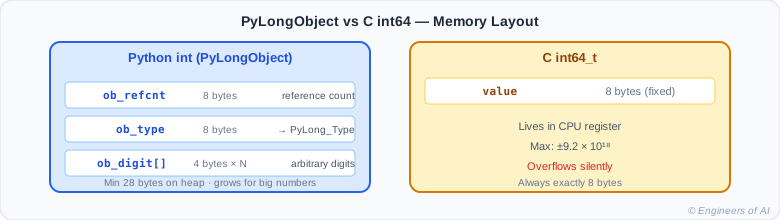
For comparison, a C int64_t is always exactly 8 bytes and lives in a CPU register. A Python int is at minimum 28 bytes on the heap.
# Small integer caching: CPython pre-creates integers -5 through 256
a = 100
b = 100
print(a is b)    # True - same cached object, no allocation

a = 1000
b = 1000
print(a is b)    # False - two separate heap allocations

# Python handles enormous integers natively
factorial_20 = 1
for i in range(1, 21):
    factorial_20 *= i

print(factorial_20)                    # 2432902008176640000
print(sys.getsizeof(factorial_20))     # 28 bytes - fits in one digit

factorial_100 = 1
for i in range(1, 101):
    factorial_100 *= i

print(len(str(factorial_100)))         # 158 digits
print(sys.getsizeof(factorial_100))    # ~108 bytes
Output:
True
False
2432902008176640000
28
158
108
The performance implication: For arithmetic-heavy code - scientific computing, data processing loops, ML training - use NumPy's fixed-width integer types (np.int32, np.int64), which store raw C integers without the Python object wrapper. Python's arbitrary precision is powerful but comes at a real memory and speed cost.
Part 7 - Text Encoding: From ASCII to Unicode
Text is stored as numbers. Always. The question is: which number represents which character?
ASCII (American Standard Code for Information Interchange):
- 128 characters (0–127), encoded in 7 bits
- Covers: uppercase/lowercase English letters, digits, punctuation, and control characters
'A'→ 65,'a'→ 97,'0'→ 48,'\n'→ 10
Unicode:
- Defines 1,114,112 possible code points (U+0000 to U+10FFFF)
- Covers every writing system, emoji, mathematical symbols, ancient scripts, and more
- A code point is just an integer. Unicode defines which integer maps to which character.
- Python 3
stris always a sequence of Unicode code points.
UTF-8 (Unicode Transformation Format - 8-bit):
- The most common encoding for storing and transmitting Unicode text
- Variable-width: 1 byte for ASCII characters (fully backward-compatible), 2–4 bytes for others
- Not all byte sequences are valid UTF-8 - the format includes error detection
# Characters are integers
print(ord("A"))        # 65
print(ord("a"))        # 97
print(ord("0"))        # 48
print(ord("\n"))       # 10
print(ord("🚀"))       # 128640  - Unicode code point

print(chr(65))         # 'A'
print(chr(9786))       # '☺'
print(chr(128640))     # '🚀'

# Encoding: str (Unicode code points) → bytes (UTF-8)
text = "Hello"
encoded = text.encode("utf-8")
print(encoded)              # b'Hello'
print(len(encoded))         # 5 bytes - one byte per ASCII character

# ASCII characters: 1 byte each in UTF-8
print("A".encode("utf-8"))           # b'A'
print(len("A".encode("utf-8")))      # 1

# Non-ASCII Latin: 2 bytes each
print("é".encode("utf-8"))           # b'\xc3\xa9'
print(len("é".encode("utf-8")))      # 2

# Emoji: 4 bytes each
rocket = "🚀"
encoded_rocket = rocket.encode("utf-8")
print(encoded_rocket)                # b'\xf0\x9f\x9a\x80'
print(len(encoded_rocket))           # 4 bytes for one emoji

# Chinese characters: 3 bytes each in UTF-8
chinese = "中文"
print(len(chinese.encode("utf-8")))  # 6 bytes (2 chars × 3 bytes)

# Decoding: bytes → str
raw = b'\xf0\x9f\x9a\x80'
print(raw.decode("utf-8"))           # 🚀

# See the code point and byte count for each character
for char in "A🚀中":
    cp = ord(char)
    nbytes = len(char.encode("utf-8"))
    print(f"'{char}'  U+{cp:04X}  →  {nbytes} bytes in UTF-8")
Output:
65
97
48
10
128640
A
☺
🚀
b'Hello'
5
b'A'
1
b'\xc3\xa9'
2
b'\xf0\x9f\x9a\x80'
4
6
🚀
'A'  U+0041  →  1 bytes in UTF-8
'🚀'  U+1F680  →  4 bytes in UTF-8
'中'  U+4E2D  →  3 bytes in UTF-8
UTF-8 byte structure:
  1 byte   (0xxxxxxx)               →  code points U+0000 – U+007F (ASCII)
  2 bytes  (110xxxxx 10xxxxxx)      →  U+0080 – U+07FF
  3 bytes  (1110xxxx 10xxxxxx 10xxxxxx)  →  U+0800 – U+FFFF
  4 bytes  (11110xxx 10xxxxxx 10xxxxxx 10xxxxxx)  →  U+10000 – U+10FFFF
:::note Why Python 3 Strings Feel Different From Python 2
In Python 2, str was raw bytes and unicode was text. In Python 3, str is always Unicode and bytes is always raw binary data. This separation eliminates an entire class of encoding bugs - but it means you must explicitly .encode() at output and .decode() at input whenever you cross the text/binary boundary.
:::
Part 8 - IEEE 754 Floating Point: Why 0.1 + 0.2 ≠ 0.3
This is the most important section for understanding a class of bugs that affects every programmer who uses floating-point arithmetic.
A 64-bit IEEE 754 floating-point number - which is what Python's float is - has this structure:
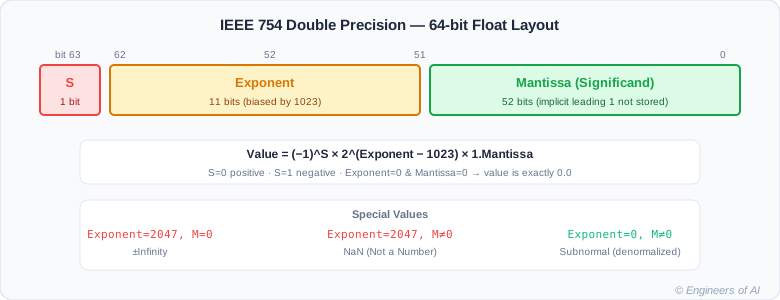
Why 0.1 cannot be represented exactly:
In binary, 0.1 is an infinite repeating fraction:
0.1 in binary = 0.0001100110011001100110011001100110011...
                         ↑ the pattern 1100 repeats forever
Just as 1/3 = 0.333... repeats infinitely in decimal, 1/10 = 0.00011001100110011... repeats infinitely in binary. IEEE 754 stores only 52 mantissa bits, so it rounds at bit 52. The stored value is not exactly 0.1 - it is the closest representable binary fraction.
# The famous float surprise
print(0.1 + 0.2)               # 0.30000000000000004
print(0.1 + 0.2 == 0.3)        # False

# See the actual value stored in memory - not 0.1
from decimal import Decimal
print(Decimal(0.1))
# 0.1000000000000000055511151231257827021181583404541015625
# That is the ACTUAL stored value, not 0.1

print(Decimal(0.2))
# 0.200000000000000011102230246251565404236316680908203125

# Inspect the raw IEEE 754 bytes of 0.1
import struct
packed = struct.pack("d", 0.1)    # 'd' = double precision (64-bit float)
print(packed.hex())
# 3fb999999999999a
# The repeating 9s in hex reflect the repeating binary pattern

# The fix: decimal.Decimal for exact decimal arithmetic
from decimal import Decimal, getcontext
getcontext().prec = 50   # 50 significant digits of precision

a = Decimal("0.1")   # Must use a string - not Decimal(0.1)
b = Decimal("0.2")   # float(0.2) already has the rounding error
print(a + b)         # 0.3 - exact
print(a + b == Decimal("0.3"))   # True

# The other fix: math.isclose for approximate comparisons
import math
print(math.isclose(0.1 + 0.2, 0.3))                   # True
print(math.isclose(0.1 + 0.2, 0.3, rel_tol=1e-9))     # True
Output:
0.30000000000000004
False
0.1000000000000000055511151231257827021181583404541015625
0.200000000000000011102230246251565404236316680908203125
3fb999999999999a
0.3
True
True
True
Special IEEE 754 values:
import math, sys

# Infinity - from overflow or explicit conversion
pos_inf = float("inf")
neg_inf = float("-inf")
print(pos_inf + 1)          # inf
print(pos_inf * -1)         # -inf
print(1 / pos_inf)          # 0.0

# NaN (Not a Number) - from undefined operations
nan = float("nan")
print(nan)                  # nan
print(nan == nan)           # False - NaN is not equal to itself!
print(math.isnan(nan))      # True  - always use isnan() to check
print(nan + 1)              # nan   - NaN propagates through arithmetic

# System limits
print(sys.float_info.max)       # 1.7976931348623157e+308 - max float
print(sys.float_info.max * 2)   # inf - overflow
print(sys.float_info.epsilon)   # 2.220446049250313e-16
# epsilon: smallest x such that 1.0 + x != 1.0
Output:
inf
-inf
0.0
nan
False
True
nan
1.7976931348623157e+308
inf
2.220446049250313e-16
Part 9 - Practical Binary in Python
Python has several types for working directly with raw binary data:
# bytes: immutable sequence of integers 0–255
b = bytes([72, 101, 108, 108, 111])
print(b)                     # b'Hello'
print(b[0])                  # 72
print(len(b))                # 5

# bytes literals with hex escapes
b2 = b"\x48\x65\x6c\x6c\x6f"
print(b2)                    # b'Hello'

# bytearray: mutable version of bytes
ba = bytearray([0, 1, 2, 3, 4])
ba[0] = 255
print(ba)                    # bytearray(b'\xff\x01\x02\x03\x04')

# Hex literals for byte-level manipulation (common in networking and crypto)
mask = 0xFF              # 255 - all 8 bits set
value = 0x4A             # 74
high_nibble = (value & 0xF0) >> 4   # Upper 4 bits
low_nibble  = (value & 0x0F)        # Lower 4 bits
print(f"0x{value:02X}: high nibble={high_nibble}, low nibble={low_nibble}")
# 0x4A: high nibble=4, low nibble=10

# memoryview: zero-copy interface to binary data
data = bytearray(range(256))
view = memoryview(data)
print(view[0:4].tobytes())   # b'\x00\x01\x02\x03' - no copy of underlying data

# struct module: read binary data as typed values
import struct
# Pack two unsigned shorts and one double into bytes
packed = struct.pack("HHd", 1, 2, 3.14)
print(packed.hex())          # depends on platform
# Unpack them back
a, b, c = struct.unpack("HHd", packed)
print(a, b, c)               # 1 2 3.14
Output:
b'Hello'
72
5
b'Hello'
bytearray(b'\xff\x01\x02\x03\x04')
0x4A: high nibble=4, low nibble=10
b'\x00\x01\x02\x03'
0100020000000000051eb851eb8514400
1 2 3.14
:::tip bytes vs str
In Python 3, bytes and str are completely separate types. You cannot concatenate them, compare them with ==, or use them interchangeably. This is intentional - Python forces you to be explicit about the boundary between text (Unicode) and binary data. Always .encode() before writing to a network socket or binary file; always .decode() immediately after receiving raw bytes.
:::
AI/ML Real-World Connection
Every neural network weight is, at the hardware level, a sequence of bits. The dtype you choose determines how many bits per weight, which controls GPU memory usage, compute speed, and numerical precision.
import numpy as np

# float64: 64 bits per value - standard Python float, rarely used in ML
arr_f64 = np.array([1.0, 2.0, 3.0], dtype=np.float64)
print(f"float64: {arr_f64.itemsize} bytes/value, {arr_f64.nbytes} bytes total")

# float32: 32 bits per value - standard for ML training
arr_f32 = np.array([1.0, 2.0, 3.0], dtype=np.float32)
print(f"float32: {arr_f32.itemsize} bytes/value, {arr_f32.nbytes} bytes total")

# float16: 16 bits per value - half memory, used for inference
arr_f16 = np.array([1.0, 2.0, 3.0], dtype=np.float16)
print(f"float16: {arr_f16.itemsize} bytes/value, {arr_f16.nbytes} bytes total")

# int8: 8 bits per value - quantized models (4× smaller than float32)
arr_i8 = np.array([1, 2, 3], dtype=np.int8)
print(f"int8:    {arr_i8.itemsize} bytes/value, {arr_i8.nbytes} bytes total")

# Precision comparison for 0.1 + 0.2
print("\nPrecision test (0.1 + 0.2):")
print(f"  float64: {np.float64(0.1) + np.float64(0.2)}")
print(f"  float32: {np.float32(0.1) + np.float32(0.2)}")
print(f"  float16: {np.float16(0.1) + np.float16(0.2)}")
Output:
float64: 8 bytes/value, 24 bytes total
float32: 4 bytes/value, 12 bytes total
float16: 2 bytes/value, 6 bytes total
int8:    1 bytes/value, 3 bytes total

Precision test (0.1 + 0.2):
  float64: 0.30000000000000004
  float32: 0.3
  float16: 0.2998046875
The three floating-point formats in AI/ML work:
| Format | Total bits | Sign | Exponent | Mantissa | Primary use |
|---|---|---|---|---|---|
| float64 | 64 | 1 | 11 | 52 | General Python math |
| float32 | 32 | 1 | 8 | 23 | Standard ML training |
| float16 | 16 | 1 | 5 | 10 | Inference, mixed precision |
| bfloat16 | 16 | 1 | 8 | 7 | TPU training, modern GPUs |
bfloat16 is particularly clever: it uses float32's full 8-bit exponent (same dynamic range as float32, critical for gradient magnitudes) but cuts the mantissa from 23 bits to 7 bits. The storage is the same as float16 (2 bytes), but bfloat16 handles the range of values that gradient computations produce much better than float16's narrow 5-bit exponent.
Quantization: Converting float32 weights to int8 for inference:
# Memory calculation for a 7-billion-parameter model
params = 7_000_000_000

float32_gb = params * 4 / 1e9
float16_gb = params * 2 / 1e9
int8_gb    = params * 1 / 1e9

print(f"float32: {float32_gb:.0f} GB")   # 28 GB
print(f"float16: {float16_gb:.0f} GB")   # 14 GB
print(f"int8:    {int8_gb:.0f} GB")      #  7 GB

# int8 quantization: 4× smaller than float32, fits in consumer GPU VRAM
# Trade-off: lower precision may reduce accuracy slightly
# Modern quantization techniques (GPTQ, AWQ) minimize the accuracy cost
Output:
float32: 28 GB
float16: 14 GB
int8:    7 GB
Mixed precision training uses float16 for the forward pass (fast, half the memory) but accumulates gradients in float32 (to preserve precision for weight updates). This is a direct consequence of the binary representation tradeoffs you now understand.
Common Mistakes
Mistake 1: Using == to Compare Floats
# Bug: exact float comparison fails due to representation error
price = 0.1 + 0.1 + 0.1
print(price == 0.3)          # False - always fails

# A subtler version: summing 10 values of 0.1
total = sum(0.1 for _ in range(10))
print(total == 1.0)          # False
print(total)                 # 0.9999999999999999

# Fix 1: math.isclose for general numeric comparisons
import math
print(math.isclose(0.1 + 0.2, 0.3))                 # True
print(math.isclose(total, 1.0))                      # True

# Fix 2: round() to a safe number of decimal places
print(round(0.1 + 0.2, 10) == round(0.3, 10))        # True

# Fix 3: decimal.Decimal with string literals for financial code
from decimal import Decimal
total_money = Decimal("0.10") * 3
print(total_money == Decimal("0.30"))    # True
print(total_money)                       # 0.30 - exact
Output:
False
False
0.9999999999999999
True
True
True
True
0.30
Mistake 2: Misunderstanding ~n in Python
# In C with uint8_t: ~5 = ~00000101 = 11111010 = 250
# In Python: integers have arbitrary width, so ~ always gives -(n+1)

print(~5)       # -6   (not 250 - Python int has no fixed bit width)
print(~0)       # -1
print(~(-1))    # 0

# The formula: ~n == -(n + 1), always, for any Python int

# If you need C-style 8-bit unsigned NOT:
def bitwise_not_uint8(n):
    return (~n) & 0xFF    # Mask to lowest 8 bits

print(bitwise_not_uint8(5))         # 250
print(bin(bitwise_not_uint8(5)))    # 0b11111010
print(bitwise_not_uint8(0))         # 255
Output:
-6
-1
0
250
0b11111010
255
Mistake 3: Forgetting Encoding When Opening Files
# Bug: system default encoding may not be UTF-8 (especially on Windows)
# with open("data.txt") as f:
#     content = f.read()    # May raise UnicodeDecodeError on non-ASCII content

# Bug: writing str to binary mode file
# with open("data.txt", "wb") as f:
#     f.write("hello")    # TypeError: a bytes-like object is required

# Correct: always specify encoding for text files
# with open("data.txt", "r", encoding="utf-8") as f:
#     content = f.read()

# Demonstrating a real UnicodeDecodeError:
raw_bytes = b"\xff\xfe"    # UTF-16 BOM bytes - not valid UTF-8
try:
    text = raw_bytes.decode("utf-8")
except UnicodeDecodeError as e:
    print(f"UnicodeDecodeError: {e}")
# UnicodeDecodeError: 'utf-8' codec can't decode byte 0xff in position 0

# Fix: specify the correct encoding, or handle errors explicitly
text_replaced = raw_bytes.decode("utf-8", errors="replace")
print(repr(text_replaced))    # '\ufffd\ufffd' - Unicode replacement characters

text_ignored = raw_bytes.decode("utf-8", errors="ignore")
print(repr(text_ignored))     # '' - invalid bytes silently dropped
Output:
UnicodeDecodeError: 'utf-8' codec can't decode byte 0xff in position 0: invalid start byte
'\ufffd\ufffd'
''
Interview Questions
Q1: Why does 0.1 + 0.2 not equal 0.3 in Python?
Answer: This is not a Python bug - it is a fundamental property of IEEE 754 binary floating-point representation, used by virtually every modern programming language and CPU. The number 0.1 cannot be represented exactly in binary (base-2), just as 1/3 cannot be represented exactly in decimal (base-10). In binary, 0.1 is 0.0001100110011... repeating forever. IEEE 754 truncates this infinite sequence to 52 mantissa bits, introducing a tiny rounding error. When two such approximations are added, the errors accumulate to produce 0.30000000000000004. The fix for comparisons is math.isclose(); for exact decimal arithmetic (finance, currency) use decimal.Decimal initialized with string literals.
Q2: What is two's complement and why do computers use it?
Answer: Two's complement is the standard method for representing signed (positive and negative) integers in binary. To negate a number: flip all its bits, then add 1. For example, +5 = 00000101; flipped: 11111010; plus 1: 11111011 = -5. Computers use two's complement because it makes the addition hardware identical for positive and negative numbers - no special-case subtraction circuit is needed. The same ADD instruction works for 5 + (-5), with the carry-out bit simply discarded. The alternative representation, sign-magnitude (where the first bit is just a sign flag), requires separate hardware paths for addition and subtraction.
Q3: What is the difference between ASCII and UTF-8?
Answer: ASCII is a 7-bit character encoding that maps 128 characters (0–127) to integers: English letters, digits, punctuation, and control characters. UTF-8 is a variable-width encoding of Unicode, which defines 1,114,112 possible code points covering every writing system and emoji. UTF-8 is backward-compatible with ASCII: the 128 ASCII characters are encoded identically in UTF-8 as single bytes. Non-ASCII characters use 2, 3, or 4 bytes. So ASCII is a strict subset of UTF-8. UTF-8 is the dominant encoding for files, REST APIs, HTML, and databases because it efficiently handles the common case (ASCII text) while supporting the full Unicode range.
Q4: Why do Python integers never overflow, while C integers do?
Answer: C integers have a fixed bit width - int32_t is always 32 bits, int64_t always 64 bits. When arithmetic exceeds that width, the bits simply wrap around (or produce undefined behavior for signed integers). Python integers are arbitrary-precision objects stored on the heap. CPython internally represents them as arrays of 30-bit "digits" (on 64-bit systems). When a value exceeds the current digit array, CPython reallocates a larger array. This means Python can represent integers of any magnitude limited only by available RAM. The cost: a Python int is at minimum 28 bytes (vs 8 bytes for int64_t) and all arithmetic involves heap objects rather than CPU register operations.
Q5: What is the difference between bytes and str in Python?
Answer: str is a sequence of Unicode code points - an abstract text representation independent of any particular encoding. bytes is a sequence of raw integers 0–255 - actual binary data stored in memory. In Python 3, they are completely separate types and cannot be mixed implicitly. Converting from str to bytes requires .encode(encoding) (e.g., "hello".encode("utf-8")); the reverse requires .decode(encoding). The distinction matters at every I/O boundary: network sockets, binary-mode files, and HTTP request bodies work with bytes; string formatting, text processing, and most Python string operations work with str. The discipline of always decoding immediately on input and encoding immediately on output eliminates an entire class of encoding bugs.
Q6: What are IEEE 754 special values and when do they appear in practice?
Answer: IEEE 754 defines three classes of special floating-point values beyond normal numbers. Positive and negative infinity (float("inf"), float("-inf")) result from overflow (a number too large to represent in 64-bit float) or from dividing a nonzero float by zero. NaN (Not a Number) (float("nan")) results from mathematically undefined operations such as 0.0 / 0.0, math.inf - math.inf, or math.sqrt(-1.0). NaN has the unique property that it is not equal to itself - nan == nan is False - so you must use math.isnan() to detect it. NaN propagates through arithmetic: any operation involving NaN produces NaN, which helps detect invalid values in a pipeline rather than silently computing wrong results.
Quick Reference Cheatsheet
| Concept | Python syntax | Example / output |
|---|---|---|
| Binary literal | 0b101010 | 42 |
| Decimal → binary string | bin(42) | '0b101010' |
| Binary string → int | int("101010", 2) | 42 |
| Hex literal | 0xFF | 255 |
| Decimal → hex string | hex(255) | '0xff' |
| Character → code point | ord("A") | 65 |
| Code point → character | chr(65) | 'A' |
| str → bytes | "hello".encode("utf-8") | b'hello' |
| bytes → str | b'hello'.decode("utf-8") | 'hello' |
| Float → raw bytes | struct.pack("d", 0.1).hex() | '3fb9999...' |
| Safe float compare | math.isclose(a, b) | True / False |
| Exact decimal math | Decimal("0.1") + Decimal("0.2") | Decimal('0.3') |
| Bitwise AND | a & b | bits set in both |
| Bitwise OR | a | b | bits set in either |
| Bitwise XOR | a ^ b | bits set in one only |
| Bitwise NOT (Python) | ~n | -(n + 1) |
| Left shift | n << k | n × 2^k |
| Right shift | n >> k | n // 2^k |
| Integer object size | sys.getsizeof(n) | bytes on heap |
Graded Practice Challenges
Level 1 - Predict the Output
What does bin(255) print? What does int("1010", 2) return?
Show Answer
bin(255) prints '0b11111111'.
255 is the maximum value of an unsigned byte. All 8 bits are set to 1. The bin() function always prepends '0b' to indicate binary notation.
int("1010", 2) returns 10.
Reading right to left by bit position:
0×2⁰ + 1×2¹ + 0×2² + 1×2³ = 0 + 2 + 0 + 8 = 10
print(bin(255))         # '0b11111111'
print(int("1010", 2))   # 10
Level 1 - True or False
True or false: 0.1 + 0.1 + 0.1 == 0.3 evaluates to True in Python.
Show Answer
False.
print(0.1 + 0.1 + 0.1 == 0.3)   # False
print(0.1 + 0.1 + 0.1)           # 0.30000000000000004
Even though you are adding 0.1 three times rather than adding 0.1 and 0.2, each 0.1 is already an approximation in binary. The accumulated rounding error causes the result to differ slightly from the stored approximation of 0.3. This is why == is never the right comparison for floats.
The correct approach:
import math
print(math.isclose(0.1 + 0.1 + 0.1, 0.3))   # True
Level 2 - Debug the Code
The following code is intended to compare a running total to 0.3. Find the bug, explain why it occurs, and provide two different fixes.
total = 0.0
for _ in range(3):
    total += 0.1

if total == 0.3:
    print("Balance correct")
else:
    print(f"Balance error: got {total}")
Show Answer
The bug: floating-point comparison using ==. After three additions of the binary approximation of 0.1, the accumulated rounding error means total stores 0.30000000000000004, not the binary approximation of 0.3. The == check fails.
total = 0.0
for _ in range(3):
    total += 0.1
print(total)           # 0.30000000000000004
print(total == 0.3)    # False - the bug
Fix 1: math.isclose for general numeric tolerance comparison
import math

total = 0.0
for _ in range(3):
    total += 0.1

if math.isclose(total, 0.3, rel_tol=1e-9):
    print("Balance correct")     # This branch runs
else:
    print(f"Balance error: got {total}")
math.isclose(a, b, rel_tol=1e-9) checks that |a - b| <= rel_tol × max(|a|, |b|). It tolerates tiny floating-point errors.
Fix 2: decimal.Decimal for exact decimal arithmetic (best for financial code)
from decimal import Decimal

total = Decimal("0")
for _ in range(3):
    total += Decimal("0.1")   # String argument → exact representation

print(total)                   # 0.3  - exact
print(total == Decimal("0.3")) # True
Critical detail: Decimal("0.1") is exact. Decimal(0.1) inherits the float's rounding error. Always use string literals with Decimal for financial values.
Level 3 - Design Challenge
Design a compact storage format for storing 8 boolean flags in a single byte using bitmask operations. Write three functions:
set_flag(byte_value, flag_position)- returns new byte with that flag set to 1clear_flag(byte_value, flag_position)- returns new byte with that flag cleared to 0check_flag(byte_value, flag_position)- returnsTrueif that flag is set
flag_position is 0 (rightmost / least significant) to 7 (leftmost / most significant). Demonstrate with a real use case involving named flags.
Show Answer
def set_flag(byte_value: int, flag_position: int) -> int:
    """Set the bit at flag_position to 1. Returns updated byte value."""
    if not (0 <= flag_position <= 7):
        raise ValueError(f"flag_position must be 0–7, got {flag_position}")
    mask = 1 << flag_position    # e.g., position 3  →  0b00001000
    return byte_value | mask     # OR sets the bit without changing others

def clear_flag(byte_value: int, flag_position: int) -> int:
    """Clear the bit at flag_position to 0. Returns updated byte value."""
    if not (0 <= flag_position <= 7):
        raise ValueError(f"flag_position must be 0–7, got {flag_position}")
    mask = 1 << flag_position        # e.g., position 3  →  0b00001000
    return byte_value & (~mask)      # AND with NOT mask clears only that bit
    # ~mask = 0b11110111 - all bits 1 except the target → AND preserves all others

def check_flag(byte_value: int, flag_position: int) -> bool:
    """Return True if the bit at flag_position is 1."""
    if not (0 <= flag_position <= 7):
        raise ValueError(f"flag_position must be 0–7, got {flag_position}")
    mask = 1 << flag_position
    return bool(byte_value & mask)   # nonzero result means the bit was set

def show_byte(label: str, byte_value: int) -> None:
    print(f"{label:25s}  0b{byte_value:08b}  (decimal {byte_value})")


# Real use case: ML pipeline configuration flags packed into one byte
# Bit 0 = normalize_inputs
# Bit 1 = augment_data
# Bit 2 = use_cache
# Bit 3 = log_predictions
# Bit 4 = enable_dropout
# Bit 5 = mixed_precision
# Bit 6 = distributed_training
# Bit 7 = debug_mode

NORMALIZE_INPUTS  = 0
AUGMENT_DATA      = 1
USE_CACHE         = 2
LOG_PREDICTIONS   = 3
ENABLE_DROPOUT    = 4
MIXED_PRECISION   = 5
DISTRIBUTED       = 6
DEBUG_MODE        = 7

# Start with all flags off
config = 0b00000000
show_byte("Initial config:", config)

# Enable flags for a training run
config = set_flag(config, NORMALIZE_INPUTS)
config = set_flag(config, USE_CACHE)
config = set_flag(config, ENABLE_DROPOUT)
config = set_flag(config, MIXED_PRECISION)
show_byte("Training config:", config)

# Query individual flags
print(f"\nnormalize_inputs:  {check_flag(config, NORMALIZE_INPUTS)}")   # True
print(f"augment_data:      {check_flag(config, AUGMENT_DATA)}")          # False
print(f"mixed_precision:   {check_flag(config, MIXED_PRECISION)}")       # True
print(f"debug_mode:        {check_flag(config, DEBUG_MODE)}")            # False

# Switch to inference config: disable dropout, disable augmentation
config = clear_flag(config, ENABLE_DROPOUT)
config = clear_flag(config, AUGMENT_DATA)     # already off, but idempotent
show_byte("\nInference config:", config)

print(f"\nenable_dropout:    {check_flag(config, ENABLE_DROPOUT)}")      # False
print(f"mixed_precision:   {check_flag(config, MIXED_PRECISION)}")       # True

# Store the config in a single byte - useful for serialization
config_byte = bytes([config])
print(f"\nSerialized as 1 byte: {config_byte.hex()}")

# Restore from bytes
restored_config = config_byte[0]
print(f"Restored mixed_precision: {check_flag(restored_config, MIXED_PRECISION)}")  # True
Output:
Initial config:            0b00000000  (decimal 0)
Training config:           0b00110101  (decimal 53)

normalize_inputs:  True
augment_data:      False
mixed_precision:   True
debug_mode:        False

Inference config:          0b00100101  (decimal 37)

enable_dropout:    False
mixed_precision:   True

Serialized as 1 byte: 25
Restored mixed_precision: True
Design notes:
1 << flag_positioncreates a mask with exactly one bit set at the desired position| masksets that bit regardless of its current state (idempotent set)& ~maskclears that bit:~maskflips all bits, so the target bit becomes 0; AND with the original preserves all other bits& maskisolates just the target bit; any nonzero result means it was set- This pattern appears in: Unix file permissions (
chmod 755), network packet flags, hardware device registers, database permission bitmasks, and GPU capability flags - Storing 8 booleans in 1 byte vs 8 Python
boolobjects: the byte-level storage is 1 byte of actual data; 8 Python booleans are 8 separate heap objects costing8 × 28 = 224 bytesas Python objects
Key Takeaways
- A bit is a single transistor state - 0 or 1. A byte is 8 bits and can hold 256 distinct values (0–255).
- Binary (base-2) positional notation works exactly like decimal but with powers of 2.
bin(),int("...", 2), and0bliterals are your Python tools. - Two's complement is how signed integers are stored in hardware. Negate a value by flipping all bits and adding 1. Standard addition works correctly without special cases.
- Python integers are arbitrary precision - they grow on the heap as needed and never overflow. The cost: minimum 28 bytes per integer versus 8 bytes for a C
int64_t. - Bitwise operators (
&,|,^,~,<<,>>) operate on raw binary representation and are used in networking, permissions, hardware interfaces, and performance-critical code. - ASCII covers 128 characters in 7 bits. Unicode covers 1+ million code points. UTF-8 encodes Unicode using 1–4 bytes per character, backward-compatible with ASCII.
0.1 + 0.2 != 0.3because0.1cannot be represented exactly in binary. Usemath.isclose()for float comparisons anddecimal.Decimalfor exact decimal arithmetic.- IEEE 754 uses 1 sign bit, 11 exponent bits, and 52 mantissa bits for Python
float. Special values includeinf,-inf, andnan. - In AI/ML, dtype determines bytes per weight: float32 = 4 bytes, float16 = 2 bytes, bfloat16 = 2 bytes, int8 = 1 byte. Halving the dtype halves GPU memory and can double the model size or batch size you can fit.