
Compilation vs Interpretation - How Python Actually Runs Your Code
Reading time: ~18 minutes | Level: Foundation → Engineering
Here is a question most Python developers cannot answer correctly:
$ python app.py
What happens between pressing Enter and your first print() statement executing?
If your answer is "Python reads the file and executes it line by line" - you have the wrong model. That model will hurt you when you try to optimize Python, when you debug mysterious __pycache__ directories, when you try to understand why PyPy is 10x faster for some workloads, or when a senior engineer asks you in an interview to explain Python's execution model.
The real answer is more interesting, more nuanced, and more useful.
What You Will Learn
- Why "Python is an interpreted language" is an incomplete and misleading statement
- The exact pipeline from
.pyfile to CPU instructions - What bytecode is, where it lives, and how to inspect it yourself
- How the Python Virtual Machine (PVM) executes bytecode
- What CPython is, and why it matters that it is the reference implementation
- Why JIT compilation exists and what PyPy does differently
- How dynamic typing forces runtime overhead that compiled languages avoid
- How Python's execution model affects real architectural decisions
- The connection between this and NumPy's speed advantage over pure Python
Prerequisites
- Python installed and runnable (
python --versionworks) - Comfortable with the concept that there are multiple programming languages
- No performance tuning experience required
The Mental Model: Three Tiers of Language Execution
Before diving into Python specifically, you need the map of the territory.

Python occupies Tier 3. It compiles, then interprets. The compilation step is fast and largely invisible. The interpretation step is where your code actually runs.
Part 1 - The Classical Compilation Model (C, C++, Rust)
To understand Python's approach, you need to understand what it is not.
In a fully compiled language like C, the pipeline looks like this:
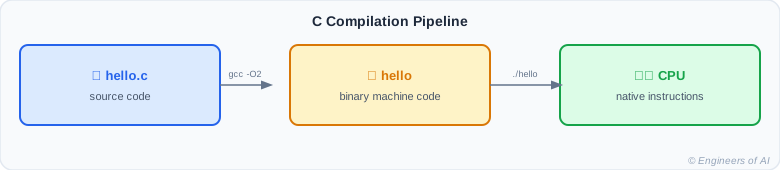
The output binary contains actual CPU instructions - opcodes that the processor understands natively. No translation happens at runtime. The compiler has already done all the work.
What this gives you:
- Maximum execution speed - code runs at CPU speed
- Aggressive compiler optimization (inlining, dead code elimination, vectorization)
- Platform-specific binary (must recompile for each target architecture)
What you give up:
- Compilation time (can be minutes for large projects)
- Type errors discovered at compile time only (good for safety, harder for rapid iteration)
- Tighter memory management responsibility
// C: type is known at compile time
int x = 10;      // 4 bytes, exactly
int y = x + 5;   // CPU does this in one instruction
The C compiler knows at compile time that x is a 32-bit integer. It generates a single assembly instruction for the addition. No type checking at runtime. No overhead.
Part 2 - What Python Actually Does
When you run python app.py, Python performs two distinct phases:
Phase 1: Compilation to Bytecode
Python reads your source file, parses it, checks for syntax errors, and compiles it to bytecode - a compact, lower-level representation that is not machine code, but is easier and faster for Python's virtual machine to execute than raw Python source.
Phase 2: Bytecode Execution in the PVM
The Python Virtual Machine (PVM) reads the bytecode instructions one by one and executes them. This is the "interpretation" step.
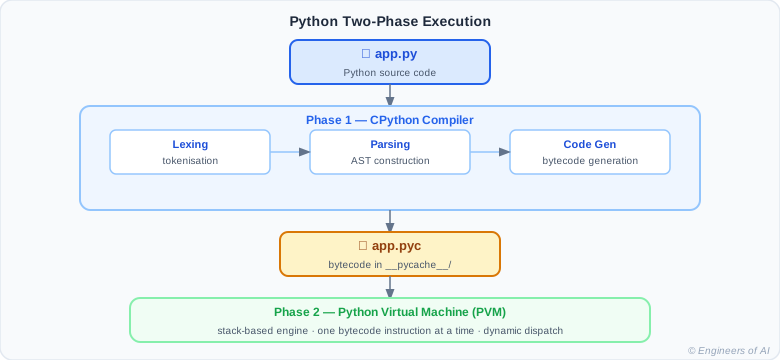
:::note The Key Insight Python does compile. It compiles to bytecode, not machine code. The bytecode is then interpreted by the PVM. This is a hybrid model - not purely compiled, not purely interpreted. :::
Watch: Python's Execution Model Explained
Part 3 - What Is Bytecode?
Bytecode is a compact, intermediate representation of your Python program. It is:
- Lower-level than Python source - closer to machine instructions
- Higher-level than machine code - still needs a virtual machine to run
- Platform-independent - the same
.pycfile runs on any OS that has a compatible Python version - Not human-readable directly, but inspectable with Python's
dismodule
You can inspect bytecode yourself:
import dis

def add_numbers(a, b):
    result = a + b
    return result

dis.dis(add_numbers)
Output:
  2           0 RESUME                   0

  3           2 LOAD_FAST                0 (a)
              4 LOAD_FAST                1 (b)
              6 BINARY_OP               0 (+)
             10 STORE_FAST               2 (result)

  4          12 LOAD_FAST                2 (result)
             14 RETURN_VALUE
Each line is one bytecode instruction. Reading from top to bottom:
LOAD_FAST 0 (a)- Push the value of local variableaonto the stackLOAD_FAST 1 (b)- Push the value of local variablebonto the stackBINARY_OP 0 (+)- Pop top two values, add them, push resultSTORE_FAST 2 (result)- Pop the stack top and store it asresultLOAD_FAST 2 (result)- Pushresultonto the stackRETURN_VALUE- Return the stack top to the caller
This is a stack-based virtual machine. All operations happen by pushing and popping values on an internal stack.
:::tip Inspecting Bytecode in Practice
The dis module is genuinely useful for performance debugging. When two Python implementations produce different bytecode, the one with fewer instructions is generally faster.
:::
Let's look at something more interesting:
import dis

def conditional_example(x):
    if x > 0:
        return "positive"
    else:
        return "non-positive"

dis.dis(conditional_example)
Output:
  2           0 RESUME                   0

  3           2 LOAD_FAST                0 (x)
              4 LOAD_CONST               1 (0)
              6 COMPARE_OP               4 (>)
             12 POP_JUMP_IF_FALSE       10 (to 34)

  4          14 LOAD_CONST               2 ('positive')
             16 RETURN_VALUE

  6     >>   18 LOAD_CONST               3 ('non-positive')
             20 RETURN_VALUE
You can see the COMPARE_OP (the > comparison) and the POP_JUMP_IF_FALSE (the if branch). The bytecode makes the control flow explicit.
Part 4 - The Python Virtual Machine (PVM)
The PVM is the runtime engine that executes bytecode. In CPython (the reference implementation), the PVM is implemented in C in a file called ceval.c - a massive C function that is essentially a loop running through bytecode instructions.

Key components:
- Value stack - Where intermediate computation results live. Every expression evaluation pushes and pops this stack.
- Frame stack - Every function call creates a new frame. Frames contain local variables, the value stack, and a reference to the code object (bytecode).
- Global Interpreter Lock (GIL) - Ensures only one thread executes Python bytecode at a time. This is why CPython threads cannot truly parallelize CPU-bound work.
Part 5 - The __pycache__ Directory and .pyc Files
When Python compiles your source file, it caches the bytecode:
myproject/
├── app.py
├── utils.py
└── __pycache__/
    ├── app.cpython-312.pyc
    └── utils.cpython-312.pyc
The .pyc files contain:
- A magic number (identifies the Python version)
- A timestamp or hash of the source file
- The compiled bytecode
Next time you run app.py, Python checks if the .pyc is fresh (source file unchanged, same Python version). If yes, it skips compilation and goes straight to execution. This is a performance optimization - parsing and compiling Python source takes time.
# You can force Python to compile without running:
import py_compile
py_compile.compile("app.py")

# Or compile to optimize (strips docstrings):
# python -O app.py  (creates .opt-1.pyc)
# python -OO app.py (creates .opt-2.pyc, also strips assert statements)
:::warning Bytecode is Not Security
Distributing .pyc files does not protect your source code. Bytecode is trivially decompiled back to Python-like source. If you need to protect code, .pyc is not the answer.
:::
Watch: Python Compilation and Bytecode Deep Dive
Part 6 - Why Python is Slower Than C (And By How Much)
Consider adding two numbers:
# Python
x = 10
y = 20
result = x + y
Here is what the PVM actually does for x + y:
- Look up
xin the local namespace dictionary - hash lookup - Look up
yin the local namespace dictionary - hash lookup - Check the type of
x- what istype(x)? - Check the type of
y- what istype(y)? - Look up the
__add__method on the type ofx - Call
__add__(x, y)through the method dispatch mechanism - The actual integer addition happens inside
int.__add__ - A new integer object is allocated on the heap
- The reference count is set, type pointer is set
- The result is returned and pushed onto the stack
Compare with C:
int x = 10;
int y = 20;
int result = x + y;
The C compiler generates approximately:
mov eax, 10
add eax, 20
mov [result], eax
Three CPU instructions. Python takes hundreds.
This is not a Python bug. It is the price of dynamic typing, garbage collection, and the object model. Python trades raw arithmetic speed for:
- Variables that can hold any type at any time
- Automatic memory management
- Runtime introspection and modification of running code
- Clean, readable syntax
# You can measure this yourself
import timeit

# Python loop: O(n) additions in Python objects
python_time = timeit.timeit(
    "total = sum(range(1_000_000))",
    number=10
)

print(f"Python: {python_time:.3f}s")
# NumPy: same operation in C
import numpy as np
import timeit

numpy_time = timeit.timeit(
    "np.arange(1_000_000).sum()",
    setup="import numpy as np",
    number=10
)

print(f"NumPy: {numpy_time:.3f}s")
NumPy will be 10-100x faster because it bypasses the Python object model for the actual computation.
Part 7 - Dynamic Typing and Runtime Dispatch
Python determines types at runtime. This is the core cost.
def add(a, b):
    return a + b

add(1, 2)         # Works: int + int
add("hello", "!") # Works: str + str
add([1, 2], [3])  # Works: list + list
add(1, "hello")   # TypeError at RUNTIME
The same function works with completely different types. The PVM resolves + by looking up __add__ on whatever type a happens to be at runtime.
In C, this function would need to be compiled separately for each type (or use templates/generics). In Python, one function handles all types dynamically - at the cost of runtime type lookup on every call.
This dynamic dispatch is visible in the bytecode - BINARY_OP does not know at compile time what types it will be adding. It finds out at runtime on every call.
Part 8 - JIT Compilation: The PyPy Alternative
CPython does not use JIT compilation. PyPy does.
Just-In-Time (JIT) compilation means: instead of interpreting bytecode repeatedly, a JIT compiler watches which bytecode is executed frequently ("hot paths") and compiles those paths to native machine code at runtime.
CPython (no JIT):
Bytecode → PVM interprets → [repeat for every execution]

PyPy (with JIT):
Bytecode → PVM interprets → [detects hot path]
                           → JIT compiles hot path to machine code
                           → [subsequent calls run machine code directly]
For computation-heavy loops (like number crunching, text processing, simulations), PyPy can be 5-50x faster than CPython.
# This kind of code benefits enormously from PyPy's JIT
def compute_heavy(n):
    total = 0
    for i in range(n):
        total += i * i
    return total

# In CPython: every iteration goes through PVM
# In PyPy: after warmup, JIT compiles the loop to native machine code
result = compute_heavy(10_000_000)
Why doesn't CPython use JIT?
- Complexity: JIT compilers are extremely complex
- Memory overhead: JIT-compiled code takes memory
- Warmup time: JIT needs time to identify and compile hot paths
- The CPython team prioritizes stability and correctness
Python 3.13+ introduced an experimental JIT optimizer. The landscape is changing.
Part 9 - CPython vs Other Python Implementations
"Python" the language and "CPython" the implementation are different things.
| Implementation | Description | Best for |
|---|---|---|
| CPython | Reference implementation in C | Standard Python, ecosystem compatibility |
| PyPy | JIT-compiled Python in RPython | CPU-bound pure Python code |
| Jython | Python on the JVM | Java ecosystem integration |
| IronPython | Python on .NET CLR | .NET ecosystem integration |
| MicroPython | Python for microcontrollers | Embedded systems, IoT |
| GraalPy | Python on GraalVM | Polyglot systems |
When someone says "Python," they almost always mean CPython. The behaviors discussed on this page - bytecode, PVM, GIL, .pyc files - are CPython specifics. Other implementations may handle them differently.
AI/ML Real-World Connection
The execution model directly impacts machine learning performance.
Why NumPy is fast:
import numpy as np

# Python loop: every iteration goes through PVM
def python_dot_product(a, b):
    total = 0
    for x, y in zip(a, b):
        total += x * y
    return total

# NumPy: computation runs entirely in C, no PVM per element
def numpy_dot_product(a, b):
    return np.dot(a, b)

# For 1,000,000-element arrays, NumPy is ~200x faster
NumPy arrays store data as contiguous C arrays (not Python objects). Operations like np.dot() call into C/Fortran routines that run without the PVM. Python is only involved in the function call - not in the actual computation.
PyTorch's approach:
import torch

# Tensor operations are compiled C++/CUDA - not Python bytecode
x = torch.randn(1000, 1000)
y = torch.randn(1000, 1000)
result = torch.matmul(x, y)  # Runs in C++/CUDA, not PVM
PyTorch's Python API is a thin wrapper around a C++ computation engine. The Python execution model is bypassed for actual tensor math. Python acts as the "glue language" that orchestrates C++ operations.
This is the architectural pattern that makes Python viable for high-performance ML: write the orchestration in Python (clean, expressive), run the computation in C/C++/CUDA (fast).
:::info Python as Orchestration Language The most important thing the execution model teaches you: Python is often the coordinator of performance, not the performer. Understanding bytecode helps you identify where Python is doing work vs where C is doing work. :::
Common Mistakes and Misconceptions
Mistake 1: Thinking Python compiles nothing
# Misconception: "Python reads line by line"
# Reality: Python compiles the entire function before executing it

def broken():
    x = 1
    return x
    y = undefined_variable  # SyntaxError? No - NameError at runtime...
                            # actually this is unreachable code with no error
Python's compilation step catches syntax errors before execution. But semantic errors (like undefined variable names) are caught at runtime. The compilation step is real - it just produces bytecode, not machine code.
Mistake 2: Assuming .pyc files provide security or optimization
# .pyc files are NOT:
# - Obfuscated source (trivially decompilable)
# - Machine code (still interpreted by PVM)
# - Significant optimization (same bytecode runs)

# They ARE:
# - Cached compilation (saves parse time on re-runs)
# - Version-stamped (invalid across Python versions)
Mistake 3: Thinking the GIL makes Python single-core forever
import threading
import numpy as np

# This parallelizes correctly - NumPy releases the GIL
def compute_in_thread():
    data = np.random.randn(1_000_000)
    return np.sum(data ** 2)

# NumPy operations run in C and release the GIL
# Multiple threads can run NumPy simultaneously
threads = [threading.Thread(target=compute_in_thread) for _ in range(4)]
for t in threads:
    t.start()
for t in threads:
    t.join()
The GIL prevents multiple Python threads from executing Python bytecode simultaneously. But C extensions like NumPy can release the GIL during computation, enabling true parallelism.
Interview Questions
Q1: Is Python compiled or interpreted?
Answer: Python is neither purely compiled nor purely interpreted - it uses a hybrid model. When you run a Python file, CPython first compiles the source code to bytecode (.pyc files in __pycache__). This bytecode is then executed by the Python Virtual Machine (PVM), which is an interpreter. So Python compiles to bytecode, then interprets that bytecode. The common claim that "Python is interpreted" is an oversimplification.
Q2: What is bytecode and why does Python use it?
Answer: Bytecode is a compact, platform-independent intermediate representation between Python source code and machine code. It is lower-level than Python source (easier/faster to execute) but higher-level than native machine code (requires the PVM to run). Python uses bytecode because it allows the compilation step to catch syntax errors early, enables caching (.pyc files avoid recompiling unchanged files), and maintains portability across operating systems without recompiling.
Q3: What is the GIL and why does it exist?
Answer: The Global Interpreter Lock (GIL) is a mutex in CPython that ensures only one thread executes Python bytecode at a time. It exists because CPython's memory management (particularly reference counting) is not thread-safe, and the GIL was the simplest solution to prevent race conditions. Consequence: CPU-bound Python threads cannot truly parallelize. Workaround: use multiprocessing (separate processes, no shared GIL) or C extensions that release the GIL (like NumPy). Python 3.13 introduced an experimental no-GIL mode.
Q4: Why is CPython slower than PyPy for computation-heavy code?
Answer: CPython interprets bytecode on every execution - there is no optimization based on runtime behavior. PyPy includes a JIT (Just-In-Time) compiler that identifies frequently-executed code paths ("hot paths") and compiles them to native machine code at runtime. After warmup, hot paths in PyPy execute as native machine code rather than being interpreted, giving 5-50x speedups for CPU-bound pure Python.
Q5: What is a stack-based virtual machine?
Answer: In a stack-based VM like Python's PVM, all operations work by pushing values onto an internal value stack and popping them off. For example, a + b is implemented as: push a, push b, execute BINARY_OP (pops two values, adds them, pushes result). This contrasts with register-based VMs (like Lua's or Dalvik's) where values are stored in named "registers" rather than a stack. Stack-based VMs are simpler to implement; register-based VMs can be faster because they require fewer stack manipulation instructions.
Q6: How does dis.dis() help with performance optimization?
Answer: dis.dis() shows the bytecode generated for a Python function, revealing exactly what the PVM will execute. You can compare two implementations and pick the one with fewer or cheaper bytecode instructions. For example, comparing a list comprehension vs a for loop using dis reveals that comprehensions have a dedicated LIST_APPEND bytecode instruction that is more efficient than the loop equivalent. Real-world use: identifying unnecessary attribute lookups (slow), unnecessary dict creations, or redundant function calls in hot paths.
Quick Reference Cheatsheet
| Concept | What it is | Key Tool |
|---|---|---|
| Source code | Human-readable .py file | Text editor |
| Bytecode | Compiled intermediate form | dis.dis(), __pycache__/ |
| PVM | The bytecode interpreter | python command |
| CPython | Reference Python implementation | python --version |
| PyPy | JIT-compiled Python | pypy command |
| GIL | Per-process thread lock | threading docs |
.pyc | Cached bytecode file | __pycache__/ directory |
__pycache__ | Directory of cached bytecode | Auto-created by Python |
| Stack-based | PVM uses push/pop for operations | dis module output |
| JIT | Runtime compilation of hot paths | PyPy-specific |
Graded Practice Challenges
Level 1 - Predict the Output
What does this print?
import dis

def mystery(x):
    return x * 2

dis.dis(mystery)
Show Answer
The output will show bytecode instructions for the function body. Something like:
  2           0 RESUME                   0

  3           2 LOAD_FAST                0 (x)
              4 LOAD_CONST               1 (2)
              6 BINARY_OP               5 (*)
             10 RETURN_VALUE
The exact format depends on Python version. Key instructions: LOAD_FAST loads x (local variable), LOAD_CONST loads the literal 2, BINARY_OP with multiplication, RETURN_VALUE returns the result.
Level 1 - True or False
True or false: .pyc files make Python code faster because the CPU can execute bytecode directly.
Show Answer
False.
.pyc files save compilation time (parsing source to bytecode) on repeated runs. The CPU cannot execute bytecode directly - bytecode still requires the PVM to interpret it. .pyc files do not change how fast your code runs, only how fast Python starts executing it.
Level 2 - Debug the Misconception
A colleague says: "I'm going to distribute only the .pyc files of my app to protect my source code from theft."
What is wrong with this plan?
Show Answer
Two problems:
-
Bytecode is trivially decompilable. Tools like
uncompyle6anddecompile3can reconstruct Python source code from.pycfiles with high accuracy. Distributing.pycfiles provides essentially zero source code protection. -
Bytecode is version-dependent.
.pycfiles compiled for Python 3.11 will not run on Python 3.12 - the magic number in the file header encodes the Python version. Users would need the exact same Python version you used to compile.
Better approaches for code protection: encryption + runtime decryption (complex), Cython (compiles to C), licensing agreements, or designing your system so the most valuable logic runs server-side.
Level 3 - Design Challenge
You are building a Python service that needs to process 10 million integers per second (a real-time data processing pipeline). You benchmark pure Python and it achieves 500,000 integers per second - 20x too slow.
Without changing the algorithm, explain three different approaches to close that performance gap, and for each approach, explain which part of the execution model you are exploiting.
Show Answer
Approach 1: Use NumPy for vectorized operations
import numpy as np

# Instead of:
total = sum(x * x for x in data)  # PVM executes per element

# Use:
arr = np.array(data)
total = np.sum(arr ** 2)           # C executes per element, GIL released
Exploitation: NumPy's C implementation bypasses the PVM for the actual computation. Python only orchestrates the function call. The GIL is released during NumPy's C execution, allowing the computation to use CPU caches efficiently.
Approach 2: Use Cython or Numba for JIT/AOT compilation
# Numba JIT
from numba import njit

@njit
def process(data):
    total = 0
    for x in data:
        total += x * x
    return total

# First call: JIT compiles to machine code
# Subsequent calls: runs at C speed
Exploitation: Numba's JIT compiler compiles the Python function to native machine code (similar to PyPy's JIT, but applied selectively). The PVM is completely bypassed for the decorated function.
Approach 3: Use multiprocessing to parallelize
from multiprocessing import Pool
import numpy as np

def process_chunk(chunk):
    arr = np.array(chunk)
    return np.sum(arr ** 2)

with Pool(processes=8) as pool:  # 8 CPU cores
    chunks = [data[i::8] for i in range(8)]
    results = pool.map(process_chunk, chunks)
    total = sum(results)
Exploitation: Each process has its own Python interpreter and GIL. With 8 cores, you can theoretically process 8x as many integers per second. Combined with NumPy in each process, this compounds the gains.
The key insight: you are not fighting the PVM - you are bypassing it for computation while using Python only for coordination.
Key Takeaways
- Python uses a hybrid model: compile to bytecode, then interpret bytecode in the PVM
- "Python is interpreted" is a simplification - it also compiles (to bytecode, not machine code)
- Bytecode is platform-independent but requires the PVM to execute
- CPython is the reference implementation; PyPy, Jython, and others use different execution strategies
- The GIL limits CPU parallelism in threads but does not affect multiprocessing or C extension parallelism
- Python's speed limitations come from dynamic typing (runtime type resolution), object overhead (everything is an object), and per-instruction PVM overhead
- NumPy, PyTorch, and pandas are fast because they run their computations in C/C++/CUDA, bypassing the PVM
- PyPy's JIT compiles hot paths to native machine code at runtime - 5-50x faster for CPU-bound pure Python
- Understanding the execution model is how you know where to optimize and why a particular approach is faster