
Flowcharts - Seeing Logic Before Writing It
A junior developer spent 3 days debugging a race condition in a concurrent payment system. The logs were confusing. The code looked correct. The unit tests passed.
A senior engineer asked for the flowchart.
The junior had drawn one - a rough sketch on paper before starting implementation. The senior looked at it for 15 minutes. Then pointed to a branch: "Here. This path returns 'success' before the database write completes. If the network is slow, the confirmation goes out before the transaction is recorded."
The code looked correct because it was syntactically valid. The flowchart showed the flaw because it made the control flow visible in a way that scrolling through code never can.
Flowcharts are not for beginners who do not know how to code. They are for engineers who know that code hides things that diagrams reveal.
What You Will Learn
- The standard flowchart symbols and exactly what each represents
- The three fundamental patterns all programs follow: Sequence, Selection, Iteration
- How to draw a complete authentication system as an ASCII flowchart
- How to model loops and break conditions visually
- A complete payment processing flowchart with all failure paths
- How to flowchart a machine learning training loop
- When to use flowcharts versus pseudocode
- How to write flowcharts as Mermaid diagrams in documentation
Prerequisites
- You have read the Pseudocode lesson (or understand that algorithms have inputs, decisions, and loops)
- You have written basic Python conditionals and loops
- You understand that real systems have multiple failure modes
Mental Model: What a Flowchart Reveals

The flowchart and the code express the same logic. The flowchart makes every branch visible simultaneously. The code requires you to hold all branches in your head as you scroll.
Part 1 - Flowchart Symbols and What They Mean
There are five symbols that cover 95% of all flowcharts you will ever draw.
Oval - Start and End (Terminator)

Every flowchart has exactly one Start. It may have multiple End nodes (one for each termination path: success, error, timeout, etc.). An algorithm with no End node on paper is an algorithm that might never terminate - a critical design flaw you want to catch before coding.
Rectangle - Process (Action)
Any operation that does something: assignment, calculation, function call, write to database, send a message. The most common shape in a flowchart.
Diamond - Decision (Conditional)
A decision node always has exactly two exits, labeled YES/NO or TRUE/FALSE or the specific condition branches. If you find yourself drawing a diamond with three exits without labels, stop - you have an ambiguous condition that will become an ambiguous if statement.
Parallelogram - Input/Output
Any interaction with the outside world: reading from keyboard, displaying to screen, reading from a file, writing to a database, sending an HTTP response.
Arrow - Flow direction
Arrows show which node executes after which. Flow generally goes top to bottom and left to right. Arrows that point upward indicate a loop.
You only need these five symbols to model any algorithm. Resist the urge to invent new shapes. Unfamiliar symbols in a flowchart defeat the purpose of visual communication.
Part 2 - The Three Patterns All Programs Follow
Every program, regardless of complexity, is built from exactly three control patterns.
Pattern 1: SEQUENCE - Top to bottom, no branches

Python:
# Sequence: each line runs once, in order
number = int(input("Enter a number: "))
result = number * number
print(f"The square is: {result}")

# Output (if user enters 7):
# The square is: 49
Pattern 2: SELECTION - Decision with branches

Python:
number = int(input("Enter a number: "))

if number % 2 == 0:
    print("Even")
else:
    print("Odd")

# Output (if user enters 4): Even
# Output (if user enters 7): Odd
Pattern 3: ITERATION - Flow that loops back up

Python:
i = 1

while i <= 5:
    print(i)
    i += 1

# Output:
# 1
# 2
# 3
# 4
# 5
These three patterns combine to form every algorithm that has ever been written. A nested loop is ITERATION inside ITERATION. An if-statement inside a loop is SELECTION inside ITERATION. Understanding the three primitives means you can decompose any algorithm into familiar pieces.
Part 3 - Complete Example: Authentication Flow
A login system has three distinct failure conditions and one success path. Drawing this as a flowchart makes all four outcomes simultaneously visible.

What the flowchart reveals:
- There are three distinct failure paths, each with a different message
- The happy path (success) is the rightmost vertical path through all YES branches
- Each failure terminates immediately - there is no possibility of reaching "Generate token" through an error branch
- The order of checks matters: user must exist before we can check their password; password must be correct before we check account status
Python translation - the flowchart maps directly:
def login(username, password, user_database):
    # Failure path 1: user not found
    if username not in user_database:
        return {"status": "error", "message": "User not found"}

    user = user_database[username]

    # Failure path 2: wrong password
    if not check_password_hash(password, user["password_hash"]):
        return {"status": "error", "message": "Wrong password"}

    # Failure path 3: account inactive
    if user["account_status"] != "active":
        return {"status": "error", "message": "Account inactive"}

    # Happy path: all checks passed
    token = generate_session_token(username)
    return {"status": "success", "token": token}

def check_password_hash(password, stored_hash):
    # Simplified - in production use bcrypt or argon2
    import hashlib
    return hashlib.sha256(password.encode()).hexdigest() == stored_hash

def generate_session_token(username):
    import secrets
    return secrets.token_hex(32)

# Output examples:
# login("unknown", "pass", {})              → {"status": "error", "message": "User not found"}
# login("alice", "wrongpass", db)           → {"status": "error", "message": "Wrong password"}
# login("alice", "correct", db)            → {"status": "success", "token": "a3f9..."}
Without the flowchart, a developer might write the password check before the user-existence check - causing a KeyError because user_database[username] fails when the user does not exist. The flowchart enforces the correct order visually.
Part 4 - Modeling Loops in Flowcharts
Loops are the most visually distinctive flowchart pattern: an arrow that points upward, back to a condition that was already evaluated.
FOR loop over a list:

Python:
items = ["apple", "banana", "cherry"]
i = 0

while i < len(items):
    print(f"Processing: {items[i]}")
    i += 1

# Output:
# Processing: apple
# Processing: banana
# Processing: cherry
How break appears in a flowchart - early exit from a loop:

Python:
def find_first(items, target):
    for i, item in enumerate(items):
        if item == target:
            return i  # break equivalent: exits loop immediately
    return -1  # loop completed without finding target

# Output:
print(find_first(["apple", "banana", "cherry"], "banana"))  # 1
print(find_first(["apple", "banana", "cherry"], "grape"))   # -1
The break in a flowchart appears as a YES branch from a decision diamond that bypasses the loop-back arrow and exits directly to an END node. This is visually distinct from the loop continuing - an engineer reviewing the flowchart can immediately see that two different end conditions exist.
Part 5 - Real Engineering Example: Payment Processing
A payment system has one happy path and five distinct failure modes. Every failure must be handled. Every failure results in a different user experience and a different database state.

What the flowchart reveals that code alone hides:
- Card validation must happen BEFORE charging (obvious in diagram, surprisingly skipped in code)
- If the database write fails AFTER the card has been charged, the charge must be reversed - a compensating transaction. This path is visually obvious in the flowchart; engineers who do not draw this diagram often ship systems that charge cards without recording orders.
- The happy path is a clean vertical line. All errors branch off horizontally. This visual pattern is the goal.
Python translation with try/except mirroring the error branches:
def process_payment(card_number, amount, expiry_date, card_balance):
    # Failure 1: invalid card format
    if not is_valid_card_format(card_number):
        return {"status": "error", "message": "Invalid card format"}

    # Failure 2: card expired
    if is_card_expired(expiry_date):
        return {"status": "error", "message": "Card expired"}

    # Failure 3: insufficient funds
    if card_balance < amount:
        return {"status": "error", "message": "Insufficient funds"}

    # Attempt to charge card
    try:
        charge_id = charge_card_via_gateway(card_number, amount)
    except GatewayError:
        return {"status": "error", "message": "Gateway error, please retry"}

    # Attempt to write to database - must reverse charge if this fails
    try:
        order_id = write_order_to_database(charge_id, amount)
    except DatabaseError:
        reverse_charge(charge_id)  # Compensating transaction
        return {"status": "error", "message": "System error, charge reversed"}

    # Send confirmation (non-critical - don't fail payment if email fails)
    try:
        send_confirmation_email(order_id)
    except EmailError:
        pass  # Log but don't fail the payment

    return {"status": "success", "order_id": order_id}

# Output examples:
# process_payment("invalid", 50, ...) → {"status": "error", "message": "Invalid card format"}
# process_payment("4111...", 500, ..., balance=100) → {"status": "error", "message": "Insufficient funds"}
# process_payment("4111...", 50, ..., balance=200)  → {"status": "success", "order_id": "ord_..."}
The database write failure path - where a card has been charged but the order was not recorded - is the most expensive bug in e-commerce engineering. It takes exactly 5 seconds to see this path on a flowchart. It can take months and many refund requests to discover it in production code.
Part 6 - ML Training Loop as Flowchart
Machine learning training loops have nested iteration structures, conditional branching for early stopping, and multiple state variables that must be tracked. Flowcharting this before implementation reveals the structure clearly.
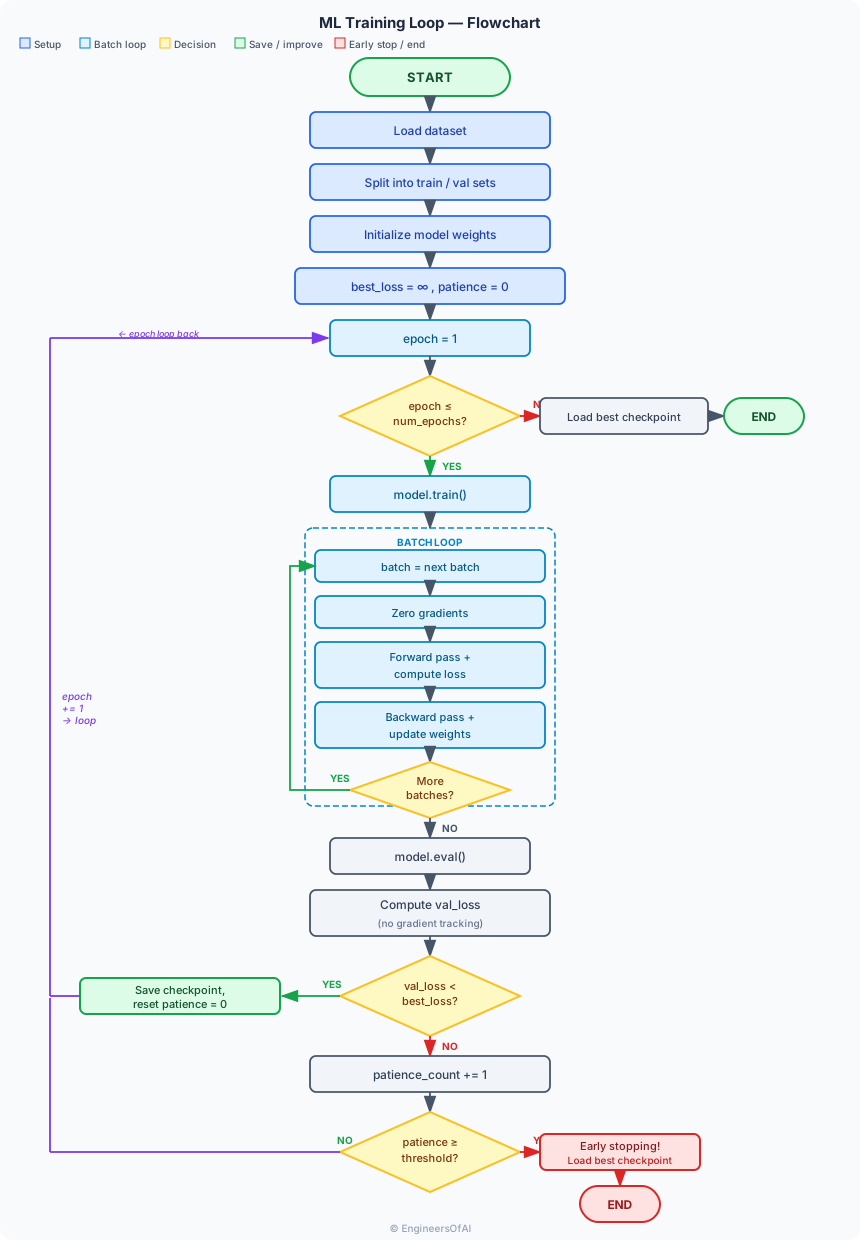
Python - the flowchart maps directly to the implementation structure:
def train_model(model, train_loader, val_loader, num_epochs=50, patience=5):
    import torch
    optimizer = torch.optim.Adam(model.parameters(), lr=0.001)
    criterion = torch.nn.CrossEntropyLoss()

    best_val_loss = float("inf")
    patience_count = 0
    best_model_state = None

    for epoch in range(1, num_epochs + 1):
        # Training phase
        model.train()
        for batch_inputs, batch_labels in train_loader:
            optimizer.zero_grad()           # Clear gradients (not at epoch level!)
            predictions = model(batch_inputs)
            loss = criterion(predictions, batch_labels)
            loss.backward()
            optimizer.step()

        # Validation phase
        model.eval()
        val_loss = 0.0
        with torch.no_grad():               # No gradient tracking during eval
            for batch_inputs, batch_labels in val_loader:
                predictions = model(batch_inputs)
                val_loss += criterion(predictions, batch_labels).item()

        val_loss /= len(val_loader)

        if val_loss < best_val_loss:
            best_val_loss = val_loss
            best_model_state = model.state_dict().copy()
            patience_count = 0
        else:
            patience_count += 1
            if patience_count >= patience:
                print(f"Early stopping at epoch {epoch}")
                break

    model.load_state_dict(best_model_state)
    return model

# The flowchart made visible 4 critical implementation details:
# 1. optimizer.zero_grad() inside the batch loop, not the epoch loop
# 2. model.train() / model.eval() mode switching
# 3. torch.no_grad() context during validation
# 4. patience_count resets to 0 on improvement (not just checked)
Part 7 - Flowchart vs Pseudocode: When to Use Which
Both tools design logic before implementation. They serve different situations.
| Dimension | Flowchart | Pseudocode |
|---|---|---|
| Format | Visual, spatial | Textual, sequential |
| Best for | Branching logic, parallel paths | Sequential algorithms, recursion |
| Audience | Non-technical stakeholders, onboarding | Engineers implementing the code |
| Version control | Hard (images, ASCII art) | Easy (plain text, diffs cleanly) |
| Speed to create | Slower (spatial layout) | Faster (typing) |
| Complex loops | Can become cluttered | Cleaner with indentation |
| Decision trees | Excellent - paths visible at a glance | Gets verbose with many branches |
| Interview communication | Good for showing system design | Good for algorithm design |
Rule of thumb:
- Use flowcharts for system-level design and communication with non-engineers or team leads who need to see all paths simultaneously
- Use pseudocode for algorithm-level design immediately before implementation
- Use both for complex systems: flowchart the system, pseudocode the algorithm inside each box
Part 8 - Drawing Flowcharts in Text (Mermaid)
For documentation that lives in a repository, ASCII art flowcharts become unmaintainable. Mermaid syntax produces rendered diagrams from text that version-controls cleanly.
Docusaurus supports Mermaid natively when the @docusaurus/theme-mermaid plugin is configured. The above text renders as a proper flowchart diagram with boxes, diamonds, and arrows. This gives you the visual clarity of a flowchart with the version-control benefits of text.
Mermaid quick reference:
| Symbol | Mermaid syntax | Represents |
|---|---|---|
| Oval (Start/End) | A([text]) | Terminator |
| Rectangle (Process) | A[text] | Action/Process |
| Diamond (Decision) | A{text} | Condition |
| Parallelogram (I/O) | A[/text/] | Input/Output |
| Arrow with label | `A --> | label |
| Arrow no label | A --> B | Sequential flow |
AI/ML Real-World Connection
Data preprocessing is one of the most flowchart-worthy operations in machine learning. The pipeline has multiple conditional branches - what happens when data is malformed? What happens when a feature column is entirely missing? - and these questions are almost always missed without a visual design step.

The "what if" questions the flowchart forces you to answer:
- What if a required column is entirely missing? →
SchemaError - What if a numeric column has >50% nulls? → Drop column (don't silently fill with noise)
- What if the test set has categories not seen in training? → Handle with "unknown" token, not a
ValueErrorat prediction time - Should the scaler be fit on training data only? → Yes, explicitly shown in the diagram - fitting on all data leaks test information into the model
Every one of these is a real data leakage or silent failure bug. Flowcharting the preprocessing pipeline reveals them in 15 minutes.
Common Mistakes
Mistake 1 - Flowchart with no END node

An algorithm that has no End on paper is an algorithm whose termination has not been thought through. In code, this becomes a function that sometimes returns a value and sometimes returns None implicitly - one of Python's most confusing bugs.
Fix: Every possible path through your flowchart must reach an End node. Draw End nodes for error paths, success paths, early exits, and loop completions.
Mistake 2 - Decision diamond with unlabeled exits
A diamond with more than two unlabeled exits creates ambiguity. An engineer implementing from an unlabeled three-way diamond must guess what each path means. Label every exit with its exact condition.
Mistake 3 - Drawing code-level flowchart instead of logic-level
A flowchart that mirrors every line of code provides no design benefit. The purpose is to see the shape of the algorithm - which paths exist, where decisions are made, where the algorithm can terminate. Code-level details belong in the code, not the flowchart.
Interview Questions
Q1. What is a flowchart and when should you draw one before writing code?
Answer: A flowchart is a visual representation of an algorithm using standardized symbols - ovals for start/end, rectangles for processes, diamonds for decisions, parallelograms for input/output - connected by arrows that show the direction of flow. You should draw a flowchart before writing code when the algorithm has multiple decision branches (to see all paths simultaneously), when different team members or non-technical stakeholders need to review the logic, when the system has multiple failure modes each requiring different handling, or when you are designing concurrent systems where race conditions can hide in branches that look correct in code but are visible in diagrams.
Q2. What are the four main flowchart symbols?
Answer: Oval (terminator) - marks the start and end of the algorithm; every path must eventually reach an End. Rectangle (process) - represents any action: assignment, calculation, function call, database write. Diamond (decision) - represents a conditional check with exactly two labeled exits (YES/NO). Parallelogram (input/output) - represents interaction with the outside world: reading user input, printing output, reading from a file. Arrows connect the shapes and show the direction of execution.
Q3. What is the difference between a flowchart and pseudocode?
Answer: A flowchart is visual and spatial - it shows all paths through an algorithm simultaneously, making branches and decision points immediately visible. Pseudocode is textual and sequential - it reads top to bottom like code, making it easier to express complex nested logic and closer to the eventual implementation. Flowcharts communicate better to non-technical audiences and reveal branching problems quickly. Pseudocode version-controls cleanly (plain text), is faster to write for algorithms with deep nesting, and translates more directly into code. In practice: use flowcharts for system-level design and communication; use pseudocode for algorithm-level design immediately before implementation.
Q4. How does a flowchart represent a loop?
Answer: A loop in a flowchart is represented by an arrow that points upward (or backward) to a condition diamond that was already encountered in the flow. The condition diamond has two exits: one that continues into the loop body (the YES branch), and one that exits the loop to the next step (the NO branch). The loop body always ends with an arrow that loops back to the condition. A break statement appears as a YES branch from a decision diamond inside the loop body that bypasses the loop-back arrow and exits directly to the next step after the loop.
Q5. What production bugs are revealed by flowcharts that code review typically misses?
Answer: Three categories stand out. First, missing compensating transactions: if a system charges a card and then fails to write the order to the database, a flowchart makes the "charge succeeded but write failed" path visible - requiring a reversal transaction on that path. This path is invisible in code because it requires following a try/except branch that rarely fires in development. Second, incorrect operation ordering: a flowchart makes it immediately visible if a balance check happens after a deduction, or if a user-existence check happens after a password check. In code, lines can be reordered by accident. Third, missing termination: a flowchart with no End node on a particular path reveals that the algorithm has an implicit None return - which becomes a silent failure in production.
Quick Reference Cheatsheet
| Symbol | Shape | Mermaid | Meaning |
|---|---|---|---|
| Terminator | Oval | ([text]) | Start or End of algorithm |
| Process | Rectangle | [text] | Action, calculation, assignment |
| Decision | Diamond | {text} | Condition with YES/NO exits |
| Input/Output | Parallelogram | [/text/] | Read input or display output |
| Arrow (sequential) | → | A --> B | Unconditional flow |
| Arrow (conditional) | → label → | `A --> | label |
| Pattern | Description | Loop-back arrow? |
|---|---|---|
| Sequence | Linear top-to-bottom | No |
| Selection | Diamond with two branches | No |
| Iteration | Loop body with back-arrow to condition | Yes |
Graded Practice Challenges
Level 1 - Draw an ASCII Flowchart
Problem: Draw an ASCII flowchart for "find the maximum number in a list". The flowchart must show:
- A Start node
- Initialization of variables
- The loop structure
- The comparison decision
- An End node
Show Answer

Python translation:
def find_max(numbers):
    if not numbers:
        raise ValueError("Cannot find max of empty list")

    max_value = numbers[0]
    i = 1

    while i < len(numbers):
        if numbers[i] > max_value:
            max_value = numbers[i]
        i += 1

    return max_value

# Output:
print(find_max([3, 1, 4, 1, 5, 9, 2, 6]))  # 9
print(find_max([-5, -3, -1, -4]))           # -1
Key elements the flowchart enforces:
- The empty list guard clause must come before
list[0]access max_valueinitializes to the first element, not zero (works for negative numbers)- The loop starts at index 1, not 0 (element 0 is already in
max_value)
Level 2 - Find the Logic Bug
Problem: This flowchart description has a logic bug. Find it and explain the correct fix.

Show Answer
The Bug: The balance deduction happens BEFORE the sufficiency check. If the user has insufficient funds, the money has already been removed from their balance before the error is returned. The system then returns an error but the balance is permanently reduced - the user lost money without a successful transaction.
Correct flowchart:
Python demonstration:
# Buggy version - deducts before checking
def process_payment_buggy(user_balance, amount):
    user_balance -= amount          # Bug: deducted before check
    if user_balance >= 0:
        return {"status": "success", "new_balance": user_balance}
    else:
        return {"status": "error", "message": "Insufficient funds"}
        # Balance is now negative - money was "lost"

# Fixed version - checks before deducting
def process_payment_fixed(user_balance, amount):
    if user_balance < amount:       # Check first
        return {"status": "error", "message": "Insufficient funds"}
    user_balance -= amount          # Then deduct
    return {"status": "success", "new_balance": user_balance}

# Demonstrate the difference:
balance = 50
payment = 80

result_buggy = process_payment_buggy(balance, payment)
print(result_buggy)
# Output: {"status": "error", "message": "Insufficient funds"}
# But balance was temporarily set to -30 - wrong

result_fixed = process_payment_fixed(balance, payment)
print(result_fixed)
# Output: {"status": "error", "message": "Insufficient funds"}
# Balance never modified - correct
Why flowcharts catch this: The deduction rectangle appears before the comparison diamond in the flowchart description. When drawn visually, the sequence deduct → check is immediately questionable - every reviewer instinctively asks "why are we deducting before we know if we should?" In code, these two lines are adjacent and less obviously ordered. The visual representation of sequence makes the ordering error unmistakable.
Level 3 - Design Challenge
Problem: Design a complete flowchart for an e-commerce checkout system with the following steps:
- Validate cart (not empty, items still in stock)
- Inventory check (reserve items)
- Payment processing (charge card)
- Order creation (write to database)
- Inventory deduction (finalize stock change)
- Send notification (email and SMS)
- Return order confirmation
Include ALL failure paths. Then describe which Python exception type would map to each failure branch, and identify which failures require compensating transactions (undoing a previous successful step).
Show Answer
Complete flowchart:
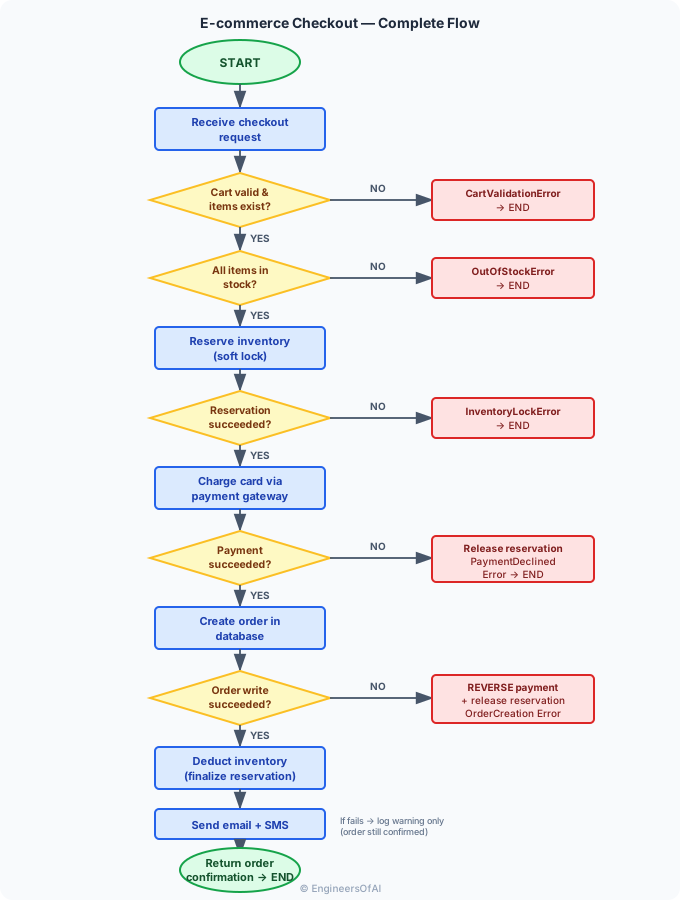
Exception mapping:
| Failure Branch | Python Exception | Compensating Transaction Required? |
|---|---|---|
| Cart empty or item not found | CartValidationError(ValueError) | No - nothing was modified |
| Item out of stock | OutOfStockError(ValueError) | No - nothing was modified |
| Inventory reservation failed | InventoryLockError(RuntimeError) | No - lock never acquired |
| Payment declined | PaymentDeclinedError(Exception) | Yes - release inventory reservation |
| Order database write failed | OrderCreationError(RuntimeError) | Yes - reverse payment charge + release reservation |
| Notification failure | Log only, no exception raised | No - order is complete; notification is non-critical |
Key design decisions the flowchart forces:
- Inventory must be reserved (soft lock) before charging - prevents overselling when two users buy the last item simultaneously
- Payment must be reversed if the database write fails - the "ghost charge" bug
- Inventory reservation must be released on payment failure - prevents permanent stock locks
- Notification failure must NOT fail the order - the customer was charged and has an order; a failed email is not a payment failure
Python skeleton matching the flowchart:
def checkout(cart, payment_info):
    # Guard: validate cart
    if not cart or not all_items_exist(cart):
        raise CartValidationError("Cart invalid")

    # Guard: check stock
    unavailable = get_unavailable_items(cart)
    if unavailable:
        raise OutOfStockError(f"Out of stock: {unavailable}")

    # Reserve inventory (compensating: must release if payment fails)
    reservation_id = reserve_inventory(cart)

    try:
        # Charge card (compensating: must reverse if DB write fails)
        charge_id = charge_payment(payment_info, cart_total(cart))

        try:
            # Write order (critical path - if this fails, reverse charge)
            order_id = create_order(cart, charge_id)
        except DatabaseError:
            reverse_charge(charge_id)       # Compensating transaction
            raise OrderCreationError("Order creation failed, charge reversed")

    except PaymentDeclinedError:
        release_reservation(reservation_id)  # Compensating transaction
        raise

    # Finalize inventory (after payment succeeds)
    deduct_inventory(reservation_id)

    # Notifications - non-critical
    try:
        send_notifications(order_id)
    except NotificationError:
        log_warning(f"Notification failed for order {order_id}")

    return {"order_id": order_id, "status": "confirmed"}
Key Takeaways
- Flowcharts make control flow visible in a way that code cannot - all paths are simultaneously visible on one diagram
- The five symbols (oval, rectangle, diamond, parallelogram, arrow) cover every algorithm you will ever design
- Every program is built from three primitives: Sequence (top-to-bottom), Selection (diamond with two branches), Iteration (backward arrow to condition)
- The happy path in a well-designed flowchart is a straight vertical line; all error branches extend horizontally
- A flowchart with no End node on a path reveals a silent
Nonereturn bug before a single line of code is written - Decision diamonds must have exactly two labeled exits - unlabeled or three-way diamonds indicate ambiguous logic
- Loops appear visually as arrows pointing upward;
breakappears as a branch that bypasses the loop-back arrow - Flowcharts are the right tool for system-level and team communication; pseudocode is the right tool for algorithm-level design before implementation
- Mermaid syntax gives flowcharts the visual clarity of diagrams with the version-control benefits of plain text
- The most expensive production bugs - ghost charges, overselling, missing compensating transactions - are immediately visible in flowcharts and nearly invisible in code review