
Strings Internals and Immutability - Engineering the Text Layer
Reading time: ~22 minutes | Level: Foundation → Engineering
Consider this code. What does it print, and more importantly, why?
a = "hello"
b = "hello"
c = "".join(["hel", "lo"])

print(a is b)   # ?
print(a is c)   # ?
print(a == c)   # ?
Most developers assume a is b is True because the strings look the same. Some are surprised that a is c might be False even though a == c is definitively True. These results are not random - they are consequences of a well-defined CPython optimization called string interning, operating on top of an even deeper mechanism called PEP 393 flexible string representation.
If you cannot explain these results with confidence, you are treating strings as a black box. This lesson opens the box.
What You Will Learn
- How CPython physically stores strings in memory (PEP 393 internals)
- Why Python 3 strings are sequences of Unicode code points, not bytes
- What immutability truly means and why it is a design strength, not a limitation
- How the
+=operator in a loop quietly creates an O(n²) algorithm - How string interning works, which strings are automatically interned, and how to force interning
- Performance comparison of f-strings,
.format(), and%formatting - Time complexities of common string operations
- Six interview questions with detailed, engineer-level answers
- Three graded practice challenges
Prerequisites
- Variables and assignment in Python
- Basic understanding of objects and references
- Familiarity with
id()andtype() - A working Python 3.8+ environment
Python Strings Are Sequences of Unicode Code Points
When you write s = "café" in Python 3, you are not storing bytes. You are storing a sequence of Unicode code points - abstract numeric identifiers for every character in human writing.
s = "café"
for char in s:
    print(repr(char), "→ U+{:04X}".format(ord(char)))
'c' → U+0063
'a' → U+0061
'f' → U+0066
'é' → U+00E9
The character é has code point U+00E9 - a single integer. This is fundamentally different from bytes. In UTF-8, U+00E9 is encoded as two bytes (0xC3 0xA9), but Python's str object knows nothing about UTF-8 bytes. It works at the code point level.
This is why:
s = "café"
print(len(s))              # 4  - four code points
print(len(s.encode("utf-8")))  # 5  - five bytes
The divergence between character count and byte count is a frequent source of bugs in systems that assume "one character equals one byte." Any time you see a buffer size, a database column length limit, or a wire protocol field width, ask yourself: is that limit in code points or bytes?
CPython Memory Representation - PEP 393 Flexible Strings
Before PEP 393 (introduced in Python 3.3), CPython stored every string using either 2 or 4 bytes per character regardless of content, which was wasteful for ASCII-heavy text. PEP 393 introduced the flexible string representation: CPython inspects the string at creation time and chooses the most compact internal storage format that can represent all characters present.
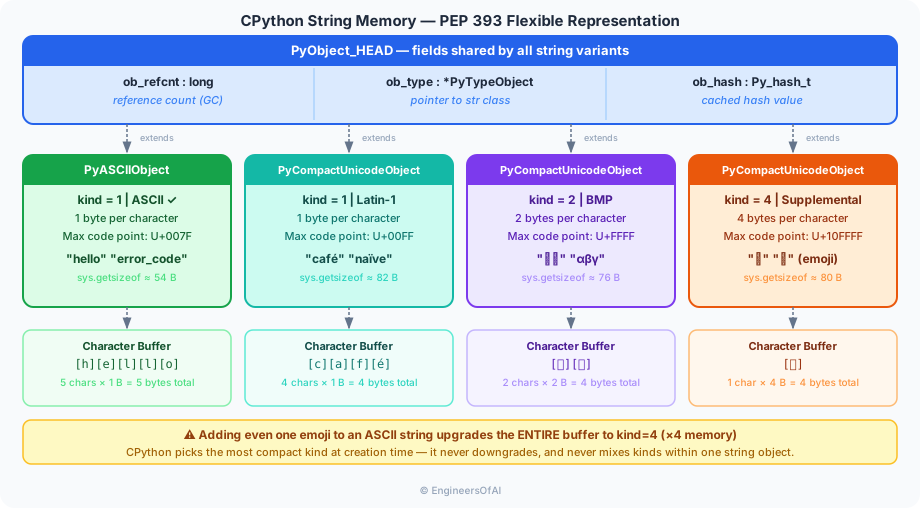
The four internal storage kinds are:
| Kind | Bytes per char | Max code point | Example content |
|---|---|---|---|
PyASCIIObject (kind=1, ASCII flag) | 1 | U+007F | "hello", "error_code" |
PyCompactUnicodeObject kind=1 | 1 | U+00FF | "café", "naïve" (Latin-1) |
PyCompactUnicodeObject kind=2 | 2 | U+FFFF | "你好", "αβγ" (BMP) |
PyCompactUnicodeObject kind=4 | 4 | U+10FFFF | "🔥", "𝄞" (supplemental) |
You can verify this yourself:
import sys

strings = ["hello", "café", "你好", "🔥"]
for s in strings:
    print(f"{s!r:12} sys.getsizeof={sys.getsizeof(s)} bytes, len={len(s)}")
'hello'      sys.getsizeof=54 bytes, len=5
'café'       sys.getsizeof=82 bytes, len=4
'你好'        sys.getsizeof=76 bytes, len=2
'🔥'         sys.getsizeof=80 bytes, len=1
Notice that a single emoji (🔥) uses more memory per character than pure ASCII. Adding even one emoji to an otherwise ASCII string forces the entire string's buffer to upgrade to kind=4 (4 bytes per character), even for all the ASCII characters within it.
This "kind upgrade" is the reason some production systems that process user-generated text (e.g., chat messages) can see surprising memory spikes when users submit strings containing emoji or CJK characters - the entire string object is reallocated at a wider character width.
Immutability - A Design Decision, Not a Limitation
Immutability means that once a string object is created, its content cannot be altered in place. Any operation that appears to "modify" a string actually creates a new string object:
s = "hello"
print(id(s))

s = s.upper()
print(id(s))   # different id - new object

# You cannot do this:
# s[0] = "H"   → TypeError: 'str' object does not support item assignment
Why Immutability Was the Right Choice
Reason 1: Strings can be used as dictionary keys and set members.
Python's dict and set use a hash table internally. An object can only be stored in a hash table if its hash value never changes. Immutability guarantees that a string's hash is stable for its entire lifetime.
lookup = {"status": "active", "role": "admin"}
key = "status"
print(lookup[key])   # works because string hash is stable
If strings were mutable, a dictionary key could be modified after insertion, making it impossible to find the entry again - the same bug that plagues mutable list keys in naive implementations.
Reason 2: Safe sharing between variables.
When you write b = a for a string, Python does not copy the string's content. Both names point at the same object. This is safe precisely because neither can mutate the shared object.
a = "immutable_value"
b = a
# b cannot corrupt a's content, no defensive copying needed
Reason 3: Thread safety without locks.
In a multithreaded program, multiple threads can read the same string object simultaneously without synchronization, because no thread can ever write to it.
The O(n²) Concatenation Trap
Here is one of the most important performance lessons in Python. Consider this innocent-looking loop:
result = ""
for i in range(10_000):
    result = result + str(i)
Because strings are immutable, every iteration of result + str(i) must:
- Allocate a new string object large enough to hold both operands
- Copy the content of
resultinto the new object - Copy the content of
str(i)into the new object - Discard the old
result
In iteration k, you are copying approximately k characters. The total work is proportional to 0 + 1 + 2 + ... + n = n(n+1)/2, which is O(n²).
| Iteration | New allocation | Characters copied |
|---|---|---|
| 0 | "0" | 1 |
| 1 | "01" | 2 |
| 2 | "012" | 3 |
| ... | ... | ... |
| 9999 | "0123...9999" | ~38,890 total chars |
Total copies ≈ n²/2 - this is quadratic growth.
For 10,000 items, this is ~50 million character copy operations instead of ~38,000.
The correct solution is ''.join():
parts = []
for i in range(10_000):
    parts.append(str(i))

result = "".join(parts)
str.join() calculates the total required length in one pass, allocates a single buffer, then fills it in a second pass. The total work is O(n).
import time

# Benchmark: concatenation vs join
n = 50_000

start = time.perf_counter()
result = ""
for i in range(n):
    result = result + str(i)
concat_time = time.perf_counter() - start

start = time.perf_counter()
result = "".join(str(i) for i in range(n))
join_time = time.perf_counter() - start

print(f"Concatenation: {concat_time:.3f}s")
print(f"Join:          {join_time:.3f}s")
print(f"Speedup:       {concat_time / join_time:.1f}x")
On a typical machine, join is 10–50x faster for large n.
The += operator on strings has the same problem. result += str(i) is syntactic sugar for result = result + str(i) - it creates a new object every time. CPython has a small optimization that sometimes avoids this for simple cases, but it is fragile and should not be relied upon. Always use join for building strings in loops.
String Interning - When Python Reuses String Objects
Python's runtime maintains an internal table of "interned" strings. When a new string is created that matches an already-interned string, Python may return the existing object instead of allocating a new one. This is why a is b can be True even when a and b were created independently.
Which strings are automatically interned?
CPython automatically interns strings that look like valid Python identifiers and are short:
# These are typically interned:
a = "hello"
b = "hello"
print(a is b)   # True - both point to the same object

# These are NOT automatically interned:
x = "hello world"   # contains a space - not an identifier
y = "hello world"
print(x is y)   # False (usually) - two separate objects
The exact rules vary across CPython versions and are implementation details. The interning behavior for compile-time string literals in the same code object is more predictable than runtime-constructed strings.
sys.intern() - Force Interning
When you are building a system that stores millions of repeated strings (e.g., column names in a data pipeline, HTTP header names, DNS records), you can force interning to share memory:
import sys

raw = "Content-Type"    # not interned by default
s1 = sys.intern(raw)
s2 = sys.intern("Content-Type")

print(s1 is s2)   # True - guaranteed same object
# Memory benefit demonstration
import sys

# Without interning: 1,000,000 separate objects
strings_no_intern = ["status" for _ in range(1_000_000)]

# With interning: 1,000,000 references to ONE object
strings_interned = [sys.intern("status") for _ in range(1_000_000)]
Never use is to test string equality in production code. is tests object identity (same memory address), not value equality. Two strings with identical content can exist as separate objects - this depends on the Python implementation, version, and how the strings were constructed. Always use == for equality.
# WRONG - relies on interning behavior
if username is "admin":
    grant_access()   # may silently fail

# CORRECT
if username == "admin":
    grant_access()
String Methods - What They Actually Do
str.encode() - Producing Bytes
encode() applies a character encoding to translate the sequence of Unicode code points into a sequence of bytes:
s = "café"
b = s.encode("utf-8")
print(type(b))   # <class 'bytes'>
print(b)         # b'caf\xc3\xa9'

# Different encodings produce different bytes:
print(s.encode("utf-16-le"))  # b'c\x00a\x00f\x00\xe9\x00'
print(s.encode("latin-1"))    # b'caf\xe9'
The returned bytes object is completely separate from the str object. The str stores code points; the bytes stores raw byte values.
# Encoding errors - what happens with unmappable characters?
s = "日本語"
try:
    s.encode("ascii")
except UnicodeEncodeError as e:
    print(f"Cannot encode: {e}")

# Control error handling:
s.encode("ascii", errors="replace")   # → b'???'
s.encode("ascii", errors="ignore")    # → b''
s.encode("ascii", errors="xmlcharrefreplace")  # → b'日本語'
str.split() - Internal Behavior
split() scans the string linearly for the separator, then creates new string objects for each segment. The time complexity is O(n) in the length of the string:
line = "2024-01-15,error,connection timeout,server-01"
parts = line.split(",")
# Creates 4 new string objects, each a substring of the original
print(parts)
split() without arguments splits on any whitespace and removes empty strings - this is more aggressive than split(" "):
s = "  hello   world  "
print(s.split())       # ['hello', 'world']
print(s.split(" "))    # ['', '', 'hello', '', '', 'world', '', '']
str.split(sep, maxsplit=N) stops after N splits, returning at most N+1 elements. This is useful for parsing structured text where you only need the first few fields.
f-strings vs .format() vs % - Performance Comparison
All three formatting approaches produce equivalent output, but they differ in how they work and how fast they run:
name = "engineer"
score = 42

# f-string (Python 3.6+) - compiled to bytecode at parse time
result = f"{name} scored {score}"

# str.format() - runtime method call with format parsing
result = "{} scored {}".format(name, score)

# % formatting - C-style, oldest approach
result = "%s scored %d" % (name, score)
import timeit

setup = "name = 'engineer'; score = 42"

t_fstring = timeit.timeit("f'{name} scored {score}'", setup=setup, number=1_000_000)
t_format  = timeit.timeit("'{} scored {}'.format(name, score)", setup=setup, number=1_000_000)
t_percent = timeit.timeit("'%s scored %d' % (name, score)", setup=setup, number=1_000_000)

print(f"f-string:  {t_fstring:.3f}s")
print(f".format(): {t_format:.3f}s")
print(f"%:         {t_percent:.3f}s")
f-string:  0.082s
.format(): 0.142s
%:         0.121s
f-strings are typically 1.5–2x faster than .format() because the Python compiler generates specialized FORMAT_VALUE bytecode instructions rather than parsing a format string at runtime. For hot paths processing millions of log lines, this difference matters.
Use f-strings as your default. Use .format() when you need a reusable template string stored as a variable. Use % only when interfacing with logging (the logging module uses %-style formatting lazily - it never formats the string if the log level is suppressed).
String Comparison - == vs is vs Lexicographic Order
== vs is
a = "hello"
b = "hel" + "lo"   # constructed at runtime

print(a == b)   # True  - same characters
print(a is b)   # may be True or False - implementation detail
== compares content. is compares identity (memory address). Use == for strings, always.
Lexicographic (Unicode) Ordering
String comparison uses Unicode code point order, not alphabetical order in the human sense:
print("Z" < "a")    # True - 'Z' is U+005A, 'a' is U+0061
print("b" < "á")    # True in many locales, but depends on code point
print("apple" < "banana")  # True - 'a' < 'b'
print("apple" < "Apple")   # False - 'a' (97) > 'A' (65)
  Unicode ordering (simplified):
  0-9 (U+0030–U+0039) < A-Z (U+0041–U+005A) < a-z (U+0061–U+007A)

  So: "Z" < "a" is TRUE because 90 < 97
For locale-aware sorting (e.g., sorting names in German, French, or Chinese), use the locale module or the PyICU library. Raw Python string comparison is correct for byte-protocol identifiers but wrong for human-facing text sorting.
Raw Strings, Byte Strings, and Multiline Strings
Raw Strings - r"..."
A raw string disables backslash escape processing. Every backslash is kept as a literal backslash:
# Without raw: backslash sequences are interpreted
path = "C:\new_folder\test"    # \n is a newline, \t is a tab!
print(path)

# With raw: backslashes are literal
path = r"C:\new_folder\test"
print(path)   # C:\new_folder\test
Raw strings are essential for regular expressions, where backslashes are part of the pattern syntax:
import re

# Without raw: \\d is needed (one escaped backslash + d)
pattern = "\\d{3}-\\d{4}"

# With raw: \d is written naturally
pattern = r"\d{3}-\d{4}"

print(re.match(r"\d{3}-\d{4}", "555-1234"))
A raw string cannot end with an odd number of backslashes. r"C:\path\" is a syntax error. This is the one edge case where raw strings cannot save you.
Byte Strings - b"..."
A bytes literal creates a bytes object, not a str. Each element is an integer 0–255:
b = b"hello"
print(type(b))    # <class 'bytes'>
print(b[0])       # 104 - the integer value of 'h' in ASCII

# You cannot mix str and bytes:
s = "hello"
# result = s + b    → TypeError
result = s.encode("utf-8") + b   # convert first
Multiline Strings
Triple-quoted strings span multiple lines and preserve embedded newlines and indentation:
sql = """
    SELECT user_id, email
    FROM users
    WHERE active = true
    ORDER BY created_at DESC
"""
print(sql)
The leading newline and indentation are preserved verbatim. Use .strip() or textwrap.dedent() if you want clean output:
import textwrap

sql = textwrap.dedent("""
    SELECT *
    FROM users
    WHERE active = true
""").strip()
Time Complexities of Common String Operations
| Operation | Description | Time Complexity | Notes |
|---|---|---|---|
s[i] | indexing | O(1) | Direct buffer access |
s[i:j] | slicing | O(k) | k = j − i, copies k chars |
len(s) | length | O(1) | Length stored in header |
s + t | concat | O(n + m) | New allocation + copy |
"".join(list) | join | O(n) | Single allocation |
s.find(sub) | find | O(n·m) | n=len(s), m=len(sub), naive |
sub in s | contains | O(n·m) | Same as find |
s.replace(a,b) | replace | O(n) | Linear scan |
s.split(sep) | split | O(n) | Linear scan |
s.encode() | encode | O(n) | Each char processed |
s == t | equality | O(n) | Worst case; O(1) if lengths differ |
s < t | comparison | O(n) | Lexicographic, character by character |
hash(s) | hash | O(n) first call | Cached after first computation |
hash(s) is computed once and cached in the string object's header (the ob_hash field). Subsequent calls to hash(s) return the cached value in O(1). This caching is why using strings as dictionary keys repeatedly is efficient.
Common Pitfalls
Pitfall 1 - Forgetting That Methods Return New Strings
s = "hello world"
s.upper()           # result is discarded!
print(s)            # still "hello world"

s = s.upper()       # correct: reassign
print(s)            # "HELLO WORLD"
Pitfall 2 - Using is for String Equality
user_input = input("Enter role: ")
# user_input will NEVER be an interned string - it comes from I/O

if user_input is "admin":   # BROKEN - always False for runtime strings
    grant_access()

if user_input == "admin":   # CORRECT
    grant_access()
Pitfall 3 - UnicodeDecodeError on Bytes
# Reading a file opened in binary mode
with open("data.bin", "rb") as f:
    raw = f.read()

# This may crash if the file contains non-UTF-8 bytes:
text = raw.decode("utf-8")   # UnicodeDecodeError

# Safe version:
text = raw.decode("utf-8", errors="replace")
# or detect encoding:
import chardet
encoding = chardet.detect(raw)["encoding"]
text = raw.decode(encoding)
Pitfall 4 - Assuming len() Returns Byte Count
s = "日本語"
print(len(s))              # 3 - three code points
print(len(s.encode("utf-8")))  # 9 - nine bytes (3 bytes per CJK char)

# A database column defined as VARCHAR(10) in PostgreSQL stores 10 CHARACTERS
# A column defined as VARCHAR(10) BYTE in Oracle stores 10 BYTES
# Know which limit applies before you truncate
Pitfall 5 - + Concatenation in a Loop (The O(n²) Trap - Revisited)
# This processes log lines - 100,000 lines, performance matters
# BAD - O(n²)
report = ""
for line in log_lines:
    report = report + line + "\n"

# GOOD - O(n)
report = "\n".join(log_lines) + "\n"
Interview Questions and Answers
Q1. Why are Python strings immutable, and what are the concrete benefits?
Strings are immutable because their design targets safe sharing, hashability, and thread safety. Concretely: (1) immutable strings can be used as dictionary keys and set elements because their hash never changes; (2) multiple variables can point to the same string object without any risk of one variable corrupting another's value - no defensive copies needed; (3) in CPython, the GIL combined with immutability means strings can be safely read by multiple threads without locks. The trade-off is that every string "modification" allocates a new object, which is why join instead of loop concatenation is critical.
Q2. Explain string interning. When does Python automatically intern a string, and when should you use sys.intern() manually?
String interning means storing a string in a global table and reusing that single object whenever the same string value appears. CPython automatically interns string literals that look like valid identifiers (letters, digits, underscores, no spaces) because these commonly appear as attribute names and dictionary keys in Python's own internals. At runtime, dynamically constructed strings (from user input, file I/O, string operations) are generally not automatically interned. You should call sys.intern() manually when you are loading large datasets with high cardinality repetition - for example, column names repeated across millions of DataFrame rows, or thousands of identical HTTP header name strings. Interning can reduce memory from O(n) separate objects to O(1) for repeated values.
Q3. Why is ''.join(parts) O(n) while result += part in a loop is O(n²)?
With += in a loop, each iteration creates a new string object of size k (where k is the current accumulated length), copies all k characters of the existing string, then appends the new part. Total characters copied: 1 + 2 + ... + n = n(n+1)/2 = O(n²). The join() method works differently: it iterates through the list once to sum all lengths, allocates one buffer of exactly the right total size, then iterates again to copy each part into position. Total characters copied: exactly n, making it O(n). For 50,000 items this is the difference between 1.25 billion operations and 50,000 operations.
Q4. What is PEP 393's flexible string representation, and why does it matter in practice?
PEP 393 (Python 3.3+) changed how CPython stores string characters internally. Instead of always using 2 or 4 bytes per character, CPython now inspects the maximum Unicode code point in the string and uses the most compact format: 1 byte per character for strings whose highest code point is ≤ U+00FF, 2 bytes per character for strings up to U+FFFF (Basic Multilingual Plane), and 4 bytes per character for strings containing supplemental plane characters (emoji, rare scripts). This means ASCII-heavy strings use 4–5x less memory than before PEP 393. The practical implication: adding a single emoji to an otherwise ASCII string forces a full reallocation of the internal buffer at 4 bytes per character. This is relevant when processing user-generated content, where the presence of emoji in a dataset changes its memory profile.
Q5. What is the difference between str.encode() and bytes.decode(), and when do encoding errors occur?
str.encode(encoding) converts a Python str (Unicode code points) to a bytes object using the specified codec. bytes.decode(encoding) does the reverse. Encoding errors occur when: (a) during encode(), a code point has no representation in the target encoding (e.g., encoding "日" with "ascii" fails because U+65E5 is not in ASCII); (b) during decode(), the byte sequence is not valid for the claimed encoding (e.g., decoding b"\xff\xfe" as UTF-8 fails because those bytes are not valid UTF-8). Both methods accept an errors parameter: "strict" (default, raises exception), "ignore" (drops unmappable characters), "replace" (substitutes ? or U+FFFD), and "backslashreplace" (uses escape sequences).
Q6. Compare f-strings, .format(), and % formatting in terms of performance and use cases.
f-strings are compiled by the Python parser into specialized FORMAT_VALUE and BUILD_STRING bytecode opcodes - no runtime string parsing is needed. .format() parses its format string at call time using Python-level code. % formatting uses a C-level mini-parser. In benchmarks, f-strings are typically 1.5–2x faster than .format() and 1.3–1.5x faster than % for simple substitutions. Use f-strings as the default for readability and performance. Use .format() when you need a reusable template (a string variable with {} placeholders). Use % style with the logging module because logging.debug("message: %s", value) is lazy - the format string is only interpolated if the message will actually be emitted, avoiding formatting cost when the log level is suppressed.
Graded Practice Challenges
Level 1 - Predict the Output
a = "Python"
b = a
a = a.lower()
print(a)
print(b)
print(a is b)

parts = ["P", "y", "t", "h", "o", "n"]
s = "".join(parts)
print(s == "Python")
print(s is "Python")
Show Answer
python
Python
False
True
False   (or True - implementation-dependent, but cannot be guaranteed)
When a = a.lower() is executed, a new string object "python" is created and a is rebound to it. b still points to the original "Python" - it is unaffected because strings are immutable and the assignment only rebinds a. a is b is False because a and b now point to different objects with different content. s == "Python" is True because the content is equal. s is "Python" may be False because s was constructed at runtime via join, so it may not be the interned literal object.
Level 2 - Debug This Code
A developer wrote a function to build a CSV row from a list of values. It runs correctly for small lists but is slow for 100,000+ element lists. Identify the performance bug and rewrite the function.
def build_csv_row(values):
    row = ""
    for i, v in enumerate(values):
        row = row + str(v)
        if i < len(values) - 1:
            row = row + ","
    return row

# Usage:
data = list(range(100_000))
result = build_csv_row(data)
Show Answer
The bug: row = row + str(v) and row = row + "," create new string objects on every iteration. With 100,000 values, this results in approximately 200,000 string allocations and O(n²) total character copying.
Fixed version:
def build_csv_row(values):
    return ",".join(str(v) for v in values)

# Or equivalently:
def build_csv_row(values):
    return ",".join(map(str, values))
join pre-computes the total length, allocates one buffer, and fills it in two linear passes - O(n) total work. The map(str, values) form is slightly faster than a generator expression because it avoids Python-level function call overhead for each element.
Additional bug: if i < len(values) - 1 calls len(values) on every iteration. While this is O(1) for lists, it is unnecessary noise. The join approach eliminates this entirely.
Level 3 - Design Challenge
Design a StringAccumulator class for a log aggregation system that:
- Accepts up to 10,000 log lines via an
append(line: str)method - Returns the full log as a single string via a
build() -> strmethod - Must handle the case where
build()is called multiple times without re-allocating - Must raise
ValueErrorif a line contains a null byte (\0), which would corrupt binary log formats - Include a
__repr__that shows how many lines are buffered without materializing the full string
Explain your design choices and the time/space complexity of each operation.
Show Answer
class StringAccumulator:
    """
    Efficient log line buffer using the join-accumulator pattern.
    Validates input and caches the built result for repeated access.
    """
    MAX_LINES = 10_000

    def __init__(self):
        self._parts: list[str] = []
        self._cache: str | None = None

    def append(self, line: str) -> None:
        """
        O(1) amortized - list.append is amortized O(1).
        Validates for null bytes in O(len(line)).
        Invalidates cache on new input.
        """
        if not isinstance(line, str):
            raise TypeError(f"Expected str, got {type(line).__name__}")
        if "\0" in line:
            raise ValueError("Log lines must not contain null bytes")
        if len(self._parts) >= self.MAX_LINES:
            raise OverflowError(f"Accumulator is full ({self.MAX_LINES} lines max)")

        self._parts.append(line)
        self._cache = None   # invalidate cached result

    def build(self) -> str:
        """
        O(n) on first call (n = total characters), O(1) on subsequent calls.
        Uses join for single-allocation construction.
        """
        if self._cache is None:
            self._cache = "\n".join(self._parts)
        return self._cache

    def __repr__(self) -> str:
        """
        O(1) - does not materialize the full string.
        """
        status = "built" if self._cache is not None else "pending"
        return f"StringAccumulator(lines={len(self._parts)}, status={status})"


# Usage:
acc = StringAccumulator()
for i in range(5):
    acc.append(f"2024-01-15 INFO  event_{i} processed")

print(repr(acc))           # StringAccumulator(lines=5, status=pending)
log = acc.build()
print(repr(acc))           # StringAccumulator(lines=5, status=built)
log_again = acc.build()    # O(1) - returns cached result
print(log is log_again)    # True - same object
Design choices:
list.appendis amortized O(1) because Python lists over-allocate. A plain list is the right data structure for accumulation.- The null-byte check is O(len(line)) via
"\0" in line, which is a C-level scan - much faster than a Python loop. - The
_cachefield avoids re-runningjoinon repeatedbuild()calls. Setting it toNoneonappendensures the cache is invalidated whenever new data arrives (cache invalidation correctness). __repr__readslen(self._parts)- O(1) - and checksself._cache is not None- O(1) - without ever formatting the full string content.
Quick Reference Cheatsheet
| Topic | Key Point | Example |
|---|---|---|
| String type | Sequence of Unicode code points | "café" has len 4 |
| PEP 393 storage | 1/2/4 bytes per char based on content | ASCII→1B, emoji→4B |
| Immutability | All "changes" create new objects | s = s.upper() |
| Concatenation loop | O(n²) - avoid | Use "".join(parts) |
| Interning | Auto for identifier-like literals | "hello" is "hello" (often True) |
| Force interning | sys.intern(s) | Saves memory for repeated strings |
| Equality | Always use == | a == b not a is b |
encode() | str → bytes | "café".encode("utf-8") |
decode() | bytes → str | b"caf\xc3\xa9".decode("utf-8") |
len(s) | Code points, not bytes | len("🔥") == 1 |
| f-strings | Fastest formatting | f"{name} scored {score}" |
| Raw strings | Disable backslash escapes | r"\d{3}" for regex |
split() | No-arg splits on any whitespace | " a b ".split() → ['a', 'b'] |
find() vs index() | find returns -1, index raises | Use find when miss is possible |
hash(s) | Cached after first call | O(n) once, O(1) after |
Key Takeaways
- Python 3
strstores Unicode code points, not bytes. Thelen()of a string is the number of code points, not the number of bytes it would occupy in UTF-8 or any other encoding. - CPython uses PEP 393 flexible string representation: 1, 2, or 4 bytes per character depending on the maximum code point present. A single emoji can quadruple the memory of an otherwise ASCII string.
- Strings are immutable by design: this enables hashing (use as dict keys), safe sharing between variables, and thread safety without locks.
''.join(parts)is O(n);result += partin a loop is O(n²). For any loop building a string, always accumulate into a list and join once at the end.- String interning means CPython may reuse the same object for equal strings that look like identifiers. Use
sys.intern()to force interning for repeated runtime strings. Never useisfor string equality comparison - always use==. encode()convertsstrtobytes;decode()convertsbytestostr. This boundary is whereUnicodeDecodeErrorandUnicodeEncodeErrorlive. Handle encoding errors explicitly with theerrorsparameter.- f-strings are the fastest and most readable formatting mechanism - prefer them by default, with
%-style reserved for theloggingmodule's lazy evaluation pattern. - Raw strings (
r"") disable backslash escape processing and are essential for regular expressions. Byte strings (b"") createbytesobjects, notstrobjects.