
Context Managers - The with Statement and Resource Management
Reading time: ~17 minutes | Level: Foundation → Engineering
Here is something most Python developers miss about context managers:
class SuppressAndLog:
    def __enter__(self):
        return self

    def __exit__(self, exc_type, exc_val, exc_tb):
        if exc_type is not None:
            print(f"Suppressed: {exc_type.__name__}: {exc_val}")
        return True   # This return value changes everything

with SuppressAndLog():
    x = 1 / 0   # ZeroDivisionError

print("Program continues!")   # This line executes!

# Output:
# Suppressed: ZeroDivisionError: division by zero
# Program continues!
Returning True from __exit__ suppresses the exception. The with block raises, __exit__ swallows it, and execution continues normally after the with statement.
Most developers think of context managers as "only for files." In reality, they are a general protocol for guaranteed cleanup, exception handling, and resource lifecycle management - one of the most powerful patterns in Python.
What You Will Learn
- The
__enter__/__exit__protocol - exactly what Python calls and when - The
withstatement desugared: the real sequence of operations step by step - The full
__exit__signature and the critical meaning of its return value - Writing your own context manager class with a real database connection example
- The
@contextmanagerdecorator: generator-based context managers withyield - Five key tools from
contextlib:suppress,ExitStack,nullcontext,redirect_stdout,closing - Nested
withstatements and the combinedwith A() as a, B() as b:syntax - Exception handling strategies in
__exit__: re-raise, suppress, or replace - Real-world patterns: database transactions, lock acquisition, timers, temp directories
Prerequisites
- Python 3.8+ and understanding of classes and dunder methods
- Familiarity with
try/except/finallyblocks - Basic understanding of generators and
yield(for@contextmanagersection)
Mental Model: The Lifecycle of a with Block
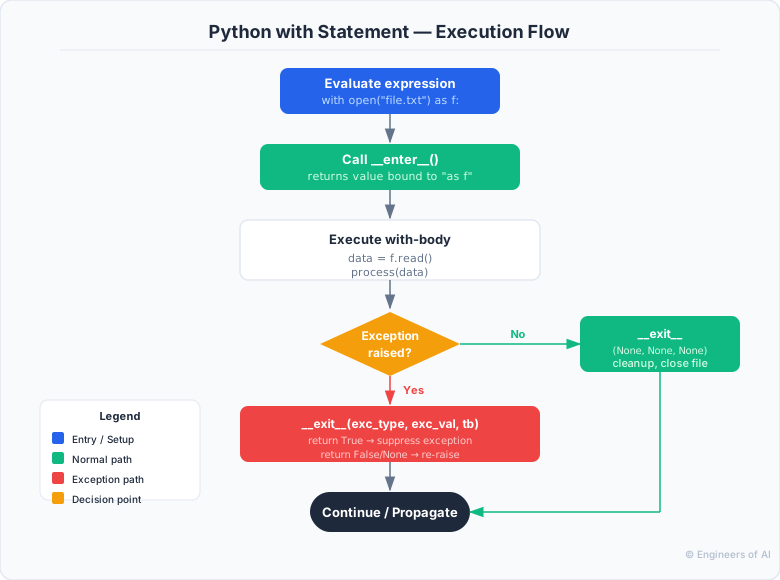
The diagram below shows the exact execution order when Python encounters a with statement - from evaluating the expression to the final exception decision in __exit__:
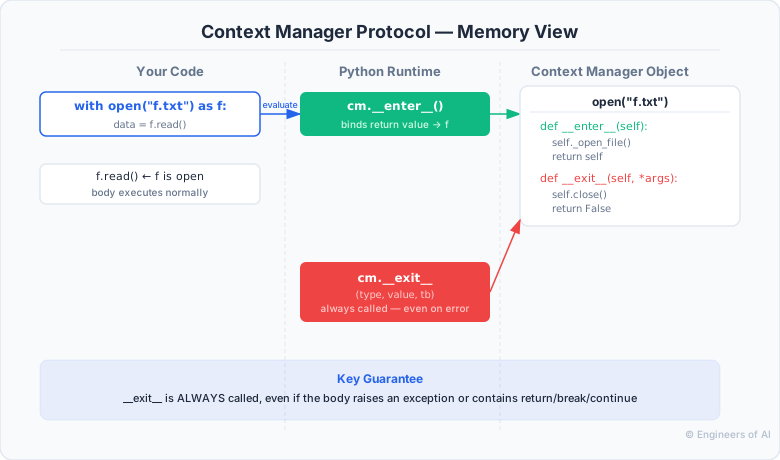
And here is how the __enter__ / __exit__ protocol maps to Python runtime internals - what each call returns, what data flows where:
Part 1 - The Protocol: __enter__ and __exit__
__enter__ - Setup
__enter__ is called when the with block begins. Its return value is what gets bound to the as variable:
import time


class Timer:
    def __enter__(self):
        self.start = time.perf_counter()
        return self   # `as` variable will be this Timer instance

    def __exit__(self, exc_type, exc_val, exc_tb):
        self.elapsed = time.perf_counter() - self.start
        print(f"Elapsed: {self.elapsed:.4f}s")
        return False   # do not suppress exceptions

with Timer() as t:
    result = sum(range(10_000_000))

print(f"Sum: {result}")
print(f"Time: {t.elapsed:.4f}s")
# Elapsed: 0.1823s
# Sum: 49999995000000
# Time: 0.1823s
Key point: __enter__ can return anything. File objects return self. Database connections often return a cursor. Locks return the lock itself. It is common but not required to return self.
__exit__ - Teardown
__exit__ is called when the with block exits - whether by normal completion, return, break, continue, or exception.
class DatabaseTransaction:
    def __init__(self, connection):
        self.conn = connection

    def __enter__(self):
        self.conn.begin()
        return self.conn.cursor()   # return cursor, not self

    def __exit__(self, exc_type, exc_val, exc_tb):
        if exc_type is None:
            # No exception - commit the transaction
            self.conn.commit()
            print("Transaction committed")
        else:
            # Exception occurred - roll back
            self.conn.rollback()
            print(f"Transaction rolled back due to: {exc_type.__name__}")

        return False   # never suppress exceptions - let them propagate
The __exit__ Signature in Full Detail
def __exit__(self, exc_type, exc_val, exc_tb):
    #               ↑           ↑        ↑
    #     exception type   exception  traceback object
    #     e.g. ValueError  instance   (for debugging)
    #     None if no exc   None       None
    pass
class DetailedExit:
    def __enter__(self):
        return self

    def __exit__(self, exc_type, exc_val, exc_tb):
        if exc_type is None:
            print("No exception occurred")
        else:
            import traceback
            print(f"Exception type: {exc_type}")
            print(f"Exception value: {exc_val}")
            print("Traceback:")
            traceback.print_tb(exc_tb)
        return False

with DetailedExit():
    raise ValueError("something went wrong")

# Exception type: <class 'ValueError'>
# Exception value: something went wrong
# Traceback:
#   File "...", line N, in <module>
#     raise ValueError("something went wrong")
The Return Value of __exit__
This is the most commonly misunderstood part:
# Return False (or None) - exception propagates normally
def __exit__(self, exc_type, exc_val, exc_tb):
    cleanup()
    return False   # exception continues to propagate

# Return True - exception is suppressed (swallowed)
def __exit__(self, exc_type, exc_val, exc_tb):
    if exc_type is FileNotFoundError:
        return True   # suppress FileNotFoundError only
    return False      # propagate everything else
# Selective suppression example
import os


class IgnoreNotFound:
    """Suppress FileNotFoundError, let everything else propagate."""
    def __enter__(self):
        return self

    def __exit__(self, exc_type, exc_val, exc_tb):
        return exc_type is FileNotFoundError

# Safe delete that does not raise if file is missing
with IgnoreNotFound():
    os.remove("might_not_exist.txt")

# Equivalent to:
try:
    os.remove("might_not_exist.txt")
except FileNotFoundError:
    pass
Part 2 - The with Statement Desugared
Understanding the exact Python translation of with removes all the magic:
# Source:
with EXPR as VAR:
    BODY

# Desugared (approximate Python equivalent):
_cm = EXPR                          # evaluate the expression once
VAR = _cm.__enter__()               # call __enter__, bind result
_exc_occurred = False
try:
    try:
        BODY
    except:
        _exc_occurred = True
        if not _cm.__exit__(*sys.exc_info()):
            raise
        # if __exit__ returns True, exception is swallowed here
finally:
    if not _exc_occurred:
        _cm.__exit__(None, None, None)
# Without `as`:
with EXPR:
    BODY

# Desugared:
_cm = EXPR
_cm.__enter__()     # return value discarded
try:
    BODY
except:
    if not _cm.__exit__(*sys.exc_info()):
        raise
else:
    _cm.__exit__(None, None, None)
This desugaring explains several behaviors:
EXPRis evaluated exactly once - you cannot modify it inside thewithblock__exit__is always called if__enter__succeeded- If
__exit__raises, that exception replaces the original exception
:::warning If __enter__ raises
If __enter__() raises an exception, __exit__() is not called. The exception just propagates. This means if your __enter__ acquires multiple resources and the second acquisition fails, you must clean up the first acquisition inside __enter__ itself (in a try/except), because __exit__ will not be called.
:::
Part 3 - Writing a Context Manager Class
Let us build a realistic database connection context manager:
import sqlite3


class ManagedConnection:
    """
    A context manager for SQLite database connections.
    Commits on success, rolls back on exception.
    """

    def __init__(self, database_path, isolation_level="DEFERRED"):
        self.database_path = database_path
        self.isolation_level = isolation_level
        self.conn = None

    def __enter__(self):
        self.conn = sqlite3.connect(self.database_path)
        self.conn.isolation_level = self.isolation_level
        self.conn.execute("BEGIN")
        return self.conn   # caller gets the connection object

    def __exit__(self, exc_type, exc_val, exc_tb):
        if exc_type is None:
            self.conn.commit()
        else:
            self.conn.rollback()

        self.conn.close()
        self.conn = None

        return False   # always propagate exceptions after cleanup

    def __repr__(self):
        status = "open" if self.conn else "closed"
        return f"ManagedConnection({self.database_path!r}, status={status})"


# Usage
with ManagedConnection("/tmp/app.db") as conn:
    conn.execute("CREATE TABLE IF NOT EXISTS users (id INTEGER, name TEXT)")
    conn.execute("INSERT INTO users VALUES (1, 'Alice')")
    conn.execute("INSERT INTO users VALUES (2, 'Bob')")
    # commit happens automatically on exit

# Transaction rollback example
try:
    with ManagedConnection("/tmp/app.db") as conn:
        conn.execute("INSERT INTO users VALUES (3, 'Charlie')")
        raise ValueError("Something went wrong!")
        conn.execute("INSERT INTO users VALUES (4, 'Dave')")
except ValueError:
    print("Transaction was rolled back - Charlie was not saved")
A Lock Context Manager with Timeout
import threading


class TimedLock:
    """
    Acquire a lock with a timeout. Raises TimeoutError if lock
    cannot be acquired within the given time.
    """

    def __init__(self, lock, timeout=5.0):
        self.lock = lock
        self.timeout = timeout
        self._acquired = False

    def __enter__(self):
        acquired = self.lock.acquire(timeout=self.timeout)
        if not acquired:
            raise TimeoutError(
                f"Could not acquire lock within {self.timeout}s"
            )
        self._acquired = True
        return self.lock

    def __exit__(self, exc_type, exc_val, exc_tb):
        if self._acquired:
            self.lock.release()
            self._acquired = False
        return False


# Usage
shared_lock = threading.Lock()

def update_shared_state():
    pass  # placeholder

with TimedLock(shared_lock, timeout=2.0):
    # Critical section - lock is held here
    update_shared_state()
# Lock is always released here
Part 4 - @contextmanager: Generator-Based Context Managers
The @contextmanager decorator from contextlib lets you write context managers as generator functions. This is often simpler than writing a class:
from contextlib import contextmanager
import time


@contextmanager
def timer(label=""):
    """Context manager that prints elapsed time."""
    start = time.perf_counter()
    try:
        yield   # execution transfers to the `with` block body here
    finally:
        elapsed = time.perf_counter() - start
        name = f"[{label}] " if label else ""
        print(f"{name}Elapsed: {elapsed:.4f}s")


with timer("sorting"):
    data = sorted(range(1_000_000), reverse=True)
# [sorting] Elapsed: 0.0823s
How @contextmanager Works
The generator is paused at yield. When the with block exits (normally or via exception), the generator is resumed from the yield point. If the body raised, the exception is thrown into the generator at the yield expression.
from contextlib import contextmanager
import sqlite3


@contextmanager
def transaction(database_path):
    """Generator-based transaction context manager."""
    conn = sqlite3.connect(database_path)
    try:
        conn.execute("BEGIN")
        yield conn          # caller receives the connection
        conn.commit()       # reached only if no exception
    except Exception:
        conn.rollback()
        raise               # re-raise after rollback
    finally:
        conn.close()        # always close


with transaction("/tmp/app.db") as conn:
    conn.execute("INSERT INTO events VALUES (?, ?)", (1, "login"))
    conn.execute("INSERT INTO events VALUES (?, ?)", (2, "purchase"))
# Committed

try:
    with transaction("/tmp/app.db") as conn:
        conn.execute("INSERT INTO events VALUES (?, ?)", (3, "logout"))
        raise RuntimeError("Unexpected failure")
except RuntimeError:
    pass
# Rolled back
Temp Directory with @contextmanager
from contextlib import contextmanager
import tempfile, os, shutil


@contextmanager
def temp_directory(prefix="tmp_"):
    """Create a temp dir, yield it, delete it on exit."""
    tmpdir = tempfile.mkdtemp(prefix=prefix)
    try:
        yield tmpdir   # caller gets the path string
    finally:
        shutil.rmtree(tmpdir, ignore_errors=True)


with temp_directory(prefix="build_") as workspace:
    config_path = os.path.join(workspace, "config.json")
    with open(config_path, "w") as f:
        f.write('{"setting": true}')
    print(f"Files in workspace: {os.listdir(workspace)}")
    # Files in workspace: ['config.json']

# workspace and all its contents are deleted here
print(f"Workspace exists: {os.path.exists(workspace)}")   # False
:::tip @contextmanager vs class: which to use?
Use @contextmanager for:
- Simple setup/teardown without complex state
- One-off patterns used only in one place
- When the generator form reads more clearly
Use a class when:
- The context manager has significant state (multiple instance variables)
- It needs additional methods beyond context manager protocol
- It must be reusable across multiple modules (a named class is easier to import)
- You need
__repr__for debugging :::
Part 5 - contextlib Tools
contextlib.suppress(*exceptions) - Clean Exception Suppression
from contextlib import suppress
import os

# The Pythonic way to delete a file if it exists:
with suppress(FileNotFoundError):
    os.remove("cache.tmp")

# Equivalent to:
try:
    os.remove("cache.tmp")
except FileNotFoundError:
    pass

# Suppress multiple exception types:
with suppress(FileNotFoundError, PermissionError):
    os.remove("/protected/file.txt")
suppress is cleaner than try/except/pass and signals intent explicitly - this is expected to sometimes fail, and that is acceptable.
contextlib.ExitStack - Dynamic Number of Context Managers
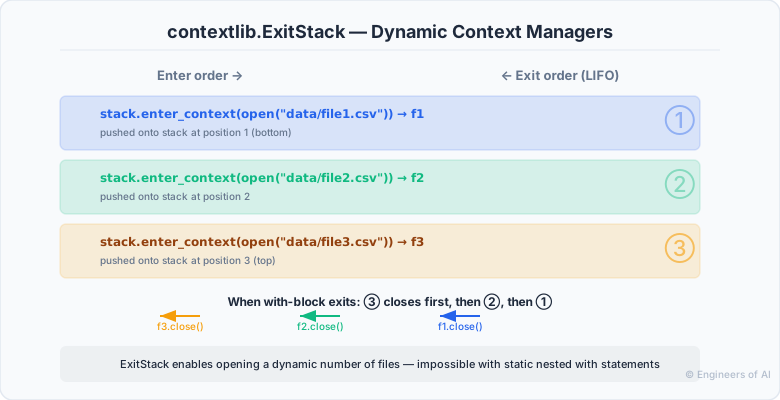
ExitStack is for situations where you do not know at write-time how many context managers you need. Context managers are entered in order and exited in reverse (LIFO) - guaranteeing cleanup even when the number of resources is determined at runtime:
from contextlib import ExitStack


def merge_files(input_paths, output_path):
    """Merge multiple files into one, all opened simultaneously."""
    with ExitStack() as stack:
        # Register each file with the stack
        input_files = [
            stack.enter_context(open(path, "r", encoding="utf-8"))
            for path in input_paths
        ]
        output = stack.enter_context(open(output_path, "w", encoding="utf-8"))

        for f in input_files:
            for line in f:
                output.write(line)

    # All files closed here, even if an exception occurred

merge_files(["part1.txt", "part2.txt", "part3.txt"], "merged.txt")
# ExitStack as a reusable defer mechanism
from contextlib import ExitStack
import os

stack = ExitStack()

# Register cleanup functions - called in LIFO order on stack.close()
stack.callback(lambda: print("cleanup 1 ran"))
stack.callback(lambda: print("cleanup 2 ran"))
tmp_path = "/tmp/work.tmp"
open(tmp_path, "w").close()
stack.callback(os.unlink, tmp_path)

try:
    do_work()
finally:
    stack.close()
# cleanup 2 ran
# cleanup 1 ran
# (and /tmp/work.tmp is deleted)
# ExitStack for conditional resource registration
from contextlib import ExitStack


def process_with_optional_backup(source, create_backup=False):
    with ExitStack() as stack:
        src = stack.enter_context(open(source, "r", encoding="utf-8"))

        if create_backup:
            backup_path = source + ".bak"
            bak = stack.enter_context(open(backup_path, "w", encoding="utf-8"))
        else:
            bak = None

        for line in src:
            if bak:
                bak.write(line)
            # process line
contextlib.nullcontext - Do-Nothing Placeholder
from contextlib import nullcontext
import sys


def process_data(data, output=None):
    """
    Process data, writing to output if provided.
    output can be a file path (str), file object, or None.
    """
    if output is None:
        ctx = nullcontext(None)    # no-op context manager
    elif isinstance(output, str):
        ctx = open(output, "w", encoding="utf-8")
    else:
        ctx = nullcontext(output)  # wrap existing file object (no-op)

    with ctx as f:
        results = []
        for item in data:
            result = str(item).upper()
            results.append(result)
            if f is not None:
                f.write(f"{result}\n")
        return results

# All three work without duplicating the processing logic:
process_data(["a", "b", "c"])                # no file output
process_data(["a", "b", "c"], "output.txt") # write to file
process_data(["a", "b", "c"], sys.stdout)   # write to stdout
contextlib.redirect_stdout and redirect_stderr
from contextlib import redirect_stdout, redirect_stderr
import io


# Capture print() output without modifying the function
def noisy_function():
    print("Debug output A")
    print("Debug output B")
    return 42

captured = io.StringIO()
with redirect_stdout(captured):
    result = noisy_function()

output = captured.getvalue()   # "Debug output A\nDebug output B\n"
assert result == 42
assert "Debug output A" in output

# Redirect stderr to a file
with open("errors.log", "a") as f, redirect_stderr(f):
    # any writes to stderr from code inside here go to errors.log
    import warnings
    warnings.warn("this is a warning")
contextlib.closing - Add Context Manager Protocol to Any Object
from contextlib import closing
import urllib.request


# closing() wraps any object that has a close() method
# Adds __enter__ (returns self) and __exit__ (calls self.close())
with closing(urllib.request.urlopen("https://httpbin.org/get")) as response:
    content = response.read(200)

# Useful for database cursors that do not implement __enter__/__exit__:
# with closing(db_connection.cursor()) as cursor:
#     cursor.execute("SELECT * FROM users")
#     rows = cursor.fetchall()
Part 6 - Nested with Statements
Traditional Nesting
# Nested with statements - valid, but increases indentation:
with open("input.txt", "r", encoding="utf-8") as infile:
    with open("output.txt", "w", encoding="utf-8") as outfile:
        for line in infile:
            outfile.write(line.upper())
Combined Syntax (Python 2.7+)
# Multiple context managers in one line - same as nesting:
with open("input.txt", "r", encoding="utf-8") as infile, \
     open("output.txt", "w", encoding="utf-8") as outfile:
    for line in infile:
        outfile.write(line.upper())
The combined form is exactly equivalent to nesting - they are closed in LIFO order (outfile first, then infile).
Exception Propagation in Nested Managers
class CM:
    def __init__(self, name):
        self.name = name

    def __enter__(self):
        print(f"{self.name}: __enter__")
        return self

    def __exit__(self, exc_type, exc_val, exc_tb):
        print(f"{self.name}: __exit__ (exc={exc_type})")
        return False   # do not suppress

with CM("outer"), CM("inner"):
    raise ValueError("test")

# Output:
# outer: __enter__
# inner: __enter__
# inner: __exit__ (exc=<class 'ValueError'>)
# outer: __exit__ (exc=<class 'ValueError'>)
# ValueError: test
Both __exit__ methods receive the original exception. The inner one is called first (LIFO). If the inner __exit__ suppresses the exception (returns True), the outer __exit__ is called with (None, None, None).
Part 7 - Exception Handling Strategies in __exit__
Strategy 1: Re-raise (Default)
def __exit__(self, exc_type, exc_val, exc_tb):
    self.cleanup()
    return False   # or return None - same effect

# Use when: the exception is meaningful to the caller and should propagate
Strategy 2: Suppress Specific Exceptions
def __exit__(self, exc_type, exc_val, exc_tb):
    if exc_type is FileNotFoundError:
        log.warning(f"File not found: {exc_val}")
        return True    # suppress
    return False       # propagate everything else
Strategy 3: Replace the Exception
import sqlite3


def __exit__(self, exc_type, exc_val, exc_tb):
    if exc_type is sqlite3.IntegrityError:
        # Translate low-level DB error to domain error
        raise DuplicateUserError(str(exc_val)) from exc_val
    return False

# Use when: lower-level exceptions should be wrapped in domain-specific ones
# The `from exc_val` preserves the original exception as __cause__
Strategy 4: Log and Re-raise
import logging

logger = logging.getLogger(__name__)


def __exit__(self, exc_type, exc_val, exc_tb):
    self.conn.close()
    if exc_type is not None:
        logger.error(
            "Exception during database operation",
            exc_info=(exc_type, exc_val, exc_tb)
        )
    return False   # always re-raise after logging
Part 8 - Real-World Patterns
Pattern 1: Database Transaction Manager
from contextlib import contextmanager
import logging

logger = logging.getLogger(__name__)


@contextmanager
def db_transaction(session):
    """
    SQLAlchemy session transaction context manager.
    Commits on success, rolls back and re-raises on failure.
    Always logs transaction outcome.
    """
    try:
        yield session
        session.commit()
        logger.debug("Transaction committed")
    except Exception as exc:
        session.rollback()
        logger.warning(f"Transaction rolled back: {exc}")
        raise
    finally:
        session.close()


# Usage in an API route handler:
# with db_transaction(get_session()) as session:
#     order = Order(**order_data.dict())
#     session.add(order)
Pattern 2: Timer Context Manager with Statistics
from contextlib import contextmanager
import time
from dataclasses import dataclass, field
from typing import List


@dataclass
class TimingStats:
    label: str
    durations: List[float] = field(default_factory=list)

    @property
    def count(self): return len(self.durations)
    @property
    def total(self): return sum(self.durations)
    @property
    def mean(self): return self.total / self.count if self.count else 0
    @property
    def minimum(self): return min(self.durations) if self.durations else 0
    @property
    def maximum(self): return max(self.durations) if self.durations else 0

    def report(self):
        print(f"[{self.label}] n={self.count} "
              f"mean={self.mean*1000:.2f}ms "
              f"min={self.minimum*1000:.2f}ms "
              f"max={self.maximum*1000:.2f}ms")


@contextmanager
def measure(stats: TimingStats):
    """Accumulate timing measurements into a TimingStats object."""
    start = time.perf_counter()
    try:
        yield stats
    finally:
        duration = time.perf_counter() - start
        stats.durations.append(duration)


# Measure multiple iterations
db_stats = TimingStats("database_query")
for _ in range(100):
    with measure(db_stats):
        time.sleep(0.001)   # simulate DB call

db_stats.report()
# [database_query] n=100 mean=1.05ms min=0.98ms max=3.21ms
Pattern 3: Managed Build Workspace
from contextlib import contextmanager
import os, shutil, tempfile, sys, logging

logger = logging.getLogger(__name__)


@contextmanager
def build_workspace(project_name, preserve_on_error=False):
    """
    Create a temporary build workspace.
    On success: clean up automatically.
    On failure: optionally preserve for debugging.
    """
    tmpdir = tempfile.mkdtemp(prefix=f"build_{project_name}_")
    logger.info(f"Build workspace: {tmpdir}")
    failed = False

    try:
        yield tmpdir
        logger.info("Build succeeded, cleaning workspace")
    except Exception as exc:
        failed = True
        if preserve_on_error:
            logger.error(
                f"Build failed - workspace preserved at {tmpdir}"
            )
        else:
            logger.error(f"Build failed: {exc}")
        raise
    finally:
        if os.path.exists(tmpdir):
            if not (preserve_on_error and failed):
                shutil.rmtree(tmpdir, ignore_errors=True)


# Usage
with build_workspace("myproject", preserve_on_error=True) as workspace:
    src_dir = os.path.join(workspace, "src")
    os.makedirs(src_dir)
    # compile_sources(src_dir)
    # run_tests(workspace)
Pattern 4: Rate Limiter Context Manager
import time
import threading


class RateLimiter:
    """Token bucket rate limiter as a context manager."""

    def __init__(self, calls_per_second):
        self.min_interval = 1.0 / calls_per_second
        self.last_call = 0.0
        self._lock = threading.Lock()

    def __enter__(self):
        with self._lock:
            now = time.monotonic()
            wait_time = self.min_interval - (now - self.last_call)
            if wait_time > 0:
                time.sleep(wait_time)
            self.last_call = time.monotonic()
        return self

    def __exit__(self, exc_type, exc_val, exc_tb):
        return False


# Allow max 10 API calls per second
api_limiter = RateLimiter(calls_per_second=10)

def make_api_call(url):
    pass  # placeholder

endpoints = ["/api/users", "/api/orders", "/api/items"]
for endpoint in endpoints:
    with api_limiter:
        response = make_api_call(endpoint)
Interview Questions
Q1: What is a context manager and what protocol does it implement?
Answer: A context manager is an object that implements the context management protocol: __enter__(self) and __exit__(self, exc_type, exc_val, exc_tb). When used with the with statement, Python calls __enter__() before the block and __exit__() after the block exits - regardless of whether the exit was normal or due to an exception. The with statement is syntactic sugar for a try/finally pattern that guarantees __exit__() is called for cleanup. Context managers are used to manage any resource with a well-defined lifecycle: file handles, database connections, locks, network sockets, timers.
Q2: What does __exit__ returning True mean? Give a concrete use case.
Answer: When __exit__ returns a truthy value, the exception that caused the with block to exit is suppressed - it does not propagate to the caller. Execution continues at the statement after the with block. Returning False or None (the default) allows the exception to propagate normally.
Concrete use case: contextlib.suppress(FileNotFoundError) returns a context manager whose __exit__ returns True if exc_type is FileNotFoundError. This lets you write:
with suppress(FileNotFoundError):
    os.remove("cache.tmp")
instead of a try/except/pass block. Only use exception suppression when you intentionally expect and accept a specific exception type - suppressing all exceptions masks bugs.
Q3: Explain the difference between @contextmanager and writing a context manager class. When would you use each?
Answer: Both achieve the same result. @contextmanager wraps a generator function: code before yield is __enter__, the yield value is the as variable, and code after yield (typically in finally) is __exit__. It is concise for simple patterns.
A class is better when: (1) the context manager has significant state (multiple instance variables); (2) it needs additional methods; (3) it must be reusable across multiple modules (a named class is easier to import and inspect); (4) you need __repr__ for debugging; (5) the cleanup logic is complex with multiple exception branches.
@contextmanager is better when: (1) the setup and teardown are simple; (2) the pattern is used only in one place; (3) the generator form reads more clearly than a class.
Q4: What is contextlib.ExitStack and when is it necessary?
Answer: ExitStack is a context manager that maintains a stack of context managers and cleanup callbacks. It allows you to dynamically compose context managers at runtime - when you don't know at write-time how many resources you need to manage.
It is necessary when: (1) you need to open a variable number of files based on runtime input; (2) you want to conditionally add context managers; (3) you want to register plain cleanup callbacks alongside context managers; (4) you want defer-style cleanup (register stack.callback(fn, *args) throughout the function).
Example: with ExitStack() as stack: files = [stack.enter_context(open(p)) for p in paths] opens all files and guarantees all are closed even if one raises.
Q5: What happens if __enter__ raises an exception?
Answer: If __enter__() raises, __exit__() is not called. There is no resource to clean up from the context manager's perspective - setup never completed. The exception propagates from the with statement. This means if your __enter__ acquires multiple resources (e.g., opens two files), and the second acquisition fails, you must clean up the first acquisition inside __enter__ itself (in a try/except), because __exit__ will not be called.
For this reason, ExitStack is the preferred approach when acquiring multiple resources: each successful acquisition is registered on the stack, and the stack's __exit__ handles cleanup of whatever was successfully acquired.
Q6: How would you implement a context manager that retries the body on specific exceptions?
Answer:
The @contextmanager approach cannot re-execute the with body because the body is not a callable from the context manager's perspective. A context manager wraps one execution of the body - it cannot loop around it.
The correct pattern for retry is a decorator or explicit loop:
import time
from functools import wraps


def retry_on(exc_type, max_attempts=3, delay=1.0):
    """Decorator that retries the wrapped function on specific exceptions."""
    def decorator(func):
        @wraps(func)
        def wrapper(*args, **kwargs):
            for attempt in range(1, max_attempts + 1):
                try:
                    return func(*args, **kwargs)
                except exc_type as e:
                    if attempt == max_attempts:
                        raise
                    print(f"Attempt {attempt} failed: {e}. Retrying in {delay}s...")
                    time.sleep(delay)
        return wrapper
    return decorator


@retry_on(ConnectionError, max_attempts=3, delay=0.5)
def fetch_data(url):
    import urllib.request
    with urllib.request.urlopen(url) as response:
        return response.read()
Context managers are suitable for setup/teardown but not for retry loops - that distinction is an important design signal.
Practice Challenges
Beginner - Build a Simple Timer
Write a context manager class Timer that measures the elapsed time of the with block. The as variable should expose the result via t.elapsed after the block.
Solution
import time


class Timer:
    """
    Context manager that measures elapsed time.

    Usage:
        with Timer() as t:
            do_work()
        print(f"Took {t.elapsed:.3f}s")
    """

    def __init__(self, label=""):
        self.label = label
        self.elapsed = 0.0
        self._start = None

    def __enter__(self):
        self._start = time.perf_counter()
        return self

    def __exit__(self, exc_type, exc_val, exc_tb):
        self.elapsed = time.perf_counter() - self._start
        if self.label:
            print(f"[{self.label}] {self.elapsed:.4f}s")
        return False   # never suppress exceptions

    def __repr__(self):
        return f"Timer(label={self.label!r}, elapsed={self.elapsed:.4f}s)"


# Test
with Timer("sorting") as t:
    data = sorted(range(1_000_000), reverse=True)

print(f"Sorted in {t.elapsed:.4f}s")   # Sorted in 0.0823s

# Works even when an exception occurs
try:
    with Timer("will fail") as t:
        time.sleep(0.1)
        raise ValueError("oops")
except ValueError:
    print(f"Failed after {t.elapsed:.4f}s")   # Failed after 0.1003s
Intermediate - Database Transaction with Savepoints
Write a @contextmanager function savepoint(conn, name) that creates a SQLite savepoint. On success, release the savepoint. On exception, roll back to the savepoint and re-raise.
Savepoints let you nest transactions - rolling back to a savepoint undoes work since the savepoint without rolling back the entire transaction.
Solution
import sqlite3
from contextlib import contextmanager


@contextmanager
def savepoint(conn, name):
    """
    Create a SQLite savepoint within an existing transaction.
    On success: release the savepoint (work is kept).
    On exception: rollback to the savepoint, then re-raise.

    Savepoints allow nested rollback without losing the outer transaction.
    """
    safe_name = name.replace("-", "_").replace(" ", "_")
    conn.execute(f"SAVEPOINT {safe_name}")
    try:
        yield conn
        conn.execute(f"RELEASE SAVEPOINT {safe_name}")
    except Exception:
        conn.execute(f"ROLLBACK TO SAVEPOINT {safe_name}")
        conn.execute(f"RELEASE SAVEPOINT {safe_name}")
        raise


# Test
def demo():
    conn = sqlite3.connect(":memory:")
    conn.execute("CREATE TABLE log (msg TEXT)")
    conn.execute("BEGIN")

    try:
        conn.execute("INSERT INTO log VALUES ('step 1')")

        # This savepoint will succeed
        with savepoint(conn, "sp1"):
            conn.execute("INSERT INTO log VALUES ('step 2')")

        # This savepoint will fail and roll back - but steps 1 and 2 survive
        try:
            with savepoint(conn, "sp2"):
                conn.execute("INSERT INTO log VALUES ('step 3 - will rollback')")
                raise ValueError("Step 3 failed!")
        except ValueError:
            print("Step 3 rolled back to savepoint")

        conn.execute("INSERT INTO log VALUES ('step 4')")
        conn.commit()

    except Exception:
        conn.rollback()
        raise

    rows = conn.execute("SELECT msg FROM log ORDER BY rowid").fetchall()
    print("Final records:")
    for row in rows:
        print(f"  {row[0]}")
    conn.close()

demo()
# Step 3 rolled back to savepoint
# Final records:
#   step 1
#   step 2
#   step 4
Advanced - ExitStack-Based Resource Pool
Implement a ConnectionPool context manager that manages multiple database connections. When used as a context manager, it opens N connections, provides them, and closes all of them on exit - even if some fail.
Solution
import sqlite3
from contextlib import ExitStack
from dataclasses import dataclass, field
from typing import List, Optional


@dataclass
class Connection:
    """A database connection with context manager support."""
    conn_id: int
    db_path: str
    _conn: Optional[sqlite3.Connection] = field(default=None, repr=False)

    def open(self):
        self._conn = sqlite3.connect(self.db_path)
        print(f"Connection {self.conn_id}: opened")
        return self

    def execute(self, sql, params=()):
        return self._conn.execute(sql, params)

    def commit(self):
        self._conn.commit()

    def close(self):
        if self._conn:
            self._conn.close()
            self._conn = None
            print(f"Connection {self.conn_id}: closed")

    def __enter__(self):
        return self.open()

    def __exit__(self, *args):
        self.close()
        return False


class ConnectionPool:
    """
    A connection pool that uses ExitStack to manage multiple connections.
    Guarantees all acquired connections are closed, even on partial failure.
    """

    def __init__(self, db_path, pool_size=3):
        self.db_path = db_path
        self.pool_size = pool_size
        self._connections: List[Connection] = []
        self._stack: Optional[ExitStack] = None

    def __enter__(self):
        self._stack = ExitStack()
        try:
            for i in range(self.pool_size):
                conn = Connection(conn_id=i, db_path=self.db_path)
                # enter_context registers conn.__exit__ on the stack
                # If this fails for connection i, connections 0..i-1 are still closed
                self._stack.enter_context(conn)
                self._connections.append(conn)
        except Exception:
            # If any connection fails, close all that were opened
            self._stack.close()
            raise

        return self

    def __exit__(self, exc_type, exc_val, exc_tb):
        self._connections.clear()
        return self._stack.__exit__(exc_type, exc_val, exc_tb)

    def get(self, index: int) -> Connection:
        """Get a specific connection from the pool."""
        if index >= len(self._connections):
            raise IndexError(f"No connection at index {index}")
        return self._connections[index]

    def execute_all(self, sql, params=()):
        """Execute SQL on all connections and collect results."""
        return [conn.execute(sql, params).fetchall() for conn in self._connections]


# Demo
import tempfile, os

with tempfile.TemporaryDirectory() as tmpdir:
    db_path = os.path.join(tmpdir, "test.db")

    # Set up the schema
    with sqlite3.connect(db_path) as setup:
        setup.execute("CREATE TABLE data (conn_id INT, value TEXT)")

    print("Opening pool:")
    with ConnectionPool(db_path, pool_size=3) as pool:
        # Each connection inserts its own records
        for i in range(pool.pool_size):
            conn = pool.get(i)
            conn.execute("INSERT INTO data VALUES (?, ?)", (i, f"from_conn_{i}"))
            conn.commit()

        # Query all connections
        all_results = pool.execute_all("SELECT * FROM data ORDER BY conn_id")
        print("\nData visible to all connections:")
        for rows in all_results:
            for row in rows:
                print(f"  conn_id={row[0]}, value={row[1]}")

    print("\nPool closed.")

# Output:
# Opening pool:
# Connection 0: opened
# Connection 1: opened
# Connection 2: opened
#
# Data visible to all connections:
#   conn_id=0, value=from_conn_0
#   conn_id=1, value=from_conn_1
#   conn_id=2, value=from_conn_2
# (x3, once per connection's view)
#
# Connection 2: closed
# Connection 1: closed
# Connection 0: closed
# Pool closed.
Quick Reference
| Tool | Usage | Purpose |
|---|---|---|
with obj as x: | Standard usage | x = obj.__enter__() |
with A() as a, B() as b: | Multi-manager | Equivalent to nested with |
__enter__(self) | Returns value for as var | Setup; commonly returns self |
__exit__(self, et, ev, tb) | return True to suppress | Teardown; handles exceptions |
@contextmanager | Decorator on generator | Code before yield = enter, after = exit |
yield value | In @contextmanager | value becomes the as variable |
contextlib.suppress(*excs) | with suppress(IOError): | Suppress listed exception types |
contextlib.ExitStack() | Dynamic resource mgmt | Variable number of context managers |
stack.enter_context(cm) | Inside ExitStack | Register a context manager |
stack.callback(fn, *args) | Inside ExitStack | Register a plain cleanup function |
contextlib.nullcontext(v) | Conditional manager | No-op; returns v as as var |
redirect_stdout(f) | with redirect_stdout(buf): | Capture print() output |
contextlib.closing(obj) | Wraps objects with close() | Adds context manager protocol |
Key Takeaways
- A context manager implements
__enter__(setup, returns theasvalue) and__exit__(teardown, receives exception info).__exit__is always called if__enter__succeeded, even if the body raises. - Returning
Truefrom__exit__suppresses the exception. ReturningFalseorNonelets it propagate. Use suppression only for explicitly expected, acceptable exceptions. - The
withstatement is a structuredtry/finally- it guarantees cleanup code runs. Use it for any resource with a lifecycle: files, connections, locks, timers. @contextmanagerlets you write a context manager as a generator: code beforeyieldis__enter__, the yielded value is theasvariable, code afteryield(infinally) is__exit__.contextlib.suppressis the idiomatic way to ignore expected exceptions.contextlib.ExitStackis the tool for managing a dynamic number of context managers.contextlib.nullcontextis a no-op placeholder for conditional context managers.- In the combined
with A() as a, B() as b:syntax, managers are exited in LIFO order (B then A) - same as nestedwithblocks. - The canonical database pattern:
yield session; session.commit()in the success path;session.rollback(); raisein the exception path - always withsession.close()infinally.